Can I Register My Car Online Heres What You Need To Know
Yes, you can register your car online in many states, saving you a trip to the DMV and hours of waiting. In this guide, we’ll walk you through online vehicle registration, what documents you need, which states support it, and tips to make the process smooth. Whether it’s a new car registration or a registration renewal, we’ve got you covered.
Key Takeaways
- Online car registration is widely available: Most states now let you register your vehicle through their DMV website, avoiding long lines and paperwork.
- You’ll need key documents ready: Your car title, proof of insurance, VIN, and payment method are typically required before you start.
- State rules vary significantly: Not every state offers the same online registration options, so always check your local DMV first.
- Fees differ by state and vehicle: Registration fees depend on your vehicle type, weight, age, and location. Budget accordingly.
- Renewals are the easiest online: Most states make registration renewal online much simpler than initial registration for a used car.
- Watch for common mistakes: Missing documents, incorrect VIN entry, and expired insurance are the top reasons online applications get rejected.
- Digital registration is now the norm: Many states issue digital registration cards and license plates, making the whole process faster and greener.
📑 Table of Contents
- Can I Register My Car Online? Heres What You Need To Know
- What Does It Mean to Register Your Car Online?
- How to Register Your Car Online: Step-by-Step
- Documents You’ll Need for Online Car Registration
- States That Offer Online Vehicle Registration
- Common Problems with Registering Your Car Online
- Tips for a Smooth Online Registration Experience
- What Happens After You Register Online?
- Frequently Asked Questions
- Conclusion
Can I Register My Car Online? Heres What You Need To Know
Introduction
Gone are the days when registering your car meant standing in a long line at the DMV. Today, most states let you handle vehicle registration from your couch. You just need a computer, some basic documents, and a few minutes of your time.
Whether you just bought a new car, picked up a used vehicle, or need to renew your registration renewal, the online route can save you a ton of hassle. But not every state works the same way, and there are a few things you should know before you get started.
In this guide, we’ll break down everything you need to know about registering your car online. From the documents you’ll need to the states that support it, we’ve got all the details covered.
What Does It Mean to Register Your Car Online?
Online vehicle registration is exactly what it sounds like. Instead of driving to a physical DMV office, you complete the registration process through your state’s DMV website or app. You fill out the required forms, upload your documents, pay the fees, and receive your registration confirmation digitally or by mail.
This option covers several situations:
- New car registration for a vehicle you just purchased
- Used car registration after buying from a private seller or dealer
- Registration renewal when your current registration is about to expire
- Title transfer when ownership changes hands
- Replacement registration if you lost your card or sticker
The process is usually straightforward. But the specifics depend heavily on your state and the type of registration you need. Some states handle everything online from start to finish. Others require a visit to the DMV for certain situations, like a first-time registration on a used vehicle.
Either way, the internet has made this whole process far less painful. Let’s look at how it actually works.
How to Register Your Car Online: Step-by-Step
While each state’s system is a little different, the general steps for online car registration are pretty similar. Here’s a walkthrough of what you can expect:
Step 1: Visit Your State’s DMV Website
Start by going to your state’s official DMV or Department of Transportation website. Avoid third-party sites that charge extra fees. Always use the official government URL to keep your personal information safe.
Most states have a dedicated section for vehicle registration. Look for links labeled “Register a Vehicle,” “Vehicle Registration,” or something similar. If you can’t find it, a quick search on the site for “register car online” should point you in the right direction.
Step 2: Gather Your Documents
Before you start filling out forms, make sure you have everything you need. Typically, you’ll need:
- Your car title or proof of ownership
- Proof of insurance (a valid insurance policy in your name)
- Your vehicle identification number (VIN)
- A valid driver’s license or ID
- Payment method for the vehicle registration fee
Some states also ask for an emissions test certificate or proof of a safety inspection. We’ll cover those details later.
Step 3: Fill Out the Registration Form
Once you’re on the registration portal, you’ll enter your vehicle details. This includes the VIN, license plate number (if applicable), and your personal information. Double-check everything. A small typo in the VIN or your address can delay the whole process.
Step 4: Pay the Registration Fee
Fees vary by state, vehicle type, and weight. Most sites accept credit cards, debit cards, or e-checks. Keep in mind that some states also charge a registration renewal fee that’s different from a new registration fee.
Step 5: Receive Your Confirmation
After you submit and pay, you’ll get a confirmation email or screen. Some states issue a digital registration card right away. Others mail a physical registration card and sticker to your address within a few weeks. Either way, save that confirmation. It proves your vehicle is legally registered.
Documents You’ll Need for Online Car Registration
Having the right paperwork is the biggest key to a successful register vehicle online experience. Missing even one document can get your application rejected. Here’s a closer look at what most states require:
Car Title or Proof of Ownership
The car title is the most important document. It proves you own the vehicle. If you bought your car from a dealership, they usually handle the title transfer for you. But if you bought from a private seller, you’ll need the signed title in your name before you register it.
For a vehicle title transfer, both the buyer and seller must sign the title. Some states also require a bill of sale. Make sure the VIN on the title matches your actual vehicle.
Proof of Insurance
Every state requires proof of insurance before you can register a car. This usually means an active insurance policy that meets your state’s minimum liability coverage. You’ll typically need to provide your policy number and the insurance company’s contact information.
Many DMVs now accept digital proof of insurance. You can often upload a photo of your insurance card or have your insurer send the details electronically. But some states still want a physical document, so check ahead.
Vehicle Identification Number (VIN)
The VIN is a unique 17-character code assigned to your vehicle. You’ll find it on the dashboard near the windshield or on the driver’s side door jamb. This number is critical. It helps the DMV verify your vehicle’s details, check for liens, and confirm it hasn’t been reported stolen.
Emissions and Inspection Certificates
Some states require an emissions test or safety inspection before registration. States like California, New York, and Pennsylvania are strict about this. If your car fails the emissions test, you’ll need to fix the issue and retest before you can register it.
Quick Tip: Check your state’s requirements ahead of time. Getting an inspection done before you start the online process can save you a lot of back-and-forth.
States That Offer Online Vehicle Registration
Not all states have the same level of online services. Here’s a general breakdown of what to expect:
States With Full Online Registration
Several states let you handle the entire registration process online, including initial registration for new purchases. These include:
- California: Offers online registration renewal and new registration through the DMV website.
- Texas: Allows online registration renewal and temporary registration for new purchases.
- Florida: Supports online registration renewal and some new registration scenarios.
- New York: Offers online renewal and registration for new vehicles through the DMV portal.
- Virginia: Lets residents register vehicles and renew registrations entirely online.
States With Limited Online Options
Some states only allow registration renewal online but require a DMV visit for new registrations or title transfers. These states include:
- Ohio: Online renewal is available, but new registrations often need an in-person visit.
- Michigan: Renewal can be done online, but initial registration requires more steps.
- Georgia: Online options are available for renewals, but new registrations may need additional documentation.
Comparison Table: Online Registration Options by State Type
| State Type | New Registration | Registration Renewal | Title Transfer |
|---|---|---|---|
| Full Online States | Yes | Yes | Yes (mostly) |
| Limited Online States | Partial | Yes | Often in-person |
| Minimal Online States | No | Sometimes | No |
Always check your specific state’s DMV website for the most current information. Rules change frequently, and new features get added all the time.
Common Problems with Registering Your Car Online
While online vehicle registration is convenient, it’s not without its challenges. Here are some common issues people run into:
Missing or Incomplete Documents
The number one reason online applications fail is missing paperwork. If your car title isn’t ready or your insurance isn’t active, the system will reject your submission. Always double-check that every required field is filled and every document is uploaded correctly.
Incorrect VIN Entry
A single wrong character in your vehicle identification number can cause problems. The system won’t match your vehicle, and your application could be flagged. Take your time entering the VIN. Copy it directly from the title if possible.
Expired Insurance
If your insurance policy has lapsed, you won’t be able to register your car. Make sure your coverage is active and that your insurer has your current address. Sometimes policies get canceled without the policyholder realizing it.
Outstanding Fees or Fines
Some states won’t let you register a vehicle if there are unpaid fines or fees tied to your license or a previous registration. Check your record before you start the process. Clearing up any outstanding issues beforehand makes everything go smoother.
Technical Glitches
Let’s be honest. Government websites aren’t always the most reliable. You might run into slow loading times, session timeouts, or error messages. If that happens, try again during off-peak hours. Early mornings or late evenings tend to be the best times to use the DMV portal.
Tips for a Smooth Online Registration Experience
Want to make the process as painless as possible? Here are some practical tips that real car owners use:
1. Start Early Before the Deadline
Every state has a car registration deadline. Missing it can lead to fines, late fees, or even having your plates suspended. Don’t wait until the last minute. Start the process at least two weeks before your registration expires.
2. Have All Documents Scanned and Ready
Most online systems require you to upload digital copies of your documents. Have these scanned or photographed ahead of time. Use a clear, well-lit image so the system can read everything properly.
3. Use a Strong Internet Connection
You don’t want your connection dropping in the middle of a payment. Use a stable Wi-Fi network rather than mobile data. This applies especially if you’re uploading large documents like your title or insurance card.
4. Keep Copies of Everything
Save copies of every form you submit, every payment confirmation, and every email you receive. If there’s ever a dispute or a system error, you’ll want documentation to back you up. Screenshot your application at each step if the site allows it.
5. Check for Hidden Fees
Some third-party websites that help with car registration charge service fees on top of the actual DMV fees. Stick to the official state website whenever possible. You’ll pay less and avoid potential scams.
6. Know Your VIN and Plate Number
These two pieces of information are essential. Have them written down or saved on your phone before you begin. This small prep step can save you a lot of frustration during the actual registration process.
Expert Insight: According to DMV professionals, the most successful online registrations happen when people prepare in advance. “The biggest mistake we see is people trying to register without their title or insurance ready,” says one DMV clerk. “Take 10 minutes to gather your documents first. It saves you 10 trips later.”
What Happens After You Register Online?
Once your application is approved and your payment goes through, here’s what typically happens next:
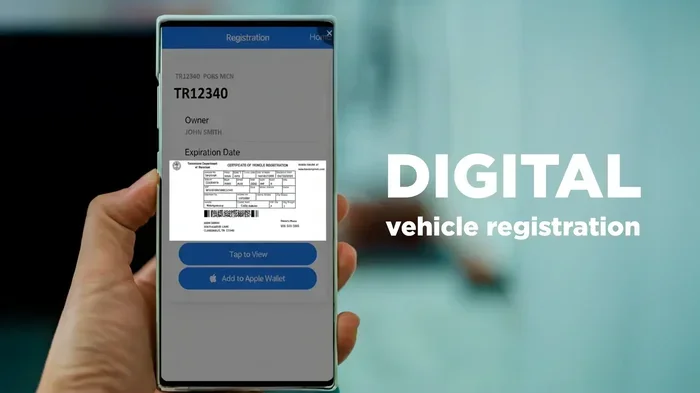
- Digital confirmation: You’ll receive an email or text confirming your registration. Some states issue a digital registration card that you can save on your phone.
- Physical mail: Most states mail your registration card, sticker, and license plates (if applicable) to your address within a few weeks.
- Temporary permit: If you’re registering a newly purchased vehicle, some states issue a temporary permit that lets you drive while you wait for your official materials.
- Renewal reminders: Many states send email or text reminders before your next registration renewal is due. Sign up for these alerts to stay on track.
Important: Don’t throw away any paper work that comes in the mail. Your registration documents are legal proof that your vehicle is registered. You may need them during a traffic stop or at a toll booth.
Frequently Asked Questions
Can I register my car online if I bought it from a private seller?
It depends on your state. Some states allow online registration for private-party purchases. Others require you to visit the DMV for a vehicle title transfer. Check your state’s DMV website or call their helpline to confirm. Generally, if the title is already in your name and you have all documents ready, online registration is more likely to be available.
How much does online car registration cost?
The vehicle registration fee varies by state, vehicle weight, and vehicle age. Most states charge between $50 and $200 for a standard registration. Some states also add county or local fees. Visit your DMV website to calculate the exact cost before you begin. Online portals always show you the total fee before you make any payment.
How long does online vehicle registration take?
If all your documents are in order, the actual online process takes about 15 to 30 minutes. However, receiving your physical registration card and plates by mail can take two to four weeks. Some states offer instant digital registration cards that you can use right away. The processing time depends on your state’s workload and your specific situation.
Can I register my car online without a valid driver’s license?
Most states require a valid driver’s license or state-issued ID to complete online car registration. If you don’t have one, you may need to visit a DMV office in person. Non-citizens with valid foreign licenses may face additional requirements. Check with your state’s DMV for specific rules about identification.
What if my online registration application gets rejected?
If your application is rejected, don’t panic. The system usually tells you why. The most common reasons are missing documents, incorrect VIN, or inactive insurance. Fix the issue, gather the correct documents, and try again. If you keep running into problems, call your DMV’s customer service line for help. They can guide you through what went wrong.
Is online car registration safe and secure?
Yes, when you use your state’s official DMV website, your information is protected with encryption and security protocols. Government sites follow strict data protection standards. Avoid third-party sites that aren’t affiliated with your state’s DMV. Always look for “https” in the URL and verify that you’re on the official government page before entering any personal details.
Conclusion
So, can I register my car online? The answer is yes, in most cases. Online vehicle registration has transformed a once tedious process into something you can handle in minutes from home. Whether you’re dealing with a new car registration, a registration renewal, or a title transfer, the digital route is faster, more convenient, and often cheaper than making the trip to the DMV.
The keys to success are simple. Prepare your documents ahead of time. Know your VIN and insurance details. Use the official state website. And start early before your car registration deadline.
Give it a try next time you need to register your vehicle. You might be surprised how easy it actually is. The days of waiting in long DMV lines are fading fast. Embrace the convenience, save yourself time, and keep your car legally on the road with just a few clicks.