Can My VIN Tell Me My Paint Code and Exact Color Code
Your VIN paint code can unlock the exact factory color of your vehicle, but it depends on the manufacturer and model year. A VIN decoder is the fastest way to pull up your vehicle color code without guessing. Whether you need a touch up paint match or a full respray, knowing your OEM paint match saves time, money, and frustration. This guide walks you through every method, tip, and trick to find your car’s true color.
Have you ever looked at your car and thought, “I need to know the exact color”? Maybe you are touching up a scratch, ordering a replacement part, or just curious about what factory color your ride came in. The vehicle identification number, or VIN, sits on your dashboard and holds a ton of data about your car. But can it really tell you your paint code? The short answer is yes, in many cases. The longer answer depends on your car’s make, model, and year. Let us walk through everything you need to know about finding your VIN paint code and exact color.
Every vehicle rolls off the assembly line with a specific color assigned to it. That color comes from a factory color code that manufacturers use to mix paint in exact batches. Over the years, these codes have become essential for anyone doing bodywork, restorations, or simple touch-ups. If you have ever tried to match a color from a chip at an auto parts store, you know how frustrating it can be when the shade is just slightly off. That is where your VIN comes in. It acts as a unique fingerprint for your car and can point you straight to the right automotive paint code. In this article, we will break down exactly how this works, what to watch out for, and the best ways to get your color match right the first time.
Key Takeaways
- Your VIN holds valuable vehicle data: it can reveal paint codes for many makes and models, but not all manufacturers embed color info directly.
- VIN decoders are the easiest tool: free and paid options can instantly pull up your factory color code and build sheet details.
- Physical paint code stickers exist: most vehicles have a label on the door jamb, under the hood, or in the trunk with the color code printed on it.
- Not all VINs show paint codes: some manufacturers reserve this data for dealer systems, so alternative methods may be needed.
- Matching your exact color matters: even slight variations in automotive paint code can cause visible color mismatch after repairs.
- Multiple lookup methods work: use your VIN, physical label, build sheet, or online color charts to find your vehicle color information.
- Always double-check your code: confirm the color code number with your dealer or a second source before ordering paint.
📑 Table of Contents
- What Does a VIN Tell You About Your Vehicle?
- How to Use a VIN Decoder to Find Your Paint Code
- Where to Find Your Physical Paint Code on the Vehicle
- What If the VIN Does Not Show Your Paint Code?
- Why Getting the Exact Paint Code Matters
- Tips for Ordering Touch Up Paint Using Your VIN Paint Code
- Final Thoughts on Using Your VIN for Paint Code Lookup
What Does a VIN Tell You About Your Vehicle?
Your VIN is a 17-character code that contains a wealth of information about your car. Each section of the code represents something specific. The first three characters identify the world manufacturer. Characters four through eight describe your vehicle’s features, like the body style, engine type, and trim level. The ninth character is a check digit used for validation. The tenth character tells you the model year. And the eleventh character identifies the assembly plant. Characters twelve through seventeen form the sequential serial number.
But where does color fit in? This is where things get interesting. Not every manufacturer encodes paint color directly into the VIN itself. However, the VIN is the key that unlocks a vehicle options decoder, which can pull up the full build sheet for your car. That build sheet includes the factory paint color, the interior color, and all the options your vehicle came with from the factory. So while the VIN does not directly contain the paint code, it is the gateway to finding it.
How Manufacturers Store Paint Information
Different car companies handle color data in different ways. Some brands embed the color code number right into the VIN through the vehicle descriptor section. Others store it in a separate database that only a VIN decoder can access. For example, Ford and Chevrolet often include trim and color codes in the VIN structure. Meanwhile, brands like BMW and Mercedes use their own proprietary systems that require a dedicated decoder tool.
Here is what you need to know about how major manufacturers store paint data:
- Ford: Often includes body color codes in the VIN or on a separate label inside the driver door jamb.
- Chevrolet: Uses a paint code sticker typically found on the driver side door frame or in the glove box.
- Toyota: Stores color info in the VIN decoder database and also prints a code on the emissions label under the hood.
- Honda: Provides the color code on a sticker in the driver door jamb area, separate from the VIN.
- BMW: Uses a complex coding system that requires a specialized VIN decoder to retrieve the factory color.
The takeaway here is that your VIN is a powerful starting point. It will not always give you the paint code directly, but it will lead you to the right place. Think of it as a map. The VIN tells you where to look, and the paint code lookup gives you the destination.
How to Use a VIN Decoder to Find Your Paint Code
A VIN decoder is the single fastest way to find your car’s paint code. These tools take your 17-character VIN and translate it into readable vehicle information. Many decoders are free and available online. You simply type in your VIN and wait a few seconds. The results typically include the make, model, year, engine type, transmission, and in many cases, the factory paint color and code.
Here is how to use a VIN decoder step by step:
- Locate your VIN. You can find it on the driver side dashboard (visible through the windshield), on the driver door jamb, or on your vehicle registration and insurance documents.
- Choose a reliable VIN decoder. Popular options include the National Insurance Crime Bureau (NICB) decoder, Decode This, and manufacturer-specific tools.
- Enter your VIN carefully. One wrong character will give you incorrect results, so double-check before submitting.
- Look for the paint or color section in the results. Not all decoders display this, but the good ones will show the body color identifier and the corresponding code number.
- Verify the code with a second source. Cross-reference the code with your physical paint label or your dealer’s system to be sure.
Free vs. Paid VIN Decoders
You will find both free and paid VIN decoders online. Free decoders from sites like the NICB or VehicleHistory.gov give you basic information, including make, model, and year. They may or may not include the paint code. Paid services like Carfax or AutoCheck provide more detailed reports that often include the factory color. If you need the exact OEM paint match, a paid decoder is usually worth the small investment.
Here is a quick comparison of popular VIN decoder options:
- NICB VINCheck (Free): Basic vehicle history and specs. Paint code not always included.
- Decode This (Free): Good for basic vehicle info. Paint code available for many makes.
- Carfax (Paid): Detailed reports including factory color in many cases.
- Manufacturer-Specific Tools: Often the most accurate for vehicle color information but may require a subscription.
Quick Tip: Always enter your VIN on a secure and reputable site. Your VIN is a unique identifier, and you do not want to share it with untrusted sources. Stick to well-known decoder tools or your dealer’s official website.
Where to Find Your Physical Paint Code on the Vehicle
Even if your VIN decoder does not return the paint code, you can still find it on your car itself. Every new vehicle comes with a color code sticker or plate somewhere on the body. This label contains the paint code, the trim code, and sometimes the interior color code too. Knowing where to look can save you a lot of time.
Common Locations for the Paint Code Sticker
The paint code sticker is not always in the same place across all brands. Here are the most common spots to check:
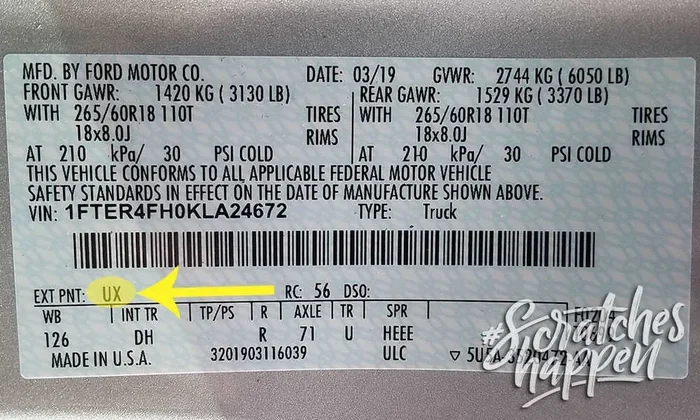
- Driver door jamb: Open your driver side door and look at the frame or the door itself. Most manufacturers place a label here with the paint code, tire pressure info, and manufacturing date.
- Under the hood: Many cars have a sticker on the inner fender, radiator support, or under the hood latch. This label often includes the paint code alongside other technical details.
- Trunk or cargo area: Some vehicles, especially SUVs and trucks, have the code sticker inside the trunk lid or on the cargo area wall.
- Glove box: A few brands, particularly older models, place the label inside the glove compartment.
- B-pillar or center pillar: On some vehicles, you can find the sticker on the vertical pillar between the front and rear doors.
Once you locate the sticker, look for words like “Paint Code,” “Body Color,” or “Color Code.” The code is usually a combination of letters and numbers, such as “WA3456” or “L234AB.” Write this code down and use it when ordering touch up paint or visiting an auto body shop.
Common Mistake: Do not confuse the paint code with the trim code. They are often on the same sticker but are labeled differently. The paint code is what you need for color matching. The trim code refers to interior or exterior trim pieces and is not relevant for paint orders.
What If the VIN Does Not Show Your Paint Code?
Sometimes, no matter how many tools you try, the VIN simply does not reveal the paint code. This happens more often than you might think. Some manufacturers keep the color data locked in their internal systems, and third-party decoders cannot access it. Others have changed their VIN structure over the years, and older models may not encode color at all.
Alternative Methods to Find Your Paint Code
When the VIN decoder route does not work, do not worry. You still have several options to find your exact factory color:
- Check the build sheet. If you have access to the original build sheet from when the car was manufactured, it will list the paint code. Dealerships sometimes keep these on file, or you may find a copy through online forums and enthusiast communities.
- Contact your dealer. Call your local dealership with your VIN and ask for the factory paint code. They can usually look this up in their system within minutes.
- Use online color code charts. Many websites maintain extensive databases of paint codes organized by make, model, and year. You can look up your vehicle and find the code without needing a VIN decoder at all.
- Check online forums and communities. Enthusiast forums for your specific car brand often have members who have already compiled paint code lists for every model and year.
- Use a paint code app. Several mobile apps allow you to enter your vehicle details and retrieve the paint code. These can be especially handy when you are at the body shop or auto parts store.
The key is to not give up after one method fails. Most vehicles can be identified with at least one of these approaches. Persistence pays off when you need an accurate OEM paint match.
Why Getting the Exact Paint Code Matters
You might wonder why you cannot just pick a color that looks close enough. The truth is, automotive paint is not like house paint. It involves multiple layers, including a base coat, a color coat, and a clear coat. Each layer interacts with the others to create the final appearance. Even a slight difference in the color code number can result in a visible mismatch under different lighting conditions.
Here is why precision matters:
- Lighting changes everything: A color that looks perfect in your garage might appear noticeably different in direct sunlight or under fluorescent lights at the body shop.
- Metallic and pearl finishes are tricky: These special paint finishes contain metallic flakes or pearl pigments that create depth and shimmer. Matching these requires the exact formula from the factory automotive paint code.
- Resale value: A poorly matched repair can hurt your car’s resale value. Buyers notice color differences, especially on visible panels like the hood or doors.
- Insurance and warranty claims: Some insurance companies and manufacturers require documented proof of the correct paint code for coverage on body repairs.
When you invest the time to find the right VIN paint code, you set yourself up for a repair that looks seamless and lasts. It is one of those small steps that makes a huge difference in the final result.
Expert Insight: Professional body shop technicians always confirm the paint code from two sources before mixing paint. They know that even a one-digit error in the vehicle color code can lead to a completely wrong color. Take the same approach at home, and you will get much better results.
Tips for Ordering Touch Up Paint Using Your VIN Paint Code
Once you have your paint code, the next step is ordering the right touch-up product. Here are some practical tips to make the process smooth and effective:
- Write down the full code exactly as it appears. Paint codes are case-sensitive and include specific letters and numbers. Even a small typo will lead to the wrong color.
- Note the model year carefully. Car manufacturers sometimes change the paint formula between model years, even if the color name stays the same. A 2019 code might not match a 2020 vehicle, even if they share the same color name.
- Ask about the clear coat. Some touch-up kits include only the base coat. For the best results, get a kit that includes both the base coat and a clear coat for protection and shine.
- Test on a hidden area first. Apply a small amount of touch-up paint on an inconspicuous spot before committing to the full repair. This lets you verify the match under different lighting.
- Keep your paint code saved for future use. Save the code in your phone, write it in your owner’s manual, or take a photo of the sticker. You never know when you might need it again.
Common Paint Code Formats by Manufacturer
Different manufacturers use different formats for their color code number. Here are some examples to help you recognize yours:
- Ford: Usually three to five characters, such as “WT6” or “YZ601.”
- Chevrolet: Typically a letter followed by numbers, like “WA3” or “G70.”
- Toyota: Often a letter and number combination, such as “3T5” or “4E4.”
- Honda: Usually two to three characters, like “NH575A” or “B97P.”
- BMW: Uses a four-digit code, such as “308” or “475.”
- Mercedes-Benz: Often starts with a letter followed by numbers, like “X4A” or “B66.”
These formats vary, but the principle is the same. Once you know what to look for, finding your code becomes much easier.
Final Thoughts on Using Your VIN for Paint Code Lookup
Finding your VIN paint code is one of those small tasks that pays off big time. Whether you are a DIYer touching up a parking lot scratch or planning a full restoration, knowing your exact factory color makes all the difference. Your VIN is a powerful tool that connects you to a world of vehicle data, including the body color identifier that ensures your repairs blend seamlessly with the original finish.
Start with a VIN decoder. If that does not work, check the physical sticker on your vehicle. If you still cannot find it, reach out to your dealer or dig into online resources. The information is out there, and with a little patience, you will find your exact factory color code. Once you have it, keep it safe for future reference. You will be glad you did the next time you need a touch-up or a body shop repair.
The process might feel overwhelming at first, especially if you are not familiar with how VINs and paint codes work. But once you see how simple it is to decode your vehicle’s color information, you will wonder why you did not do it sooner. Take the time to learn your car’s details. It is one of the best investments you can make as a car owner.
Quick Recap of the Process
- Get your VIN from the dashboard, door jamb, or documents.
- Use a VIN decoder to look up the paint code.
- If the decoder does not show the code, check the physical sticker on your vehicle.
- Contact your dealer or search online databases as a backup.
- Use the code to order the correct touch up paint or share it with your body shop.
- Verify the match before applying the paint.
Following these steps consistently will help you find the right color every single time. No more guessing, no more mismatched patches, and no more wasted money on the wrong paint. Your VIN paint code is the key to getting it right.
Frequently Asked Questions
Can I find my paint code just by looking at my VIN number?
Not always directly. Your VIN contains a lot of vehicle data, but some manufacturers do not embed the paint code in the VIN itself. However, a VIN decoder can often pull up the paint code by cross-referencing your VIN with manufacturer databases. It is the best first step to try.
What if my VIN decoder does not show the paint code?
Do not worry. Not all decoders include paint information. Try checking the physical paint code sticker on your vehicle, usually found on the driver door jamb or under the hood. You can also contact your dealership with your VIN, and they can look it up for you.
Is the paint code the same as the color name on my car?
No, the paint code is different from the color name. Manufacturers use codes like “WA3” or “3T5” to identify exact paint formulas. The color name, like “Midnight Black” or “Rio Red,” can be reused across different years or models with different formulas. Always use the code for accurate matching.
Can I use my paint code to order touch-up paint online?
Yes, most auto parts stores and online retailers let you order touch-up paint using your vehicle’s paint code. Simply enter the code when searching for products. Make sure to match the code exactly and verify the model year, as paint formulas can change between years.
Why does my car’s paint code matter for resale value?
An accurate paint match during repairs preserves your car’s appearance and structural integrity. Visible color mismatches can reduce buyer confidence and lower resale value. Having your correct factory color code ensures that any repairs blend seamlessly with the original paint.
Do all car manufacturers include paint codes in their VIN system?
No, not all manufacturers encode paint codes in the VIN. Some keep the data in proprietary systems only accessible through dealer tools. Others rely on physical stickers on the vehicle. Using a combination of VIN decoders, physical labels, and dealer assistance gives you the best chance of finding your exact code.
=== CONCLUSION ===
Your VIN paint code is one of the most useful pieces of information you can have about your vehicle. It connects you to the exact factory color, ensures accurate repairs, and saves you from the guesswork that leads to costly mistakes. Whether you use a VIN decoder, check the physical sticker, or reach out to your dealer, the goal is the same: find the right color code number and use it with confidence.
The process is simpler than most people think. With the right tools and a bit of patience, you can uncover your car’s true factory color in just a few minutes. Once you have the code, you are empowered to make smart decisions about touch-ups, repairs, and restorations. You will save money, avoid frustration, and keep your car looking its best for years to come.
Take action today. Look up your VIN, find your paint code, and keep it stored somewhere safe. This small step gives you the knowledge and control to handle any paint-related need with confidence. Your car deserves the right color, and now you have the tools to make sure it gets it.