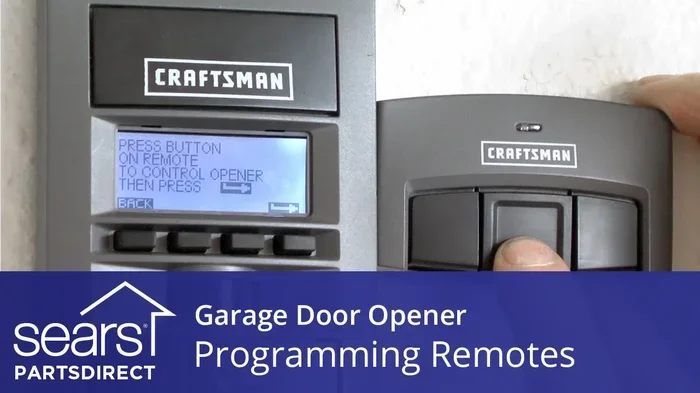
How Do You Code a Garage Door Opener Step by Step Guide
Coding your garage door opener is easier than most people think. Whether you have a Chamberlain, LiftMaster, Genie, or Craftsman unit, this step-by-step guide walks you through the entire process. You will learn how to program your garage door remote, reset your opener, and fix common coding problems without calling a technician.
Have you ever stood in your driveway, remote in hand, wondering how do you code a garage door opener? Maybe your old remote stopped working, or you bought a new one and have no idea where to start. You are not alone. Thousands of homeowners face this same question every year, and the good news is that coding your garage door opener is much simpler than it seems.
This guide will walk you through every single step. Whether you own a Chamberlain, LiftMaster, Genie, or Craftsman unit, you will find exactly what you need. We will cover the basics, the brand-specific details, and even some troubleshooting tips. By the time you finish reading, you will feel confident enough to program your opener on your own.
Programming a garage door opener does not require any special tools or technical skills. All you need is about fifteen to thirty minutes, your new remote or keypad, and a willingness to follow a few simple steps. Let us get started.
Key Takeaways
- Coding a garage door opener is a simple DIY task that most homeowners can complete in under 30 minutes.
- Every brand has a slightly different method for programming remotes and keypads, but the general process is similar.
- The learn button is the key to programming any garage door opener, and it is always located on the motor unit.
- Common mistakes include wrong timing, dead batteries, and signal interference that can prevent successful coding.
- Resetting your opener clears all old codes and gives you a fresh start for programming new remotes.
- Smart garage door openers add extra features like phone control and temporary access codes for guests.
- Regular maintenance keeps your opener working smoothly and extends its lifespan significantly.
📑 Table of Contents
- What Does It Mean to Code a Garage Door Opener?
- How Do You Code a Garage Door Opener? Step-by-Step Guide
- Brand-Specific Coding Instructions
- Common Mistakes When Coding a Garage Door Opener
- Troubleshooting Your Garage Door Opener After Coding
- How to Keep Your Garage Door Opener Secure After Coding
- When Should You Call a Professional?
- Key Takeaways
- Conclusion
What Does It Mean to Code a Garage Door Opener?
When people talk about coding a garage door opener, they mean teaching the motor unit to recognize a new remote or keypad. Every opener has a unique rolling code or fixed code system. This code acts like a secret handshake between your remote and the garage door motor. When you press the button on your remote, it sends a signal. The opener receives that signal, checks the code, and if it matches, the door opens or closes.
Modern openers use rolling codes, which change every time you use the remote. This makes your garage much more secure because the code cannot be copied or intercepted easily. Older models may use fixed codes, which stay the same every time. Both types need to be programmed the same way, but the security level differs.
Garage door remote programming is the most common reason people need to code their opener. You might be replacing a lost remote, adding a second remote for a family member, or installing a new keypad for keyless entry. Whatever the reason, the process follows a similar pattern across most brands.
Why Is Coding Important for Garage Door Security?
Coding your opener properly ensures that only your remotes and devices can control your garage door. If someone finds an old remote or picks up a stray signal, they should not be able to open your door. When you reset garage door opener codes regularly, you remove any old or unused remotes from the system. This keeps your home safe and gives you peace of mind.
Think of it like changing your Wi-Fi password. You would not leave your home network open to anyone, right? The same logic applies to your garage door opener frequency and signal. Keeping your codes fresh and your system updated is one of the easiest ways to protect your home.
How Do You Code a Garage Door Opener? Step-by-Step Guide
Now let us get into the actual process. Below, we break down the universal steps for programming a garage door opener. These steps work for most brands and models. After this section, we will dive into brand-specific details.
Step 1: Locate the Learn Button
The learn button is the heart of the programming process. It is a small button on the back or side of your garage door motor unit. You will need to climb a stepladder to reach it. The button is usually colored — red, orange, green, or purple — and may be hidden behind a light cover or a small panel.
Press and release the learn button. You will usually hear a beep or see a light blink. This tells you the opener is ready to receive a new code. You typically have thirty to sixty seconds to complete the next steps, so work quickly but carefully.
Step 2: Press and Hold the Remote Button
Pick up your new remote or the remote you want to program. Hold it close to the motor unit. Press and hold the button you want to use for your garage door. Keep holding it while you move to the next step. Do not let go until the opener confirms the signal.
Most openers will flash a light or make a clicking sound when the code is accepted. Some models will also hear a double beep. Once you see or hear this confirmation, you can release the remote button. The remote is now coded to your opener.
Step 3: Test the Remote
Walk away from the garage door to a safe distance — about ten to fifteen feet. Press the button on your newly programmed remote. The garage door should respond immediately. If it does not, try again from a closer distance. Sometimes walls or metal objects can weaken the garage door opener signal.
If the door still does not respond, do not worry. We will cover troubleshooting in a later section. For now, test all programmed remotes to make sure each one works correctly.
Step 4: Program Additional Remotes or a Keypad
Want to add more remotes or a wireless keypad? Simply repeat the process. Press the learn button again, wait for the light to blink, and then program each new device one at a time. Most openers can store between five and ten remote codes at once.
For a garage door opener keypad, the process is similar. You will enter a personal identification number (PIN) on the keypad, then press the learn button on the motor unit, and finally enter the PIN again on the keypad to complete the pairing. This gives you keyless access to your garage without needing a remote.
Brand-Specific Coding Instructions
Every garage door opener brand has its own quirks. While the general steps are the same, the button locations and indicator lights differ. Here is how to code openers from the most popular brands.
Chamberlain and LiftMaster Openers
Chamberlain and LiftMaster openers share the same programming process because they use the same parent company. Look for the learn button on the back of the motor unit. It is usually red or orange and sits under a small lens. Press and release it, then press and hold the button on your remote within thirty seconds.
For smart openers like the Chamberlain MyQ or LiftMaster 8550W, you can also use the myQ app on your phone. Download the app, create an account, and follow the on-screen instructions to connect your opener to Wi-Fi. This adds smartphone control to your garage door opener installation setup.
Genie Openers
Genie openers use a learn button that is typically purple or black. Press it once and release, then press and hold the button on your Genie remote. The motor unit light will flash, and you will hear two beeps. This confirms the remote is programmed.
Genie also offers the Aladdin Connect smart kit, which lets you control your opener from your phone. If you have a Genie model, check whether your unit supports this upgrade for added convenience.
Craftsman Openers
Craftsman openers made by Chamberlain use the same learn button process. The button is usually red and located on the motor unit head. For older Craftsman models, you may need to use a dip-switch system instead of a learn button. Dip switches are tiny switches on the back of the remote that you flip to match the settings on the motor unit.
If your Craftsman opener has a wireless keypad, the programming process involves pressing the learn button, entering your PIN on the keypad, and pressing the enter button. It is quick and straightforward once you know where to look.
Common Mistakes When Coding a Garage Door Opener
Even simple tasks can go wrong if you overlook small details. Here are the most common mistakes homeowners make when they try to program garage door opener remotes and keypads.
Skipping the Battery Replacement
This is the number one reason remotes fail to program. If your remote has weak batteries, it cannot send a strong enough signal to the motor unit. Always replace the batteries in a new remote before you start the coding process. Use fresh, name-brand batteries for the best results.
Not Pressing the Learn Button Long Enough
Some openers require you to press and hold the learn button for three to five seconds. A quick tap will not work on these models. Check your garage door opener manual for the exact instructions. If you lost the manual, you can usually find a digital copy on the manufacturer’s website by searching for your garage door opener model number.
Programming Too Many Remotes at Once
It is tempting to try to program all your remotes in one session. But most openers work best when you program one device at a time. If you try to rush through multiple remotes, you may confuse the system and have to start over.
Ignoring Signal Interference
Other electronic devices can interfere with your garage door opener frequency. Baby monitors, wireless cameras, and even neighboring openers can cause signal conflicts. If your remote works sometimes but not others, interference may be the culprit. Try moving the motor unit antenna or repositioning your remote to reduce interference.
Troubleshooting Your Garage Door Opener After Coding
So you followed all the steps, but your garage door opener still does not work. Do not panic. Most coding problems have simple solutions. Here is how to troubleshoot the most common issues.
The Remote Works but the Door Does Not Respond
First, check the batteries in your remote. Replace them if they are old. Next, make sure you are within range. Stand close to the motor unit and try again. If the door still does not respond, the code may not have been accepted properly. Try programming the remote again from scratch.
The Door Responds but Opens in the Wrong Direction
This is not a coding issue — it is a calibration problem. Check the travel limits on your opener. Most units have adjustment screws or buttons that control how far the door travels up and down. Refer to your manual for instructions on adjusting these settings.
The Keypad Does Not Work After Programming
If you just programmed a wireless keypad and it does not respond, check the PIN you entered. Make sure it matches what you set during programming. Also, ensure the keypad is within range of the motor unit. If you have a wired keypad, check the wiring connections at the back of the motor unit.
None of the Remotes Work After Programming
If nothing works after you tried to code your garage door opener, you may need to reset the entire system. Press and hold the learn button for ten to fifteen seconds until the indicator light turns off. This clears all existing codes. Then start the programming process again from the beginning.
How to Keep Your Garage Door Opener Secure After Coding
Once you have successfully coded your opener, it is important to maintain good security habits. A properly coded opener keeps your garage and home safe from intruders.
Change Your Codes Regularly
Just like you change your passwords, you should change your garage door codes periodically. If you ever lose a remote or suspect someone has an old one, reset the system and reprogram only the remotes you trust. This is especially important if you have had previous tenants, house guests, or service workers who had access to your garage.
Use Rolling Code Technology
If your opener still uses fixed codes, consider upgrading to a model with rolling code technology. Rolling codes change every time you use the remote, making it nearly impossible for someone to copy your signal. Most modern openers from Chamberlain, LiftMaster, Genie, and Craftsman already use rolling codes by default.
Keep Your Motor Unit Locked
Many openers have a manual lock feature on the motor unit. This disables the remote controls and allows only the wall switch or keypad to operate the door. Use this feature when you are home and do not need remote access. It adds an extra layer of protection against unwanted entry.
When Should You Call a Professional?
Most coding tasks are simple enough for any homeowner to handle. But there are times when you should call in an expert. If you have tried all the troubleshooting steps and your opener still will not accept a new code, there may be a technical issue with the motor unit or the circuit board.
Similarly, if you are installing a completely new garage door opener and are unsure about the wiring or mounting, it is wise to hire a professional. Improper installation can damage your door, your opener, or even create safety hazards. A trained technician can also help you choose the right opener for your garage door size and type.
Finally, if you live in an area with frequent power outages or electrical issues, a professional can install a backup battery system or surge protector for your opener. These additions keep your system running smoothly and protect your investment.
Key Takeaways
- Coding a garage door opener is a simple DIY task that most homeowners can complete in under 30 minutes.
- Every brand has a slightly different method for programming remotes and keypads, but the general process is similar.
- The learn button is the key to programming any garage door opener, and it is always located on the motor unit.
- Common mistakes include wrong timing, dead batteries, and signal interference that can prevent successful coding.
- Resetting your opener clears all old codes and gives you a fresh start for programming new remotes.
- Smart garage door openers add extra features like phone control and temporary access codes for guests.
- Regular maintenance keeps your opener working smoothly and extends its lifespan significantly.
Conclusion
Now you know exactly how do you code a garage door opener. The process is straightforward, fast, and does not require any special skills or expensive tools. Whether you are programming a new remote, adding a keypad, or resetting your entire system, the steps in this guide will help you get the job done right.
Remember to always check your batteries, work quickly after pressing the learn button, and test each device after programming. If you run into trouble, the troubleshooting section has you covered. And do not forget about security — keeping your codes fresh and your system updated protects your home and your family.
With this knowledge in hand, you can handle any garage door remote programming task that comes your way. No more frustration, no more waiting for a technician. You are now equipped to take control of your garage door opener and keep it running at its best. Go ahead, give it a try, and enjoy the satisfaction of solving the problem yourself.
How Long Does It Take to Code a Garage Door Opener?
Most homeowners can code a garage door opener in fifteen to thirty minutes. The process is quick once you know where the learn button is and how to follow the steps. If you are programming multiple remotes, add a few extra minutes for each additional device.
Can I Code a Garage Door Opener Without a Remote?
Yes, you can use a wireless keypad instead of a remote. The keypad mounts on your wall and lets you enter a PIN to open the door. The coding process is similar, but you set up a PIN during programming instead of using a remote button.
What Should I Do if My Learn Button Does Not Work?
First, make sure you are pressing the correct button. Some openers have multiple buttons for different functions. If the button still does not respond, try unplugging the opener for thirty seconds and plugging it back in. This resets the system and often fixes unresponsive buttons.
Is It Safe to Program a Garage Door Opener Myself?
Absolutely. Programming a garage door opener is a safe and simple task. You do not need to touch any electrical wiring or internal components. Just follow the steps in your manual and take basic precautions like using a stable ladder.
How Many Remotes Can I Program to One Opener?
Most openers can store between five and ten remote codes. Check your manual for the exact number for your model. If you need to add more remotes than your opener supports, you may need to upgrade to a model with higher capacity.
Do I Need to Code My Opener After a Power Outage?
Usually no. A power outage does not erase your programmed codes. However, if your opener has a backup battery and the battery dies, you may need to reprogram remotes after replacing the battery. This is rare but can happen with older models.
Frequently Asked Questions
What is How Do You Code a Garage Door Opener??
How Do You Code a Garage Door Opener? is an important topic with many practical applications.