How Do I Turn On Road Departure Mitigation on My Car
Road departure mitigation is a smart safety feature that helps keep your car on the road. This guide shows you exactly how to turn on road departure mitigation on your vehicle, whether you drive a Honda or another brand. You will learn the steps, settings, and tips to stay safe on every trip.
Have you ever drifted close to the edge of the road and wished your car could help? Road departure mitigation is a safety feature designed to do exactly that. It watches the road ahead and steps in when it thinks you are about to leave the roadway.
Many modern cars come with this feature built in. But knowing how to turn on road departure mitigation can be confusing. The steps differ by car brand and model. That is exactly why we wrote this guide. We will walk you through everything you need to know.
Whether you drive a Honda, Toyota, or another brand, you will find clear steps here. We will also cover what this feature does, how it compares to lane departure warning, and common troubleshooting tips. Let us get started.
Key Takeaways
- Easy Activation: Turning on road departure mitigation is usually simple and can be done from your dashboard or steering wheel controls.
- Brand-Specific Steps: Different car brands like Honda have unique methods to activate the system.
- Works with Honda Sensing: Most Honda models use the Honda Sensing suite, which includes road departure mitigation as a core feature.
- Know the Difference: Road departure mitigation is not the same as lane departure warning. Each does a different job.
- Smart Safety Tool: This feature uses cameras and sensors to detect road edges and alert or correct you.
- Common Issues Exist: Dirty cameras or wrong settings can cause the system to not work properly.
- Best Practice: Keep your windshield clean and always check your owner manual for model-specific steps.
📑 Table of Contents
- What Is Road Departure Mitigation?
- How to Turn On Road Departure Mitigation
- Road Departure Mitigation vs Lane Departure Warning
- When Should You Use Road Departure Mitigation?
- Common Issues When Turning On Road Departure Mitigation
- Tips for Getting the Most from Road Departure Mitigation
- Frequently Asked Questions About Road Departure Mitigation
- Final Thoughts on Road Departure Mitigation
What Is Road Departure Mitigation?
Road departure mitigation is an advanced driver assistance system, or ADAS. It uses a forward-facing camera mounted near your rearview mirror. The camera reads the road lines and detects the edges of the roadway.
When the system senses you are veering off the road without a turn signal, it reacts. It can give you a visual alert, a sound, or even apply the brakes gently. Some systems also add a small steering correction to guide you back on track.
How the Camera and Sensors Work
The forward-facing camera is the brain of the system. It looks ahead and scans for lane markings and road shoulders. If the camera sees you drifting toward the left or right edge, it triggers a warning.
Here is how the process works step by step:
- The camera detects the road edge or lane lines.
- The system calculates your trajectory.
- If you are about to leave the road, it triggers an alert.
- If you do not respond, the system can apply brakes or steering input.
This whole process happens in a fraction of a second. The goal is to prevent accidents before they happen. Road departure mitigation works best on highways and well-marked roads where lane lines are visible.
Which Cars Have Road Departure Mitigation?
Many car brands now offer this feature. Honda was one of the first to make it widely available through the Honda Sensing suite. Other brands like Subaru, Mazda, and Hyundai also offer similar systems under different names.
Here are some common brand names for this feature:
- Honda Sensing – Honda and Acura models
- Subaru EyeSight – Subaru vehicles
- Mazda i-Activsense – Mazda models
- Hyundai SmartSense – Hyundai and Kia models
No matter the brand name, the core function is the same. The system helps keep you on the road and out of danger.
How to Turn On Road Departure Mitigation
The exact steps to turn on road departure mitigation depend on your car model. Below, we cover the most common methods. We also give specific steps for popular brands.
General Steps for Most Vehicles
For most cars, the activation process follows a similar pattern. Here is the general approach:
- Start the engine and make sure the car is in a stationary position.
- Locate the driver assistance button on the steering wheel or dashboard.
- Press the button to cycle through the available modes.
- Look for the road departure icon on your dashboard display.
- Select the mode that includes road departure mitigation.
Once activated, the icon should appear on your instrument cluster. You may also hear a confirmation beep. If you do not see the icon, try pressing the button again or check your settings menu.
How to Turn On Road Departure Mitigation on Honda Models
Honda vehicles with Honda Sensing make this process very straightforward. Here are the steps for most Honda models:
- Start the engine and press the MAIN button on the steering wheel.
- The Honda Sensing system powers on automatically.
- Press the Road Departure Mitigation System button, which has an icon that looks like a car veering off the road.
- The dashboard display will show the active status.
- You can now choose between normal mode and enhanced mode if your model supports it.
On Honda Civic, Accord, CR-V, and Pilot models, this button is usually located on the left side of the steering wheel. The system works best when the windshield camera is clean and unobstructed.
How to Turn On Road Departure Mitigation on Other Brands
Other brands have slightly different activation methods. Here is a quick overview:
- Subaru: Press the EyeSight button on the steering wheel. The system includes lane departure and pre-collision features.
- Mazda: Use the Mazda Connected Commute button or the infotainment system settings to enable driver assistance features.
- Hyundai/Kia: Navigate to the driver assistance settings through the touchscreen display. Toggle the road departure warning and mitigation feature.
Always refer to your owner’s manual for model-specific instructions. The manual will also tell you about any limitations or requirements for the system.
Road Departure Mitigation vs Lane Departure Warning
Many drivers confuse road departure mitigation with lane departure warning. While they sound similar, they serve different purposes. Understanding the difference can help you use each feature correctly.
Lane Departure Warning
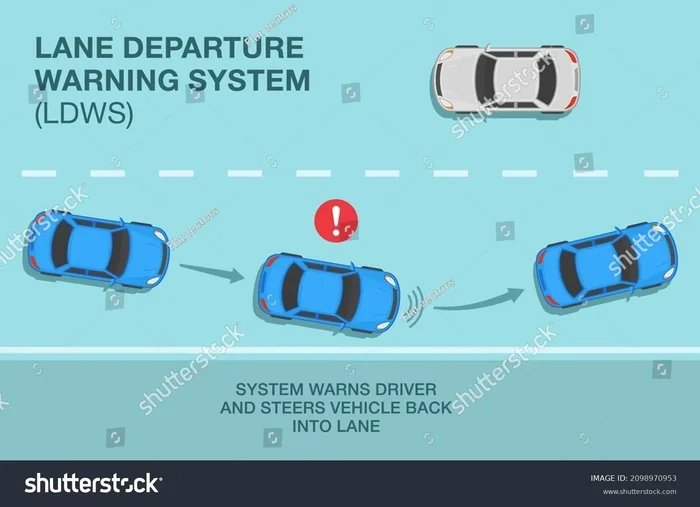
Lane departure warning alerts you when your car crosses lane lines without a turn signal. It does not take any action to correct the vehicle. The system only warns you with a beep, vibration, or visual alert.
Think of lane departure warning as a watchful co-pilot. It tells you something is wrong but leaves the correction up to you.
Road Departure Mitigation
Road departure mitigation goes further. It not only warns you but also takes corrective action. The system can apply brakes to individual wheels or nudge the steering to keep you on the road.
Here is a simple comparison table to show the differences:
| Feature | Lane Departure Warning | Road Departure Mitigation |
|---|---|---|
| Warning Alert | Yes | Yes |
| Steering Correction | No | Yes |
| Brake Intervention | No | Yes |
| Detects Road Edges | No | Yes |
| Works Without Lane Lines | No | Yes (detects road edge) |
| Default Activation | Often on by default | Usually off by default |
The key takeaway is that road departure mitigation is more active and intervention-based. It can save you from running off the road, especially on highways or rural roads with no clear lane markings.
When Do You Need Each Feature?
Both features are valuable, but they shine in different situations. Lane departure warning works best on highways with clear lane lines. Road departure mitigation is especially helpful on roads without clear markings, construction zones, or winding rural roads.
Many drivers choose to keep both features active at all times. The system will not interfere with normal driving and only steps in when it detects a potential road departure.
When Should You Use Road Departure Mitigation?
Knowing when to use road departure mitigation can make a big difference in your safety. The feature is designed for specific driving conditions. Using it correctly ensures it works when you need it most.
Highway Driving
Highway driving is where road departure mitigation shines the most. Long stretches of road can cause fatigue and distraction. The system acts as an extra set of eyes, watching for any unintentional drift toward the road edge.
Whether you are on an interstate or a four-lane highway, keeping this feature active adds a valuable layer of protection. It is especially useful during long road trips or late-night driving when alertness can drop.
Rural and Unmarked Roads
Rural roads often lack clear lane markings. This is where lane departure warning alone may not be enough. Road departure mitigation can detect the actual edge of the roadway and intervene if needed.
These roads can have narrow shoulders, gravel edges, or no shoulder at all. Having the system active gives you confidence and an extra safety net in these challenging conditions.
Construction Zones and Detours
Construction zones often have shifted lanes, temporary barriers, and uneven road edges. The system may need a moment to recalibrate in these areas. However, keeping road departure mitigation on can still help prevent accidental departures.
Always reduce your speed in construction zones and stay alert. The technology assists you but does not replace safe driving habits.
Common Issues When Turning On Road Departure Mitigation
Sometimes the system does not activate as expected. This can be frustrating, but most issues have simple solutions. Here are the most common problems and how to fix them.
Camera Blocked or Dirty
The forward-facing camera sits behind the rearview mirror, near the top of the windshield. If the camera lens is dirty, covered by a sticker, or obstructed by an object, the system will not work.
Fix: Clean the windshield area near the rearview mirror with a soft cloth. Remove any stickers or objects that block the camera view. A clean camera lens ensures accurate road detection.
System Not Enabled in Settings
Some vehicles require you to enable road departure mitigation through the infotainment settings menu. If you cannot find the activation button on the steering wheel, check the digital display settings.
Fix: Navigate to the vehicle settings menu. Look for driver assistance or safety features. Make sure road departure mitigation is toggled on.
System Disabled Due to Speed
Road departure mitigation typically activates above a certain speed, usually around 45 mph or 70 km/h. If you are driving slowly in city traffic, the system may not engage.
Fix: This is normal behavior. The system is designed for higher-speed roads. It will activate automatically when you reach the required speed threshold.
Weather Conditions Affecting the Camera
Heavy rain, snow, or fog can limit the camera’s ability to read road lines and edges. The system may temporarily disable itself in poor weather.
Fix: Drive cautiously in bad weather. The system will resume normal operation once weather conditions improve and the camera can see clearly again.
Warning Light Stays On
If the road departure warning light stays on your dashboard, it could mean the system has detected a persistent issue. This might be a camera error or a sensor problem.
Fix: Restart the vehicle and check if the light clears. If it stays on, visit a certified service center to have the system diagnosed. Do not ignore a persistent warning light.
Tips for Getting the Most from Road Departure Mitigation
To get the best performance from your road departure mitigation system, follow these practical tips. A little maintenance goes a long way in keeping the system reliable.
Keep the Windshield Clean
The camera needs a clear view of the road. Clean the windshield regularly, especially the area near the rearview mirror. A smudge or streak can confuse the system and reduce its accuracy.
Quick Tip: Keep a microfiber cloth in your car for quick clean-ups. A clean windshield also improves your overall visibility while driving.
Replace Your Windshield Correctly
If you ever need a windshield replacement, make sure the technician knows about your camera calibration. A new windshield that is not properly calibrated can throw off the road departure mitigation system.
Always have the camera recalibrated after a windshield replacement. This ensures the system continues to work accurately.
Do Not Rely on the System Alone
Road departure mitigation is a safety aid, not a replacement for attentive driving. Always stay focused on the road, keep your hands on the wheel, and stay alert.
The system can help prevent accidents, but it works best when combined with safe driving habits. Think of it as a helpful co-pilot that catches your mistakes when you are distracted or tired.
Keep Your Software Updated
Car manufacturers release software updates that improve the performance of driver assistance features. Check with your dealer or use the manufacturer’s app to see if updates are available for your vehicle.
Updated software can improve camera accuracy, reduce false alerts, and add new features. It is a simple step that keeps your safety systems running at their best.
Understand Your System’s Limits
Every system has limits. Road departure mitigation may not work well on unpaved roads, in heavy snow, or when lane lines are completely faded or missing. Knowing these limits helps you stay safe.
When the system is not active or not working, you become the primary safety system. Stay extra alert in conditions where the technology may not perform optimally.
Frequently Asked Questions About Road Departure Mitigation
Can I Turn Off Road Departure Mitigation if I Find It Annoying?
Yes, you can turn off road departure mitigation in most vehicles. Simply press the same button you used to activate it. The system will deactivate, and the icon will disappear from your dashboard. However, we recommend keeping it on for maximum safety. You can always turn it back on whenever you want.
Does Road Departure Mitigation Work in All Weather Conditions?
The system works best in clear weather conditions when the camera can see road lines and edges clearly. Heavy rain, snow, or fog can limit the system’s performance. In poor weather, the system may temporarily disable itself. Always drive cautiously and do not rely solely on the technology when visibility is low.
Will Road Departure Mitigation Interfere with Normal Driving?
No, the system is designed to be unobtrusive during normal driving. It only activates when it detects you are about to leave the road without signaling. You will not feel any interference while driving within your lane on well-marked roads.
Does Road Departure Mitigation Work on All Roads?
The system works best on roads with visible lane markings or road edges. It may not function properly on unpaved roads, roads with completely faded markings, or roads under heavy construction. The camera needs clear visual cues to detect the roadway boundaries.
Is Road Departure Mitigation the Same as Autopilot or Self-Driving?
No, road departure mitigation is not autopilot or self-driving. It is a driver assistance feature that helps keep you on the road. You remain fully responsible for steering, braking, and paying attention at all times. The system only intervenes in specific road departure situations.
How Much Does It Cost to Repair the Road Departure Mitigation System?
Repair costs vary depending on the issue. A simple camera cleaning costs nothing. If the camera or sensor needs replacement, costs can range from a few hundred to over a thousand dollars. Many insurance policies cover ADAS repairs. Check with your dealer for an accurate estimate specific to your vehicle.
Final Thoughts on Road Departure Mitigation
Road departure mitigation is one of the most valuable safety features available in modern cars. It watches the road for you and steps in when you need it most. Knowing how to turn on road departure mitigation is the first step to using this feature effectively.
Whether you drive a Honda with Honda Sensing or another brand with a similar system, the activation process is straightforward once you know where to look. Keep your windshield clean, stay updated on software, and always remember that the system supports you, not replaces you.
Take a few minutes today to find the activation button in your car. Practice turning the system on and off so you are familiar with it. When an unexpected situation arises on the road, you will be glad this feature is working for you.
Stay safe, stay alert, and let technology help you enjoy every drive with confidence.