Can I Drive My Hyundai Without the Key Fob Right Now
Yes, you can drive your Hyundai without the key fob in most models. Modern Hyundai vehicles come with backup systems that allow you to start the car even when the fob fails. Whether the battery is dead, the fob is damaged, or you simply misplaced it, understanding your Hyundai key fob backup options can save you from a frustrating situation. This guide covers every method, precaution, and tip you need to know.
Have you ever stood by your car, ready to head out, only to realize your Hyundai key fob is not working? It happens to the best of us. Maybe the battery died overnight, or perhaps the fob took a tumble and stopped communicating with your car. Whatever the reason, the panic sets in fast. Can I really drive my Hyundai without the key fob? The short answer is yes. But the full story is more helpful than a simple yes or no.
Understanding how your Hyundai smart key system works and what to do when it fails can make the difference between a smooth morning commute and a frustrating standstill. This article walks you through every method, every workaround, and every precaution you should know. Whether you drive a Hyundai Tucson, a Sonata, or a Santa Fe, the information here applies broadly across the lineup.
Let us dive into the details. By the end, you will feel confident handling a dead or missing fob situation like a pro.
Key Takeaways
- Hyundai allows keyless driving: Most Hyundai models have a backup method to start the car without the fob.
- Dead battery is the most common cause: A low fob battery is usually easy to fix with a simple replacement.
- You still need the fob nearby: Even with backup start, the proximity sensor must detect the fob inside the car.
- Preventive steps save headaches: Regular battery checks and proper fob handling prevent most problems.
- Professional help is available: Dealerships and locksmiths can assist when DIY methods fail.
- Know your specific model: Different Hyundai models have slightly different backup procedures.
📑 Table of Contents
- How Hyundai Keyless Entry and Start Systems Work
- Can You Drive a Hyundai Without the Key Fob?
- Step-by-Step: Starting Your Hyundai When the Fob Fails
- Common Reasons Your Hyundai Key Fob Stops Working
- Preventing Key Fob Problems Before They Happen
- What to Do When DIY Methods Do Not Work
- Hyundai Key Fob Maintenance: A Simple Routine
- Is It Safe to Drive Without the Key Fob?
- Final Thoughts on Driving Your Hyundai Without the Key Fob
How Hyundai Keyless Entry and Start Systems Work
Before we answer the big question, it helps to understand the technology inside your car. Hyundai vehicles equipped with keyless entry and push button start use a smart key system. This system relies on a small electronic fob that sends a signal to your car.
When you approach your Hyundai, the proximity sensor detects the fob. The car unlocks automatically. Once you sit inside and press the start button, the engine turns on because the system confirms the fob is inside the cabin. It is a seamless process that most drivers take for granted every single day.
The Role of the Key Fob Battery
The fob contains a small coin-cell battery, usually a CR2025 or CR2032. This battery powers the signal that talks to your car. When the battery weakens, the signal gets weaker too. At first, you might notice the fob works only when you hold it very close to the push button. Eventually, it stops working altogether.
Replacing the fob battery is the easiest fix. Most Hyundai owners can do it in under two minutes. But what happens when the battery dies suddenly, and you did not carry a spare? That is where the backup methods come in.
Can You Drive a Hyundai Without the Key Fob?
The answer depends on a few factors. These include your Hyundai model, the year it was manufactured, and how the fob failed. Let us break this down clearly.
Backup Start Methods Across Hyundai Models
Most modern Hyundai vehicles include a dead key fob backup procedure. Here is how it typically works:
- Place the fob on the start button. Even with a dead battery, the fob has a passive RFID chip. When you lay it directly on the push button, the car can read the chip and allow ignition.
- Hold the fob close to the steering column. Some Hyundai models have a designated spot near the steering column where the fob antenna is strongest. Placing the fob there helps the car detect it.
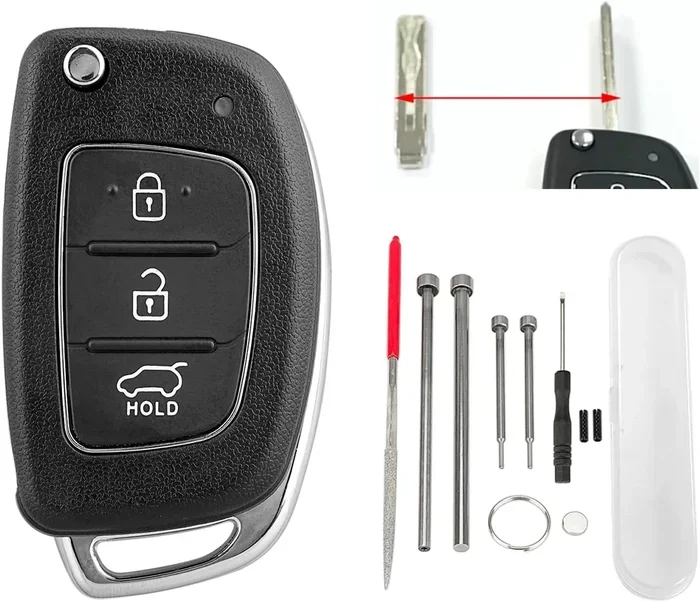
- Use the mechanical key. Every Hyundai smart key fob includes a hidden mechanical key blade. You can use this to manually unlock the driver door. However, the mechanical key alone usually cannot start the engine.
The exact procedure varies slightly by model and year. Always refer to your owner manual for the specific steps. But in general, Hyundai engineers designed these vehicles with backup options because they know fobs fail.
What If the Fob Is Completely Lost or Stolen?
Losing your fob entirely is a different situation. Without any fob inside the vehicle, the Hyundai immobilizer system will prevent the engine from starting. This is a security feature. It stops thieves from hot-wiring your car.
If you have lost your fob, you will need to:
- Contact a Hyundai dealership for a replacement fob.
- Call a certified automotive locksmith who can program a new fob.
- Use your smartphone if your Hyundai model supports the Hyundai SmartSense app or connected services.
Some newer Hyundai models allow you to use your smartphone as a digital key. If you set this up before losing your fob, you can still start and drive your car. This feature is a game changer, and it is worth setting up as a backup plan.
Step-by-Step: Starting Your Hyundai When the Fob Fails
Here is a practical walkthrough for the most common scenario. Your fob battery just died, and you need to get to work.
Step 1: Stay Calm and Check the Fob
First, make sure the fob is truly dead. Try pressing the buttons close to your ear. If you hear no beep or click, the battery is likely the problem. Do not panic. You still have options.
Step 2: Use the Backup Start Procedure
Take the fob and place it directly on the push button. Press and hold the button as you normally would. The car should recognize the fob through its passive chip and allow the engine to start. This works in most Hyundai models from 2015 and newer.
Step 3: Try the Steering Column Antenna
If placing the fob on the button does not work, move it to the steering column area. Look for a small mark or indent on the dashboard near the steering column. This is the backup antenna location. Hold the fob flat against this spot and try starting the car again.
Step 4: Use the Mechanical Key to Enter the Car
If the fob will not unlock the doors, slide out the mechanical key blade from the fob. Insert it into the driver door lock and turn to unlock. Once inside, place the fob on the start button and proceed with the backup start method.
Quick Tip: Keep a spare fob battery in your glove box. A CR2025 battery costs less than a dollar and takes seconds to swap. This small habit can save you from a roadside hassle.
Common Reasons Your Hyundai Key Fob Stops Working
Understanding why your fob fails helps you prevent future problems. Here are the most common culprits:
Dead Battery
This is the number one reason. Key fob batteries typically last two to three years. If your fob works intermittently or not at all, the battery is the first thing to check.
Signal Interference
Electronic devices, metal objects, or even other key fobs can interfere with the signal. If you keep your fob in a crowded keychain with multiple electronic devices, the signal may get blocked.
Water or Physical Damage
Dropping your fob in water or exposing it to extreme heat can damage the internal electronics. Even if the battery is fine, a damaged fob will not communicate with your car.
Software Glitch
Sometimes the car and fob simply need to re-sync. A low car battery or a recent battery disconnect can cause the system to lose pairing. A quick reset usually fixes this.
Worn-Out Fob
Over time, the fob’s internal components wear out. If your fob is more than five years old and showing signs of failure, consider replacing it entirely.
Preventing Key Fob Problems Before They Happen
Prevention is always better than cure. A few simple habits can keep your Hyundai key fob working reliably for years.
Replace the Battery on Schedule
Do not wait for the fob to fail. Replace the battery every two years as a preventive measure. Set a calendar reminder if needed.
Store the Fob Properly
Keep your fob away from direct sunlight, extreme cold, and moisture. A small fob pouch or case helps protect it from physical damage.
Avoid Signal-Blocking Habits
Do not store your fob near large metal objects or stacked electronic devices. Keep it in a dedicated pocket or compartment where its signal can travel freely.
Test Your Fob Regularly
Once a month, stand near your car and test all fob buttons. If any button feels weak or unresponsive, replace the battery immediately.
Keep a Spare Fob
Hyundai dealerships can cut and program a spare fob. Having a second fob in your home or office gives you peace of mind. It is especially valuable if your primary fob gets lost or damaged.
What to Do When DIY Methods Do Not Work
Sometimes, the backup start method simply does not work. This could mean a deeper issue with the fob, the car’s antenna, or the immobilizer system. Here is what you should do next.
Call a Hyundai Dealership
A Hyundai dealership has the tools and software to diagnose fob and ignition problems. They can reprogram your fob or replace it with a factory-matched unit. This is the most reliable option, though it may cost more than a locksmith.
Contact a Certified Automotive Locksmith
A professional locksmith can often come to your location, cut a new fob, and program it on the spot. Look for locksmiths who specifically advertise Hyundai or Korean car expertise.
Use Roadside Assistance
If you are stranded, your Hyundai roadside assistance plan or insurance coverage may cover locksmith services. Check your policy or call your provider before attempting any fixes on the roadside.
Check for Software Updates
In rare cases, a software update from the dealership can fix fob communication issues. Hyundai occasionally releases updates that improve keyless system performance.
Hyundai Key Fob Maintenance: A Simple Routine
Think of your key fob like any other car component. It needs regular care. Here is a simple maintenance routine you can follow:
- Every month: Test all buttons. Check for weak signal or delayed response.
- Every six months: Clean the fob with a soft, dry cloth. Remove any dirt or debris from the buttons and seams.
- Every two years: Replace the battery proactively, even if the fob still works.
- Annually: Inspect the fob for cracks, water damage, or loose buttons. Replace the fob if you notice any physical damage.
Following this routine keeps your fob in top shape. It also extends the life of the fob by several years. A well-maintained fob means fewer surprises and less stress.
For broader car care tips, maintaining clean car glass and surfaces contributes to better sensor performance and overall vehicle health. Regular cleaning routines help ensure all your car’s systems, including proximity sensors, function at their best.
Is It Safe to Drive Without the Key Fob?
Safety is always a top concern. The good news is that Hyundai built multiple layers of security into their smart key systems. Even without a working fob, your car remains protected against theft.
The immobilizer system ensures that only a programmed fob or a properly reprogrammed replacement can start the engine. So driving without the fob temporarily is safe. The car does not become vulnerable to theft just because you used the backup start method.
However, if your fob is lost or stolen, act quickly. Contact a dealership or locksmith to deactivate the old fob and program a new one. This prevents anyone from finding your lost fob and using it to access your vehicle.
Also, always keep the mechanical key blade accessible. In emergencies, this small piece of metal can unlock your door when nothing else works. It is an underrated but essential part of your fob system.
Final Thoughts on Driving Your Hyundai Without the Key Fob
The bottom line is clear. You can drive your Hyundai without the key fob in most situations. The backup start method is designed for exactly this scenario. A dead battery, a lost fob, or a damaged device should not leave you stranded.
That said, prevention goes a long way. Replace your fob battery regularly, store the fob safely, and keep a spare on hand. These simple habits make all the difference.
If you find yourself in a fob failure situation, stay calm. Follow the steps in this guide. Try the backup start method first. If that does not work, reach out to a dealership or locksmith. You will be back on the road in no time.
Your Hyundai is a smart car. It is built to handle the unexpected. Now you know how to handle it too.
Frequently Asked Questions
Can I start my Hyundai if the key fob battery is completely dead?
Yes, you can. Most Hyundai models allow you to place the dead fob directly on the push button or near the steering column. The car reads the fob’s internal chip and permits ignition even without a working battery.
How much does it cost to replace a Hyundai key fob?
A replacement fob typically costs between $100 and $300, depending on the model and where you purchase it. Dealerships may charge more, while aftermarket options and locksmiths often offer lower prices.
Can I use my phone to start my Hyundai without the key fob?
Some newer Hyundai models support smartphone digital keys through the Hyundai app. If you set this up before losing your fob, you can use your phone to lock, unlock, and start your car.
How long does a Hyundai key fob battery last?
A key fob battery typically lasts two to three years. If you notice weak signal or unresponsive buttons, replace the battery immediately. Keeping a spare battery in your glove box is a smart habit.
What should I do if I lose my Hyundai key fob?
Contact a Hyundai dealership or certified locksmith right away. They can deactivate the lost fob and program a new one. If you have a spare fob, use it in the meantime.
Can water damage a Hyundai key fob?
Yes, water exposure can damage the internal electronics of a key fob. If your fob gets wet, remove the battery, dry the fob thoroughly, and let it air dry for 24 hours before reinserting the battery and testing it.
=== CONCLUSION ===
Driving your Hyundai without the key fob is entirely possible and surprisingly straightforward. The Hyundai smart key system includes thoughtful backup features that most drivers never need until the moment they do. Now you know exactly what those features are and how to use them.
Remember to replace your fob battery every two years, store the fob safely, and keep a spare on hand. These habits prevent most fob-related problems before they start. And if you do find yourself stuck, the backup start method, a locksmith, or your dealership will get you back behind the wheel.
Your Hyundai key fob is a small device that plays a huge role in your daily driving experience. Treat it well, and it will serve you reliably for years to come. Drive safe, stay prepared, and never let a dead fob slow you down.