How to Change a Buick Key Fob Battery in Simple Steps
Changing your Buick key fob battery is easy and takes just minutes. You only need a CR2032 coin cell battery, a small flathead screwdriver, and a steady hand. This guide walks you through every step so you can replace the battery yourself without visiting a dealer or locksmith.
Key Takeaways
- Quick Fix: A dead Buick key fob battery is the most common reason for remote failure, and replacing it takes only minutes.
- Right Battery Matters: Most Buick key fobs use a standard CR2032 coin cell battery available everywhere for under $5.
- Simple Tools Needed: You only need a small flathead screwdriver and a clean, well-lit workspace.
- Watch for Warning Signs: Weak signal, unresponsive buttons, and intermittent operation signal a dying battery.
- Preventive Maintenance: Replace your battery proactively every 12 to 18 months to avoid getting locked out.
- Avoid Common Mistakes: Do not force the fob open, insert the battery backwards, or use low-quality batteries.
- When in Doubt, Seek Help: If the fob still fails after a battery swap, a professional can diagnose deeper electrical issues.
📑 Table of Contents
- How to Change a Buick Key Fob Battery in Simple Steps
- Understanding Your Buick Key Fob
- Signs Your Buick Key Fob Battery Needs Replacing
- Tools and Materials You Will Need
- Step-by-Step Guide to Changing Your Buick Key Fob Battery
- Tips to Extend Your Key Fob Battery Life
- Common Mistakes to Avoid When Changing a Key Fob Battery
- When Should You Seek Professional Help?
- How Often Should You Replace Your Key Fob Battery?
- Frequently Asked Questions About Buick Key Fob Batteries
- Conclusion
How to Change a Buick Key Fob Battery in Simple Steps
Your Buick key fob stops working one morning. You press the button, and nothing happens. Before you call a dealer or spend money on a replacement, take a breath. The problem is almost always a dead battery. Changing a Buick key fob battery is one of the simplest car maintenance tasks you can do at home. In this guide, we walk you through the entire process step by step.
Whether you drive a Buick Enclave, Buick Regal, or any other model, the key fob battery swap follows a similar process. You will learn what battery type you need, what tools to grab, and how to open the fob without breaking it. By the end of this article, you will feel confident doing it yourself. No special skills required. No expensive trips to the shop. Just a few minutes of your time.
A key fob battery replacement saves you time and money. Most Buick remotes use a common CR2032 coin cell battery. These batteries cost just a few dollars and last one to two years. Let us get into the details so you can get back to using your remote without any hassle.
Understanding Your Buick Key Fob
Before you open up your fob, it helps to know what you are working with. Buick key fobs come in different styles depending on the model year. Some have a physical key hidden inside. Others are sleek and button-only. But the battery replacement process is quite similar across most models.
What Type of Battery Does a Buick Key Fob Use?
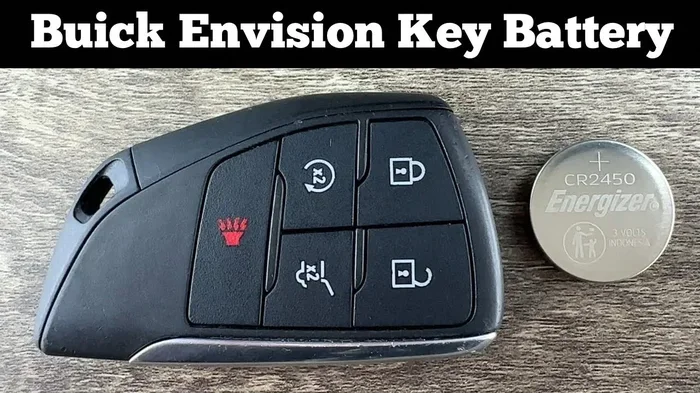
Most Buick key fobs run on a CR2032 battery. This is a standard coin cell battery that you can find at any grocery store, pharmacy, or auto parts shop. The CR2032 is a 3-volt battery. It is small, round, and easy to handle. Some older Buick models may use a slightly different battery, but the CR2032 covers the vast majority of Buick vehicles.
Here is a quick list of common battery types used in car key fobs:
- CR2032 — Most common. Used in Buick Enclave, Regal, and newer models.
- CR2025 — Slightly thinner. Found in some older models.
- CR1632 — Less common. Used in certain compact remotes.
Check your owner’s manual if you are unsure. The battery type is also printed on the old battery itself once you remove it. Always match the voltage and size exactly. Using the wrong battery can damage the fob.
Why Does a Key Fob Battery Die?
Key fob batteries drain over time. Every time you press a button, the battery sends a signal to your car. Over months and years, this adds up. Cold weather also drains batteries faster. If you live in a region with harsh winters, you may notice your fob dying more often.
Most key fob batteries last between 12 and 24 months. If your fob starts acting weak, do not wait too long. Replace it right away. A weak battery can cause intermittent signal problems. This makes it harder to lock or unlock your car from a distance.
Signs Your Buick Key Fob Battery Needs Replacing
Knowing the warning signs helps you act before the fob stops working completely. Here are the most common symptoms of a dying key fob battery:
1. Increased Distance to Unlock the Car
You used to unlock your car from 30 feet away. Now you need to stand right next to the door. This is a classic sign of a low key fob battery. The signal weakens as the battery drains.
2. Buttons Feel Less Responsive
You have to press harder or press multiple times. The buttons may feel sluggish. This happens because the battery cannot deliver enough power to send a strong signal.
3. Dashboard Warning Light
Some newer Buick models display a warning on the dashboard. A small key or battery icon may appear. This is your car telling you the fob battery is low. Do not ignore it.
4. Intermittent Working
The fob works sometimes but not always. This is frustrating and dangerous if you are locked out. Intermittent behavior almost always points to a dying battery.
5. Key Fob Stops Working Entirely
If none of the buttons work, the battery is almost certainly dead. But before you replace it, try holding the fob very close to the car and pressing the unlock button. If it works from close range, the battery is definitely the problem.
Tools and Materials You Will Need
You do not need many tools to change a Buick key fob battery. Here is everything you should have ready before you start:
- CR2032 coin cell battery — One replacement battery. Buy name brands like Energizer or Duracell for best results.
- Small flathead screwdriver — A tiny screwdriver works best. You can also use a thin plastic prying tool.
- Soft cloth or towel — To place the fob on while working. This prevents scratches.
- Good lighting — A well-lit workspace makes the process much easier.
- Magnifying glass (optional) — Helpful if you need to read tiny markings on the battery.
That is it. No expensive equipment needed. Everything costs under five dollars. The key fob battery replacement process is designed to be simple. Buick engineers made it that way so owners can handle it at home.
Step-by-Step Guide to Changing Your Buick Key Fob Battery
Now for the main part. Follow these steps carefully and you will have a working fob in minutes.
Step 1: Remove the Physical Key
Most Buick key fobs have a hidden mechanical key inside. Slide the small release button on the side of the fob. Pull the metal key out. Set it aside. This key is useful if you ever need to open your car door manually.
Step 2: Locate the Seam
Look at the fob carefully. Find the seam where the two halves of the fob meet. On most Buick models, the seam runs along the longer edge. You will see a small gap between the top and bottom halves.
Step 3: Pry Open the Fob
Insert your flathead screwdriver or plastic prying tool into the seam. Start at one corner. Gently twist the screwdriver to pop the first clip open. Work your way around the fob. Go slowly. The clips are small but they hold the fob together securely.
Do not use excessive force. If a clip feels stuck, try a different corner. Patience is key here. Rushing can crack the plastic shell.
Step 4: Remove the Old Battery
Once the fob is open, you will see the battery sitting in a small compartment. Note which side faces up. The positive side (marked with a + sign) usually faces up. Use your screwdriver or a pencil to gently push the battery out. It should pop out easily.
Pay attention to the battery orientation. The positive and negative sides matter. The new battery must go in the same way. Take a photo with your phone before removing the old battery if you are unsure.
Step 5: Insert the New Battery
Take your new CR2032 battery. Place it in the compartment with the positive side facing up, just like the old battery. Press it down gently until it clicks into place. Make sure it sits flat and secure. A loose battery will cause the fob to malfunction.
Step 6: Close the Fob
Align the two halves of the fob. Press them together firmly. You should hear the clips snap into place. Go around the entire edge and make sure all clips are secure. A half-closed fob can let moisture inside, which damages the electronics.
Step 7: Test the Fob
Stand near your Buick and press the unlock button. The doors should respond immediately. Test the lock button too. Try the trunk release if your fob has one. If everything works, you are done. Congratulations, you just saved yourself a trip to the dealer.
If the fob still does not work, try these quick checks:
- Make sure the battery is inserted correctly with the right side up.
- Check that the battery is not dead on arrival. New batteries can sometimes be weak.
- Remove any corrosion or debris from the battery contacts.
- Try the fob from closer range to the car.
Sometimes the fob needs a few seconds to re-sync with the car after a battery change. Wait a minute and try again. If it still fails, the issue may not be the battery. Move on to the troubleshooting section below.
Tips to Extend Your Key Fob Battery Life
Once you have replaced the battery, you want it to last as long as possible. Here are some practical tips:
1. Avoid Extreme Temperatures
Do not leave your key fob in a hot car during summer or in a freezing car during winter. Extreme heat and cold drain batteries fast. Keep the fob in your pocket or inside the house when you are not using it.
2. Do Not Press Buttons Unnecessarily
Every button press uses battery power. Avoid pressing the lock or unlock button when you do not need to. Some people press the fob buttons repeatedly when the car does not respond. This wastes remaining battery life.
3. Keep the Fob Away from Other Electronics
Placing your fob near cell phones or other electronic devices can cause signal interference. This forces the fob to use more power to send its signal. Keep a little distance between your fob and other devices.
4. Replace the Battery Before It Dies Completely
Do not wait until the fob stops working. Replace the battery at the first sign of weakness. A proactive approach prevents you from getting locked out of your car.
5. Use Quality Batteries
Cheap off-brand batteries may seem like a good deal, but they often have shorter lifespans. Stick with trusted brands like Energizer, Duracell, or Panasonic. Your Buick vehicle maintenance routine should include quality parts.
Common Mistakes to Avoid When Changing a Key Fob Battery
Even a simple task like battery replacement can go wrong if you are not careful. Here are common mistakes people make:
- Using the wrong battery type. Always double-check that you have a CR2032 or the correct type for your model.
- Forcing the fob open. The clips are fragile. Use gentle pressure and work around the seam slowly.
- Inserting the battery backwards. This will not damage the fob but it will not work either. Always match the orientation.
- Touching the battery contacts with metal tools. This can cause a short circuit. Use plastic tools when possible.
- Not testing the fob after replacement. Always test before you put the fob back in your pocket.
When Should You Seek Professional Help?
Most of the time, a battery change fixes the problem. But sometimes the fob still does not work after a fresh battery. This could indicate a deeper issue. Here are situations where you should call a professional:
- The fob was physically damaged, like cracked from a drop.
- The battery contacts look corroded or bent.
- The fob works intermittently even with a new battery.
- Your Buick model has a smart key system that requires programming.
Some advanced Buick models use smart key systems with proximity sensors. These fobs need to be programmed after a battery change. In such cases, visit your dealer or a qualified locksmith. They can reprogram the fob in minutes.
It is also worth noting that some car electrical systems involve more complex power management. For instance, if you are dealing with car power inverter installations or modifications, a professional can help ensure everything works safely. Similarly, understanding your vehicle’s electrical system better can help you troubleshoot other issues. For those interested in car electrical upgrades, resources like a 12V DC to 220V AC car power inverter guide can be helpful.
How Often Should You Replace Your Key Fob Battery?
On average, a Buick key fob battery lasts about 18 months. However, this varies based on usage and climate. If you use your fob multiple times a day, the battery may wear out faster. In cold climates, battery life can drop to 12 months or less.
A good habit is to check your fob battery once a year. You can buy a cheap battery tester or simply notice the warning signs we discussed earlier. Proactive replacement is always better than being stranded with a dead fob.
For car owners who also deal with other electrical accessories, like an inverter for powering devices on the go, understanding your vehicle’s electrical system is valuable. A guide on 12V to 230V car inverter setups can give you useful background on how your car’s electrical system powers different devices.
Also, if you are shopping for a new Buick or comparing vehicle specs, knowing your car’s weight and dimensions matters. Check out resources on what weight is too heavy for a car to understand how vehicle specs affect your daily driving experience.
Frequently Asked Questions About Buick Key Fob Batteries
Can I use any CR2032 battery for my Buick key fob?
Yes, most CR2032 batteries will work. However, we recommend using name-brand batteries like Energizer or Duracell. They provide consistent voltage and last longer. Cheap generic batteries may have inconsistent performance and shorter lifespans.
How do I know which side of the battery faces up?
The positive side of a CR2032 battery has a + sign and a slightly raised surface. This side should face up in the fob compartment. The negative side is flat and usually has the brand name printed on it. When in doubt, look at how the old battery was positioned before you removed it.
Will changing the battery reset my key fob settings?
No, changing the battery does not reset your fob settings. Your locks, trunk release, and any personalized settings stay intact. The fob simply loses power temporarily while the battery is out. Once the new battery is in, everything works as before.
What if my Buick key fob still does not work after replacing the battery?
First, double-check that the battery is inserted correctly. Make sure the positive side faces up. If the orientation is correct and the fob still does not work, the issue may be with the fob itself. The internal electronics could be damaged. In that case, visit your dealer or a locksmith for diagnosis and repair.
How much does it cost to change a Buick key fob battery?
A CR2032 battery costs between $2 and $5. The entire replacement process costs almost nothing if you do it yourself. If you visit a dealer or locksmith, you may pay $20 to $50 for the service. Doing it at home is quick, easy, and saves you money.
Can I recharge my key fob battery instead of replacing it?
Most Buick key fobs use disposable CR2032 batteries that cannot be recharged. Some newer models with rechargeable batteries exist, but they are less common. Check your owner’s manual to see if your fob has a rechargeable battery. If it does, you will need a special charging dock or cable.
Conclusion
Changing a Buick key fob battery is one of the easiest car maintenance tasks you can do. It takes just a few minutes, costs almost nothing, and keeps your remote working reliably. With a CR2032 battery, a small screwdriver, and this guide, you are fully equipped to handle the job yourself.
Remember the warning signs of a dying battery. Act early before you get locked out. Follow the step-by-step process carefully. And treat your new battery with care to make it last as long as possible. Your Buick key fob will thank you with years of reliable service.
Take a few minutes today to check your fob battery. It is a small action that saves you from big headaches down the road. Share this guide with fellow Buick owners who might benefit from it. And keep this page bookmarked for future reference. Stay proactive, stay prepared, and keep your Buick running smoothly.