Can I Download an App to Start My Car From Anywhere
Yes, you can download an app to start your car from virtually anywhere, as long as your vehicle supports the technology. Remote car start apps let you warm up your car, lock the doors, and check your fuel level right from your smartphone. In this guide, we cover everything you need to know about app-controlled vehicle systems.
Key Takeaways
- Remote car start apps allow you to start your vehicle from a distance using your smartphone.
- Compatibility depends on your car’s make, model, and year — not all vehicles support app start features.
- Most systems use cellular or WiFi connectivity to send commands between your phone and your car.
- Security is a top priority with encrypted signals and multi-factor authentication built into most apps.
- Aftermarket options exist for older cars that don’t have factory-installed remote start technology.
- Setting up the app is usually simple and takes less than 15 minutes for most users.
📑 Table of Contents
- What Does It Mean to Download an App to Start Your Car?
- How Does a Remote Car Start App Actually Work?
- Which Cars Are Compatible with App Start Technology?
- Step-by-Step Guide to Downloading and Setting Up Your Car Start App
- Safety, Security, and Privacy Concerns
- Troubleshooting Common Issues with App-Based Car Starts
- The Future of Remote Car Start Technology
- Conclusion
What Does It Mean to Download an App to Start Your Car?
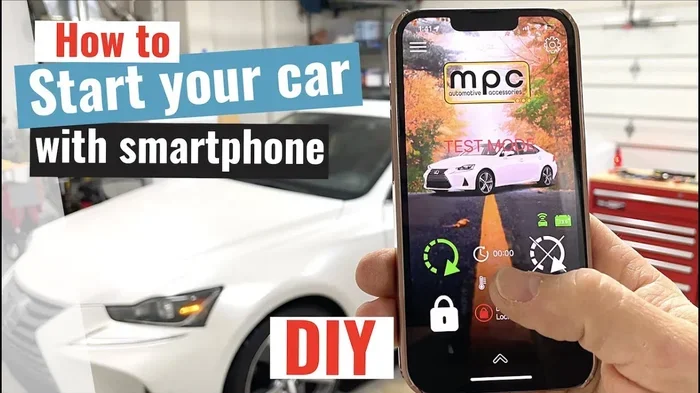
So you’re wondering, can I download an app to start my car from somewhere far away? The short answer is yes — and it’s changing the way we interact with our vehicles. A remote car start app is a software program you install on your smartphone that communicates with your car’s onboard systems. It sends a signal to your vehicle to start the engine, adjust the climate control, or lock and unlock the doors.
Think of it like this. You’re sitting inside your office on a freezing winter morning. Instead of walking to your car in the cold, you pull out your phone and tap a button. Within seconds, your car is running and warm. That’s the kind of convenience app-controlled vehicle technology offers. It’s not science fiction anymore — it’s available right now for millions of drivers.
Smart car technology has made huge strides in the last decade. What used to require a special key fob or a dealer visit can now be done from your pocket. Whether you want to start your car remotely or just check on your vehicle’s status, there’s likely an app for that.
How Does a Remote Car Start App Actually Work?
Understanding how these apps function helps you get the most out of them. The technology behind remote ignition apps isn’t overly complicated, but it does involve some clever engineering.
The Connection Between Your Phone and Your Car
Most car remote start apps rely on one of two connection methods. The first is cellular connectivity. Your car has a built-in module that connects to a cellular network, similar to how your phone connects. When you press the start button on your app, the signal travels through the cellular network to your car’s module and starts the engine.
The second method is WiFi-based communication. Some newer vehicles use WiFi hotspots or tether to your phone’s data connection. This works well when you’re within range, but cellular connections tend to offer more flexibility for vehicle start remotely from long distances.
The Role of the Key Fob
Your car’s keyless ignition system plays a big role here. Even when you use an app, the car still checks whether the correct key fob is inside the vehicle. This is a critical safety feature. The app can send the start command, but the car won’t fire up unless it detects an authorized key or fob within the cabin. This prevents theft and keeps things secure.
What Happens Behind the Scenes
When you tap the start button on your phone, here’s a quick breakdown of what happens:
- Your app sends an encrypted command through the internet.
- The signal reaches your car’s onboard telematics module.
- The module verifies your identity and checks for an authorized key fob inside.
- If everything checks out, the engine starts and the climate system activates.
- You receive a confirmation notification on your phone.
The whole process usually takes less than 30 seconds. It’s fast, reliable, and designed to feel seamless.
Which Cars Are Compatible with App Start Technology?
Not every car can be started with an app. Car compatibility check is an important first step before you get too excited. Here’s what you need to know about which vehicles support this feature.
Factory-Installed Remote Start Systems
Many modern cars come with manufacturer car apps built right in. Brands like Ford (PassConnect), Chevrolet (MyChevrolet), BMW (ConnectedDrive), and Toyota (Toyota Remote) all offer push-button start systems paired with companion apps. If your car is from the last five to seven years, there’s a good chance it has this capability.
Here’s a quick comparison of some popular brands and their apps:
- Ford: FordPass app works with most newer Ford and Lincoln models.
- Chevrolet: MyChevrolet app supports most Chevy vehicles with the available package.
- BMW: My BMW app works across the BMW lineup with connected services.
- Toyota: Toyota Remote app is available for many Toyota and Lexus models.
- Hyundai: Bluelink app comes equipped in many newer Hyundai vehicles.
Aftermarket Solutions for Older Cars
What if your car doesn’t have a built-in system? Don’t worry — aftermarket car starter kits can fill the gap. Companies like Compustar, Viper, and Python offer mobile car starter kits that can be installed in most vehicles. These kits include a module that connects to your car’s electrical system and a mobile app that lets you control everything from your phone.
Installation typically requires a professional installer, and costs can range from $200 to $600 depending on the system and your vehicle. It’s a worthwhile investment if you really want app-controlled vehicle features in an older car.
Step-by-Step Guide to Downloading and Setting Up Your Car Start App
Ready to get started? Here’s how to download an app to start your car and get it running smoothly.
Step 1: Confirm Your Vehicle’s Compatibility
Check your owner’s manual or contact your dealer to verify that your car supports remote start via app. Look for terms like connected car technology or telematics in the documentation. You can also visit the manufacturer’s website and enter your VIN for specific details.
Step 2: Download the Official App
Go to the App Store or Google Play Store and search for your car manufacturer’s app. Always download from official sources to avoid fake apps. Install the app and create an account using your email address.
Step 3: Pair Your Phone with Your Car
Follow the in-app instructions to connect your phone to your vehicle. This usually involves:
- Entering your VIN or vehicle details.
- Verifying your ownership through a code or email confirmation.
- Connecting to your car’s WiFi or Bluetooth system.
- Setting up car key fob pairing if prompted.
Most setups take about 10 to 15 minutes. The app walks you through each step clearly.
Step 4: Test the System
Once everything is paired, try starting your car from inside your house first. Make sure the engine fires up and the climate controls work. Then try it from a farther location to test the cellular or WiFi connection. This gives you confidence before you need it in a real situation.
Quick Tips for a Smooth Setup
- Keep your phone’s Bluetooth and location services enabled during setup.
- Make sure your car is parked and in park or neutral before testing.
- Update the app regularly for the latest features and security patches.
- Enable multi-factor authentication for added safety.
Safety, Security, and Privacy Concerns
Any time you connect your car to the internet, questions about safety and privacy come up. These are valid concerns, and it’s smart to think about them before you start using smart car technology.
How Manufacturers Protect Your Car
Most manufacturer car apps use strong encryption to protect your data. Signals between your phone and your car are scrambled so that no one can intercept and misuse them. Many apps also require multi-factor authentication, meaning you need more than just a password to access your vehicle.
Some systems also use car keyless entry verification. The app won’t start the car unless it confirms that the key fob is inside. This layered approach to security makes it very difficult for hackers to gain unauthorized access.
What You Can Do to Stay Safe
You also play a role in keeping your vehicle secure. Here are some practical steps:
- Use strong, unique passwords for your car app accounts.
- Never share your login credentials with people you don’t trust.
- Keep your phone’s operating system and the car app updated.
- Avoid using public WiFi when controlling your vehicle remotely.
- Regularly review your account activity for any suspicious behavior.
Privacy and Data Collection
It’s worth noting that some connected car technology collects driving data, location history, and vehicle diagnostics. This data helps manufacturers improve their products, but it also raises privacy questions. Read the terms of service carefully and adjust your privacy settings to match your comfort level. You can usually opt out of data sharing if you prefer more privacy.
Troubleshooting Common Issues with App-Based Car Starts
Even the best technology can have hiccups. Here are some common problems and how to fix them when you’re trying to start your car remotely.
The App Won’t Connect to Your Car
This is the most common complaint. Usually, it’s a connectivity issue. Make sure your car’s telematics module is active and has a good signal. Check that your phone has a stable internet connection. Restarting both the app and your phone often resolves the problem.
The Car Doesn’t Start Even Though the App Says It Did
Sometimes the remote car start app sends the command successfully, but the car doesn’t respond. The most common reason? The key fob isn’t detected inside the vehicle. Make sure the fob is in the cabin and close to the steering column. Some cars also have a specific location for the fob — like the center console or the cupholder — for proper detection.
Delayed Response Times
If your app takes longer than usual to start the car, it could be due to network congestion or server issues on the manufacturer’s end. This is more common during peak hours or after major software updates. Waiting a minute and trying again usually does the trick.
App Crashes or Freezes
App crashes happen, especially after new phone updates. Clearing the app cache, reinstalling it, or updating to the latest version typically fixes this. If the problem persists, check online forums or contact the manufacturer’s support team for help.
Expert Insight on Troubleshooting
Automotive technology experts recommend treating your car app like any other smartphone app. Keep it updated, restart it when things get glitchy, and don’t hesitate to reach out to customer support if issues continue. Most manufacturers offer dedicated help lines and even live chat support for their smart car technology platforms.
The Future of Remote Car Start Technology
The world of remote ignition apps is evolving fast. Here are some exciting trends to watch for in the near future.
Integration with Smart Home Systems
Imagine telling your smart speaker to start your car before you walk outside. This integration is already happening with devices like Amazon Alexa and Google Home. The car app integration between homes and vehicles is only going to grow.
AI-Powered Personalization
Future apps will likely use artificial intelligence to learn your habits. They’ll know when you usually leave for work and automatically prepare your car. Climate settings, route suggestions, and maintenance reminders will all become more personalized and proactive.
Enhanced Electric Vehicle Support
For electric vehicle owners, mobile car starter apps already serve a slightly different purpose. They let you pre-condition the battery, set charging schedules, and monitor power levels. As EV adoption grows, these features will become even more sophisticated and essential.
Key Takeaways
- Remote car start apps are convenient, secure, and widely available for most modern vehicles.
- Compatibility depends on your car’s make, model, and year, but aftermarket options exist for older vehicles.
- Cellular and WiFi connectivity power most app-controlled vehicle systems.
- Security features like encryption and multi-factor authentication keep your car safe from unauthorized access.
- Setting up the app is straightforward and usually takes under 15 minutes.
- Future technology promises even deeper integration with smart homes and AI.
Conclusion
So, can I download an app to start my car from anywhere? Absolutely. Whether your car has a factory-installed system or you add an aftermarket kit, remote car start apps offer incredible convenience and peace of mind. They save you time, keep you comfortable, and add a modern layer of control to your daily routine.
The technology is mature, the security measures are strong, and the setup process is user-friendly. If your vehicle supports it, there’s no reason not to take advantage of smart car technology. Start by checking your car’s compatibility, download the right app, and experience the difference for yourself. The future of driving is already here — and it fits right in your pocket.
Frequently Asked Questions
Can I start my car remotely if it has a manual transmission?
Most remote car start systems require the car to be in park for safety reasons. Manual transmission vehicles can usually use remote start features, but you must ensure the car is in neutral and the parking brake is engaged. Check your specific system’s guidelines to be safe.
How far can I be from my car to start it with an app?
With cellular connectivity, you can start your car from virtually anywhere with a cell signal. There’s no real distance limit as long as your car’s telematics module is active and connected to the internet. WiFi-based systems have shorter range but still work well in most everyday situations.
Is it safe to use a third-party app to start my car?
Stick to apps recommended by your car’s manufacturer whenever possible. Aftermarket car starter apps from reputable brands like Compustar or Viper are generally safe, but always research the company and read user reviews. Avoid unknown apps that request excessive permissions, as they could compromise your vehicle security.
Will using a remote start app drain my car battery?
Most modern cars have built-in safeguards that prevent excessive battery drain. Remote ignition systems typically limit run time and shut off automatically after a set period. However, if your car sits unused for long periods, the battery could be affected. It’s a good idea to have your battery checked regularly.
Can someone else steal my car using my remote start app?
This is very unlikely. Smart car technology uses strong encryption, and most systems require an authorized keyless ignition fob to be inside the vehicle before the engine will start. Adding multi-factor authentication to your app account provides an extra layer of protection against unauthorized access.
Do I need a subscription to use a car remote start app?
It depends on the manufacturer. Some brands offer free basic features for a limited time and then require a paid subscription for continued access. Others include app-controlled vehicle features as part of the purchase price. Check with your dealer or the manufacturer’s website to understand the full cost of using the app long-term.