How to Build the Ultimate Car Racing Simulator Setup
Building a car racing simulator setup transforms your gaming into a lifelike driving experience. Whether you are a casual gamer or a serious sim racer, the right combination of a racing wheel, pedals, cockpit, and screens makes all the difference. This guide walks you through every step of creating a setup that delivers immersive racing from the comfort of your home. You will learn what gear to choose, how to build a sturdy rig, and how to optimize your software for the best results.
There is something magical about sitting in a car racing simulator setup and feeling like you are actually on the track. The hum of the engine, the rumble of the road under your tires, and the thrill of nailing a perfect lap — it all comes together when you have the right gear. Whether you are a weekend warrior or someone who dreams of competing in sim racing leagues, your setup is everything.
A great setup does not just look cool on Instagram. It actually makes you a better driver. The feedback from a quality steering wheel teaches you how to brake later and corner smoother. The right pedals help you master heel-toe shifting. And a proper cockpit keeps you comfortable during long sessions. In this guide, we will break down every part of building the ultimate car racing simulator setup, step by step.
Key Takeaways
- Start with a quality racing wheel: The steering wheel is the heart of any car racing simulator setup and directly affects your feel and control.
- Do not skip the pedals: A proper throttle and brake pedal set gives you the precision needed for realistic lap times.
- Your rig matters as much as your gear: A sturdy sim racing frame keeps everything stable and lets you focus on driving.
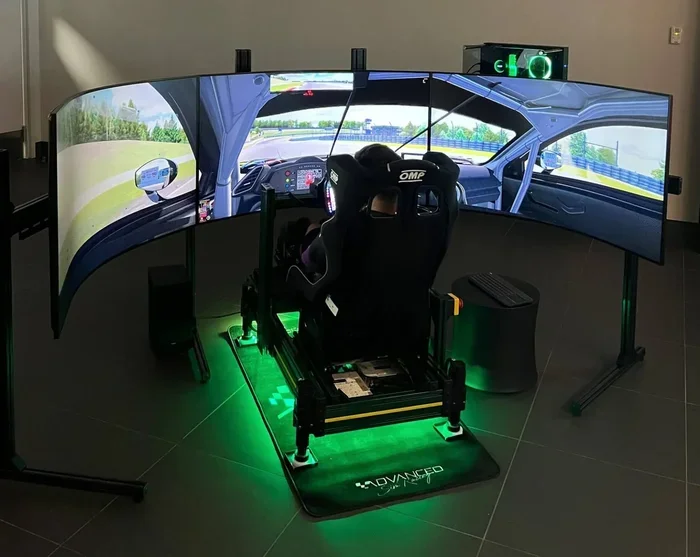
- Triple screens or a curved display boost immersion: Your visual setup creates the sense of speed and depth that flat screens cannot match.
- Software tuning is the secret weapon: Adjusting force feedback and telemetry settings can dramatically improve your driving experience.
- You do not need to spend a fortune: Smart budget choices let you build a great setup without breaking the bank.
📑 Table of Contents
- Why a Car Racing Simulator Setup Is Worth Building
- Choosing the Right Racing Wheel and Pedals
- Building Your Sim Racing Rig and Cockpit
- Monitors, Screens, and Visual Setup
- Software, Telemetry, and Fine-Tuning
- Budget vs. Premium: Where to Invest Your Money
- Common Mistakes to Avoid When Building Your Setup
- Expert Insights: Tips from Sim Racing Pros
- Conclusion
Why a Car Racing Simulator Setup Is Worth Building
You might wonder why people spend hundreds or even thousands of dollars on a home racing rig. The answer is simple: immersion and improvement. A basic controller on a couch is fun, but it cannot teach you the skills that a proper setup can. When you invest in a sim racing environment that feels real, your brain starts to learn real driving habits.
Here is what a well-built car racing simulator setup gives you:
- Realistic force feedback: The wheel pushes back when you hit bumps, lose grip, or take a corner too fast. This tactile feedback is something a controller simply cannot replicate.
- Better lap times: Many sim racers report faster times within days of upgrading their gear. The precision of a racing wheel and pedal set makes a huge difference.
- Comfort for long sessions: A proper racing seat and frame let you race for hours without back pain or fatigue.
- A sense of speed: Triple screens or a curved monitor create depth perception that makes you feel like you are truly moving.
- Community and competition: The sim racing community thrives on platforms like iRacing and Assetto Corsa. A serious setup lets you compete fairly with others.
Even if you are just starting out, building a solid foundation now means you will not have to replace everything later. Think of it as investing in your hobby. A few smart choices today can save you money and frustration down the road.
Choosing the Right Racing Wheel and Pedals
The Steering Wheel: Your Most Important Investment
The racing wheel is the centerpiece of any car racing simulator setup. It is the one piece of gear you will touch the most, so it needs to feel right. When shopping for a wheel, there are three main things to consider: force feedback quality, wheel size, and build quality.
Force feedback is what makes the wheel feel alive. Cheap wheels use basic motors that vibrate. Better wheels use advanced motors that simulate road texture, tire slip, and surface changes. If you have ever driven a real car, you know that every road feels different. A good force feedback system tries to replicate that sensation.
Wheel size matters too. Most wheels range from 250mm to 350mm. Smaller wheels are compact and affordable, but larger wheels give you more leverage and a more realistic feel. For most sim racers, a 280mm to 300mm wheel hits the sweet spot between realism and practicality.
Popular brands in the sim racing world include Logitech, Fanatec, and Thrustmaster. Each offers wheels at different price points. The Logitech G29 and G923 are great entry-level options. Fanatec wheels are considered the gold standard for serious sim racers. You do not need to spend a fortune, but investing in a quality wheel pays off quickly.
Pedals: Throttle, Brake, and Clutch
A good pedal set completes the input side of your setup. Most sim racers use a three-pedal layout with throttle, brake, and clutch pedals. Some start with a two-pedal set and add a clutch later. Either approach works, but having all three gives you more control and opens up more realistic driving techniques.
The brake pedal deserves special attention. Load cell brake pedals measure the actual pressure you apply, just like a real car. This gives you much more precise braking than potentiometer-based pedals, which just measure pedal position. If you want to improve your braking consistency, a load cell pedal set is a game changer.
Quick Tips for Pedals:
- Adjust pedal spacing to match your foot size.
- Practice heel-toe downshifting on a quiet road or empty track.
- Consider a pedal extender if you are tall or have long legs.
- Replace the rubber pedal grips with metal or aluminum pedals for better feel.
Shifters and Handbrakes
Once you have your wheel and pedals sorted, you might want to add a sequential shifter or a H-pattern shifter. A handbrake is also essential for rally-style driving or drifting. These extras are not strictly necessary, but they add another layer of realism to your car racing simulator setup. Many sim racers start with the basics and add these components over time.
Building Your Sim Racing Rig and Cockpit
What Is a Sim Racing Rig?
A sim racing rig is the frame that holds your wheel, pedals, and seats in place. Think of it as the skeleton of your setup. Without a rigid frame, your wheel will flex, your pedals will move, and your immersion will suffer. A good rig keeps everything stable and positioned exactly where you need it.
There are two main types of rigs: fixed and modular. Fixed rigs are built for one specific configuration and cannot be easily changed. Modular rigs let you adjust the wheel position, seat angle, and pedal placement. For most people, a modular rig is the better choice because it grows with your needs.
Choosing the Right Seat
Your seat affects both comfort and performance. A bucket seat from a real car is the gold standard because it holds your body in place during aggressive turns. However, a proper gaming chair or even a sturdy office chair can work well if you adjust it correctly.
Here are some things to look for in a racing seat:
- Side bolsters: These keep your body from sliding during hard cornering.
- Height adjustability: You need to be able to position the wheel at the right angle.
- Mounting points: Make sure the seat can attach securely to your sim racing frame.
- Material: Leather or faux leather lasts longer and feels more premium than fabric.
If you are on a budget, do not overlook used office chairs or even folding chairs with a cushion. Comfort is key, especially if you plan on racing for hours at a time.
Frame Materials and Stability
Sim racing frames come in steel, aluminum, and even carbon fiber. Steel is heavy and very stable but hard to move. Aluminum is lighter and still sturdy, making it a popular choice. Carbon fiber is the lightest and strongest, but it comes at a premium price.
Whatever material you choose, make sure the frame does not wobble. A shaky rig ruins the experience and can even damage your equipment over time. Many budget-friendly rigs from brands like Simmax, V3 Racing, and MoveTech offer solid stability without breaking the bank.
Monitors, Screens, and Visual Setup
Single Monitor vs. Triple Screen
Your visual setup plays a huge role in how immersive your car racing simulator setup feels. A single monitor is perfectly fine for beginners. It is affordable, easy to set up, and works great with most sim racing games. But if you want to take immersion to the next level, a triple screen or ultra-wide monitor is the way to go.
A triple screen setup wraps your peripheral vision and creates a true sense of speed. When you look left or right, you see the world unfolding around you. It takes some extra hardware and desk space, but the experience is unbeatable. Many competitive sim racers use triple screens because the wider field of view helps them spot corners and apexes faster.
Curved Monitors and Ultrawide Displays
If a triple screen feels too complex, consider an ultrawide monitor or a curved display. A 34-inch ultrawide with a 21:9 aspect ratio gives you a wider view than a standard monitor without the hassle of three separate screens. Curved monitors add a subtle sense of depth that flat screens lack.
For the best visual quality, look for monitors with a high refresh rate (120Hz or above) and a fast response time. This reduces motion blur and makes the image feel smooth during fast cornering. A 144Hz or 240Hz monitor is ideal for sim racing.
VR Headsets for Maximum Immersion
Virtual reality is another option for sim racers who want the most immersive experience possible. A VR headset puts you directly inside the cockpit and gives you a 360-degree view of the track. Popular options include the Meta Quest series and Valve Index. VR can be amazing, but it requires a powerful PC and a bit of a learning curve.
Some sim racers find VR causes motion sickness during long sessions. If you are new to VR, start with short races and work your way up. The technology is improving rapidly, and modern headsets are lighter and more comfortable than ever before.
Software, Telemetry, and Fine-Tuning
Choosing the Right Sim Racing Software
Your software choice matters just as much as your hardware. Popular sim racing titles include iRacing, Assetto Corsa Competizione, rFactor 2, and Gran Turismo 7. Each has its own strengths. iRacing is known for its competitive racing league and laser-scanned tracks. Assetto Corsa Competizione is the official GT World Challenge game and is praised for its realism. rFactor 2 is a favorite for its advanced physics engine.
Many of these games support extensive customization. You can adjust tire models, fuel consumption, weather, and even track surface grip. This level of detail is what makes sim racing feel so real.
Telemetry and Data Analysis
Telemetry is one of the most powerful tools for improving your driving. Telemetry software records data from every lap, including your braking points, throttle application, steering input, and line through corners. By reviewing this data, you can identify where you are losing time and make precise adjustments.
Popular telemetry tools include SimCraft, RaceCraft, and the built-in telemetry systems in iRacing and Assetto Corsa. Many professional sim racers and even real-world race teams use telemetry to analyze performance. You do not need to be a professional to benefit from it. Even basic data review can reveal habits you did not know you had.
Force Feedback Tuning
Most sim racing wheels come with software that lets you adjust force feedback settings. This is where you can really dial in your car racing simulator setup. You can adjust the strength of the feedback, the damping, and the saturation. Finding the right balance takes some trial and error, but it makes a noticeable difference.
Start with the default settings and then tweak one parameter at a time. If the wheel feels too harsh, reduce the strength slightly. If it feels too muted, increase it. The goal is to feel every detail of the track without the wheel fighting your hands.
Budget vs. Premium: Where to Invest Your Money
Building a car racing simulator setup can range from a few hundred dollars to several thousand. The key is knowing where to invest and where to save. Here is a simple breakdown of where your money matters most.
| Component | Budget Option | Mid-Range | Premium |
|---|---|---|---|
| Steering Wheel | Logitech G29 (~$250) | Fanatec CSW V2.1 (~$600) | Fanatec GT DD Pro (~$1,500+) |
| Pedal Set | Logitech G29 pedals (~included) | Fanatec Pedal Unit (~$300) | Load cell pedals (~$500+) |
| Rig/Frame | DIY plywood (~$100) | Modular steel rig (~$400) | Carbon fiber frame (~$1,500+) |
| Monitor | 1080p 60Hz (~$200) | 1440p 144Hz (~$400) | 4K 240Hz curved (~$800+) |
| Seat | Office chair (~$100) | Bucket seat (~$250) | Custom racing seat (~$600+) |
The steering wheel and pedals are the two components where you should not cut corners. They are the direct link between you and the virtual track. A budget monitor is perfectly fine when starting out, and you can always upgrade later. The same goes for the rig and seat. Start solid, and upgrade as your passion grows.
Common mistakes people make include buying the cheapest wheel they can find, skipping the pedals entirely, or spending all their budget on visuals while ignoring ergonomics. Balance is key. A well-rounded setup with mid-range components will outperform a setup that splurges on one expensive piece while neglecting the rest.
Common Mistakes to Avoid When Building Your Setup
Even experienced sim racers make mistakes when setting up their first rig. Here are a few pitfalls to watch out for:
- Skipping the break-in period: New mechanical wheels need a break-in period. Run the wheel through several sessions before judging its performance.
- Ignoring cable management: Loose cables can snag on the wheel or pedals and ruin a race. Use cable ties or a cable management arm to keep things tidy.
- Setting the wheel too far or too close: Your arms should be slightly bent when holding the wheel at 9 o’clock and 3 o’clock. If your arms are fully extended or cramped, adjust the position.
- Using the wrong game settings: Every sim has different force feedback settings. Copying settings from a YouTube video without adjusting for your wheel can lead to a poor experience.
- Neglecting room lighting: Glare on your screens can ruin immersion and strain your eyes. Use blackout curtains or bias lighting behind your monitors.
Avoiding these mistakes will save you frustration and help you get the most out of your car racing simulator setup from day one.
Expert Insights: Tips from Sim Racing Pros
We spoke with several members of the sim racing community to get their top tips for building a setup. Here is what they had to say:
Start simple and upgrade over time. Many pros started with a basic Logitech wheel and a folding chair. They upgraded piece by piece as they learned what mattered most to them. This approach prevents wasted money on features you might not need.
Focus on ergonomics. A comfortable setup lets you race longer and improve faster. Your monitor should be at eye level, your wheel should be at a natural angle, and your pedals should be easy to reach. Small adjustments make a big difference over time.
Join a community. The sim racing community is incredibly welcoming. Join forums, Discord servers, or local leagues. You will learn tips, find setup inspiration, and make friends who share your passion.
Keep your software updated. Sim racing developers regularly release updates that improve physics, graphics, and force feedback. Keeping your games and wheel software up to date ensures you always have the best experience.
Conclusion
Building the ultimate car racing simulator setup is one of the most rewarding projects a racing fan can take on. It combines technology, ergonomics, and passion into one experience that brings the thrill of the track right into your home. From choosing the right racing wheel and pedal set to building a stable rig and tuning your software, every decision shapes how real the experience feels.
Remember, you do not need to spend a fortune to get started. A solid wheel, a good pedal set, and a sturdy frame are all you need to begin your sim racing journey. As you grow more comfortable and passionate, you can upgrade individual components and refine your setup over time.
The most important thing is to enjoy the process. Experiment with different configurations, learn from your data, and most importantly, have fun. A great car racing simulator setup is not just about winning virtual races. It is about the joy of driving, the thrill of competition, and the satisfaction of building something that is truly yours. Start building yours today, and you will wonder why you ever raced with a controller.
Frequently Asked Questions
What is the best car racing simulator setup for beginners?
A beginner-friendly setup starts with a Logitech G29 or G923 wheel and pedal set, a sturdy desk or basic rig, and a single 1080p monitor. This combination costs around $300 to $400 and delivers a genuine sim racing experience without overwhelming complexity. You can always upgrade individual components as you get more serious about the hobby.
How much does it cost to build a full car racing simulator setup?
A basic setup can be built for $300 to $500, while a mid-range setup with a quality wheel, load cell pedals, and triple monitors runs $1,000 to $2,000. Premium setups with top-tier wheels, custom rigs, and VR can exceed $5,000. The key is to prioritize the wheel and pedals first and upgrade other components over time.
Do I need a triple screen setup for sim racing?
No, a single monitor works perfectly well for most sim racers, especially beginners. Triple screens or ultrawide monitors enhance immersion and peripheral vision, but they are not required. Start with one monitor and add more later if you feel the need for a wider field of view.
What is force feedback and why does it matter?
Force feedback is the technology that makes your steering wheel vibrate and resist your inputs based on what is happening in the game. It simulates road surface changes, tire grip, and collisions. Good force feedback makes the virtual driving experience feel much more realistic and helps you develop better driving habits.
Can I use a car racing simulator setup for other types of racing games?
Absolutely. While sim racing setups are optimized for realistic racing simulations, they work great with arcade racers, formula games, and even off-road racing titles. The improved precision of a racing wheel and pedal set enhances any driving game you play, making every session more engaging and fun.
How do I improve my lap times in sim racing?
Focus on three key areas: your gear setup, your driving technique, and your data analysis. Make sure your wheel and pedals are properly configured and comfortable. Practice braking points and cornering lines consistently. Use telemetry tools to review your laps and identify areas where you are losing time. Small adjustments in braking and throttle application often lead to the biggest improvements.