Simple Steps to Connect Bluetooth to a Jeep Wrangler
Connecting Bluetooth to a Jeep Wrangler is simple and unlocks hands-free calling and wireless music streaming. Whether you own a classic model or a newer year, this guide walks you through every step with clear instructions. You will learn how to pair your phone, fix common issues, and boost your audio quality. Follow our tips to enjoy a seamless wireless connection every time you hit the road.
Staying connected on the road matters more than ever. Whether you are driving through city streets or hitting a dirt trail in a Jeep Wrangler, you want your music and calls to flow without hassle. Connecting Bluetooth to a Jeep Wrangler gives you exactly that freedom. It is one of the simplest upgrades you can make to your vehicle. In this guide, we break down every step so you can get paired and playing in no time.
The process is straightforward, even if you are not tech-savvy. Most Jeep Wrangler models come with built-in Bluetooth support. Older models may need a small adapter. Either way, you will be up and running with wireless audio and hands-free calling. Let us dive into how this works and what you need to do.
Key Takeaways
- Easy Pairing: Most Jeep Wrangler models support Bluetooth and pairing takes only a few minutes.
- Hands-Free Safety: Bluetooth lets you make calls without taking your hands off the wheel.
- Wireless Music: Stream your favorite playlists directly through your car speakers.
- Troubleshooting Helps: Simple fixes resolve most Bluetooth connection problems.
- Accessories Boost Performance: Add Bluetooth adapters for older models to get modern features.
- Multiple Devices: You can pair more than one phone and switch between them easily.
📑 Table of Contents
- Understanding Bluetooth in Your Jeep Wrangler
- Step-by-Step Guide to Connect Bluetooth to a Jeep Wrangler
- Troubleshooting Common Bluetooth Connection Issues
- Tips to Improve Your Bluetooth Audio Experience
- Bluetooth Accessories That Enhance Your Jeep Wrangler Experience
- Safety Tips for Using Bluetooth While Driving
- Conclusion
Understanding Bluetooth in Your Jeep Wrangler
Before you start pairing, it helps to know what Bluetooth does in your vehicle. Bluetooth is a short-range wireless technology. It connects your phone to your car stereo without any cables. This means you can stream music, make calls, and use navigation apps all while keeping your hands on the wheel.
Jeep Wrangler models from the mid-2000s onward started offering Bluetooth as a standard or optional feature. Newer models have even better Bluetooth versions that deliver faster connections and improved range. The Jeep Wrangler infotainment system in newer years makes pairing almost automatic. You simply search for devices and tap to connect.
What Bluetooth Versions Mean for Your Jeep
Bluetooth has evolved over the years. Bluetooth 4.0 and later versions offer better energy efficiency and stronger signals. If your Jeep has an older Bluetooth version, the connection might be shorter range. But the basic pairing process stays the same regardless of the version. What matters most is that your phone and your car can speak the same wireless language.
The wireless connection range for most car Bluetooth systems is about 30 feet. This means your phone can be in your pocket or on the seat and still stream music without interruption. If you step out of the truck, the connection may pause and resume when you return. This is normal behavior for vehicle Bluetooth systems.
Step-by-Step Guide to Connect Bluetooth to a Jeep Wrangler
Now let us get into the actual steps. The process is similar across most Jeep Wrangler years, but there are small differences depending on your model. Below, we walk you through the standard pairing method that works for most setups.
Step 1: Turn on Bluetooth on Your Phone
Start with your phone. Open your Bluetooth settings and make sure the toggle is switched on. Most phones show a list of available devices once Bluetooth is active. Your phone is now searching for a car to pair with.
Keep your phone within a few feet of the Jeep’s stereo system during this process. This ensures a strong initial signal for Bluetooth pairing. Once paired, the range extends to about 30 feet as we mentioned earlier.
Step 2: Put Your Jeep Wrangler Stereo in Pairing Mode
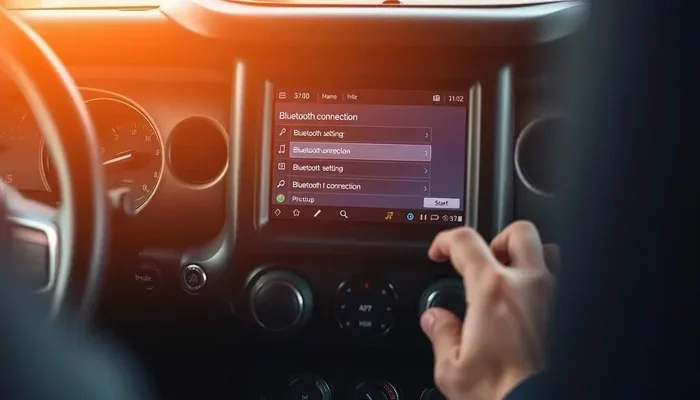
Next, you need your car stereo to be discoverable. On most Jeep Wrangler models, you press and hold the Bluetooth button on the stereo or steering wheel controls. A blinking light or a message on the screen tells you the system is in pairing mode.
Here is what to do on different systems:
- Uconnect System (Newer Models): Go to Settings, then Bluetooth, then select Add New Device.
- Older Factory Stereos: Press and hold the Bluetooth button until the light flashes blue.
- Aftermarket Stereos: Navigate to Bluetooth settings and choose Pair New Device.
Once your stereo is in pairing mode, it broadcasts its name. You will see something like “Jeep Uconnect” or “BT-700” appear on your phone’s screen.
Step 3: Select Your Jeep from Your Phone
On your phone, look for the Jeep stereo name in the list of available devices. Tap on it. Both devices will now exchange information to create a secure wireless connection. This takes just a few seconds.
You may see a passkey or PIN on the car screen. Type that same number into your phone to confirm the pairing. Some newer systems pair automatically without a PIN. Once confirmed, your phone and Jeep are linked.
Step 4: Test the Connection
Now for the fun part. Play a song on your phone and see if it comes through your car speakers. Make a test call to confirm hands-free calling works. If both work, you are all set.
If music does not start playing automatically, check your phone’s audio settings. Make sure the media audio toggle is turned on for the Bluetooth connection. This is a common step people skip during Bluetooth setup.
Troubleshooting Common Bluetooth Connection Issues
Sometimes things do not go smoothly. Bluetooth connections can act up, especially in older vehicles. Here are the most common problems and how to fix them fast.
Phone Not Showing the Jeep Stereo
If your phone does not see the Jeep in the list of available devices, try these steps. First, make sure your stereo is definitely in pairing mode. The blinking light or on-screen message confirms this. Second, toggle Bluetooth off and back on your phone. Third, restart your phone. This clears minor glitches that block Bluetooth discovery.
Another reason could be too many paired devices. Your Jeep stereo remembers previous connections. If the list is full, delete an old pairing to make room. Go to your car’s Bluetooth settings and remove devices you no longer use.
Connection Drops Frequently
A dropping connection is frustrating. This usually happens when your phone is too far from the car or when something blocks the signal. Metal bodies like the Jeep Wrangler can sometimes interfere with wireless signals. The vehicle weight and build can affect signal strength slightly.
To fix this, keep your phone in a cup holder or on the passenger seat close to the center console. Avoid placing it in the back seat or trunk. Also, check if other wireless devices nearby are causing interference. Bluetooth frequency operates on the 2.4 GHz band, which other devices also use.
Audio Quality Is Poor or Static
If your music sounds scratchy or full of static, the connection might be weak. Move closer to the car and try again. You can also reset the Bluetooth connection on both devices. On the car, delete the phone pairing and re-pair from scratch.
For a stronger audio experience, consider using a car Bluetooth adapter that plugs into your stereo’s USB or auxiliary port. These adapters often have better antennas and deliver cleaner wireless audio. Some adapters even support Bluetooth 5.0, which offers a much more stable connection than older versions.
Tips to Improve Your Bluetooth Audio Experience
Once you have a working connection, you can make it even better. These tips help you get the most out of Bluetooth streaming in your Jeep Wrangler.
Keep Your Phone and Car Software Updated
Phone updates often include fixes for Bluetooth connectivity issues. Similarly, if your Jeep has a touchscreen, check for infotainment software updates. Uconnect updates are free and can be downloaded via USB or Wi-Fi on newer models. Updated software means smoother phone connectivity and fewer bugs.
Use High-Quality Music Files
Bluetooth compresses audio to save bandwidth. If you stream low-quality music, the sound will suffer. Use high-bitrate streaming services or download music in good quality. This makes a real difference in how your wireless audio sounds through your car speakers.
Manage Multiple Paired Devices
You can pair more than one phone to your Jeep Wrangler. This is great for families or couples who share the truck. When someone else’s phone connects, your music may pause. To switch back, simply play music from your phone again. The Bluetooth connection will resume on your device.
Consider a Bluetooth Adapter for Older Models
If your Jeep Wrangler is from before Bluetooth became standard, you can still add this feature. A Bluetooth car adapter plugs into your existing stereo. These adapters range from simple AUX dongles to full-featured units with built-in microphones for calls. They are affordable and easy to install.
Some adapters also include USB charging ports. This means you can charge your phone while streaming music. Look for adapters that support Bluetooth 4.0 or higher for the best performance. You can find these adapters online or at auto parts stores.
Powertrain and Accessory Considerations
When adding aftermarket electronics to your Jeep Wrangler, it is wise to consider your vehicle’s overall electrical system. The Jeep Wrangler is known for being a heavy vehicle, with models often weighing over 4,000 lbs depending on trim and equipment. This substantial weight means the electrical system works harder to power all accessories. If you plan to add a 12v to 230v car inverter for powering other devices, make sure your alternator and battery can handle the extra load. Pairing a power inverter with a Bluetooth adapter requires careful attention to your truck’s electrical capacity to avoid draining your battery on long trips.
Bluetooth Accessories That Enhance Your Jeep Wrangler Experience
Beyond the basic pairing process, a few accessories can take your Bluetooth experience to the next level. These add-ons make your daily drive more enjoyable and your road trips more convenient.
Bluetooth FM Transmitters
An FM transmitter is a great backup option. It plugs into your cigarette lighter and broadcasts Bluetooth audio to an open FM frequency on your stereo. This works well for older Jeeps without auxiliary inputs. The sound quality is decent, though not as crisp as a direct USB connection or a dedicated Bluetooth adapter.
Wireless Car Chargers
Some modern accessories combine wireless charging with Bluetooth connectivity. You place your phone on a charging pad mounted on the dashboard, and it charges while connected to your car stereo. This eliminates cable clutter and keeps your phone connectivity seamless throughout the day.
Bluetooth Speakers for Off-Road Adventures
If you love spending time outside the truck, portable Bluetooth speakers are a great companion. You can pair them to your phone just like your car stereo. They are perfect for campsite hangs or tailgate parties. Just remember to keep them within range for a steady wireless connection.
Safety Tips for Using Bluetooth While Driving
Bluetooth is a convenience, but safety always comes first. Here are a few guidelines to follow when using hands-free calling and wireless audio in your Jeep Wrangler.
- Set up your playlist before driving. Avoid scrolling through your phone while on the road.
- Use voice commands to answer calls or change songs.
- Keep the volume at a safe level. You need to hear traffic and emergency vehicles.
- Pull over if you need to adjust Bluetooth settings or reconnect a device.
- Limit the number of paired devices to reduce connection confusion.
Following these simple rules keeps you safe and lets you enjoy your Bluetooth connection without distraction. The goal is to make driving easier, not more complicated.
Conclusion
Connecting Bluetooth to a Jeep Wrangler is one of the best upgrades you can make. It brings wireless music, hands-free calling, and a modern driving experience to your truck. Whether you have a brand-new model or an older classic, the steps in this guide will help you get paired quickly. Start with the basic pairing process, troubleshoot any issues using our tips, and explore accessories to enhance your setup. Once you experience the convenience of wireless audio in your Jeep, you will wonder how you ever drove without it. Get connected today and enjoy every mile with your favorite music playing through your speakers.