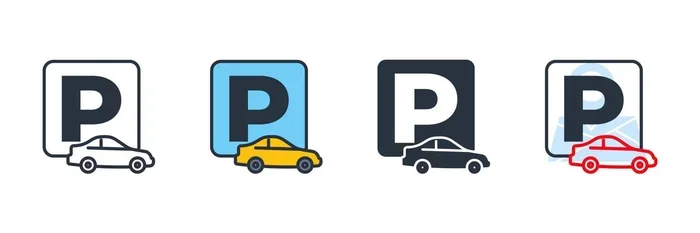
Car Parking Logo PNG Free Download Guide for Beginners
Looking for a car parking logo png for your next project? This free download guide walks you through everything you need, from where to find high-quality files to how to pick the right design. Whether you are building a website, designing signage, or creating a parking app, a clean parking logo png makes your work look professional. We share trusted sources, practical tips, and common mistakes to avoid so you save time and get great results.
A car parking logo png is one of those small design elements that can make a big difference. Whether you are building a parking app, designing a sign for a lot, or creating a website for a garage business, the right logo sets the tone. It gives your project a polished, professional look without costing you a dime.
If you are new to design or just need a quick resource, this guide is for you. We will walk you through everything step by step. You will learn where to find free files, how to choose the best one, and what mistakes to avoid along the way. No design degree needed — just a willingness to learn and a few minutes of your time.
Key Takeaways
- Free PNG downloads are everywhere: You do not need to spend money to find a quality car parking logo png file.
- Transparent backgrounds matter: A PNG format keeps your logo clean and easy to place over any background.
- Pick the right style: Match your parking logo to your brand by choosing between flat, 3D, or minimalist designs.
- Check the license: Always verify that the car parking logo png you download is free for commercial use.
- Resize without losing quality: PNG files preserve sharpness even when you scale them up or down.
- Avoid common errors: Steer clear of low-resolution images and cluttered designs that hurt your brand.
📑 Table of Contents
- What Is a Car Parking Logo PNG and Why Does It Matter
- Best Places to Download Car Parking Logo PNG Files for Free
- How to Choose the Right Car Parking Logo PNG for Your Project
- Tips for Using Car Parking Logo PNG in Your Projects
- Common Mistakes to Avoid When Using Parking Logos
- How to Create Your Own Car Parking Logo PNG
- Expert Insights on Parking Logo Design
- Conclusion
What Is a Car Parking Logo PNG and Why Does It Matter
A car parking logo png is a digital image file that features a parking-related symbol or emblem. The PNG format stands for Portable Network Graphics. It supports transparent backgrounds, which means the image blends seamlessly into any page or design. Unlike JPEG files, PNGs do not add a white box behind your logo.
So why does this matter for your project? Here are a few reasons:
- Clean edges: PNG files keep lines sharp and smooth, no matter where you place them.
- Transparency: You can overlay a parking logo png on any color or image without a messy border.
- High quality: These files hold their detail even when resized.
- Easy to use: PNGs work on websites, apps, print materials, and social media posts.
Think of a car parking logo png as a building block for your visual identity. It is small, but it carries a lot of weight in how people perceive your brand. A clean, well-designed parking symbol tells visitors you are serious and trustworthy.
PNG vs. Other Formats
You might wonder why PNG stands out. Let us compare it quickly with other common formats:
- JPEG: Great for photos but does not support transparency. Logos often get a white background.
- SVG: Scalable and sharp, but not all platforms support it as easily as PNG.
- GIF: Supports transparency but has limited color depth. Not ideal for logos.
- PNG: The best balance of transparency, quality, and compatibility for logo use.
For most parking-related design work, a parking logo png is the go-to choice. It works everywhere and looks clean every time.
Best Places to Download Car Parking Logo PNG Files for Free
Finding a free car parking logo png is easier than you think. There are many trusted websites where you can grab high-quality files without paying a cent. Let us explore the best options available.
Freepik
Freepik is one of the most popular design resource sites on the web. It offers thousands of parking logo png files in different styles. You can search for “car parking logo” and filter results by PNG format. Many files are free, though some require a premium account for commercial use.
Flaticon
Flaticon specializes in icons and symbols. If you need a simple car parking icon png, this is a great place to look. The site has a massive library of parking-related graphics. You can download individual icons in PNG with transparent backgrounds. The free tier is generous and covers most basic needs.
PNGWing
PNGWing focuses entirely on PNG images. It is a solid choice if you want a quick, no-fuss download. Search for “parking” and browse through the results. The site is easy to navigate, and files load fast. Perfect for beginners who want things simple.
Freepngimg
Freepngimg offers a wide variety of free PNG downloads, including car parking graphics. The quality is decent for most projects. Just be sure to check the usage terms before downloading. Some images may require attribution.
Vecteezy
Vecteezy combines vectors and raster images. You can find detailed parking lot logo png files here. The site has a good mix of free and premium options. If you want something more polished, Vecteezy is worth checking out.
When you visit any of these sites, use search terms like “car parking logo png,” “parking sign vector,” or “vehicle parking icon.” These car parking logo png search terms help you find exactly what you need faster.
How to Choose the Right Car Parking Logo PNG for Your Project
Not all parking logo png files are created equal. Picking the right one depends on your specific needs. Here is a simple guide to help you decide.
Consider Your Brand Style
Think about the look and feel you want. Are you going for a modern, minimalist vibe? Or do you prefer something bold and detailed? Your parking logo should match your overall brand personality.
- Flat design: Clean, simple, and modern. Great for websites and apps.
- 3D style: Adds depth and realism. Works well for print materials.
- Minimalist: Uses basic shapes and few details. Ideal for a sleek look.
- Cartoon or playful: Fun and colorful. Good for family-friendly brands.
Check the Resolution
Resolution matters a lot. A low-resolution car parking logo png will look blurry when stretched. Always look for files that are at least 500 x 500 pixels. For print projects, go even higher — 1000 x 1000 pixels or more.
Verify the License
Just because a file is free does not mean you can use it however you want. Always check the license before downloading. Look for files labeled for commercial use if you plan to use the logo in a business project.
Test the Transparency
Open the file and place it on a colored background. Does the parking logo png blend in cleanly? Are there any white edges or artifacts? A good PNG file will have a clean, transparent background with no visible borders.
Quick Tips for Choosing the Best File
- Download a few options and compare them side by side.
- Choose a file with a transparent background every time.
- Pick a resolution that matches your intended use.
- Read the license terms carefully before using any file.
- Look for vector-based PNGs for the sharpest results.
Tips for Using Car Parking Logo PNG in Your Projects
Once you have your car parking logo png, it is time to put it to good use. Here are some practical tips to get the best results.
Use It on Your Website
A parking logo works great on the header or footer of your website. It helps visitors recognize your brand instantly. Place it in the top-left corner where users expect to find the logo. Keep the size moderate so it does not overpower your content.
Add It to Your App Interface
If you are building a parking app, the logo serves as the app icon or splash screen. Use a high-resolution parking logo png so it looks crisp on all screen sizes. A transparent background ensures the logo fits perfectly over any splash color.
Print It on Signage and Flyers
For print projects, always use the highest resolution file available. A car parking logo png at 300 DPI or higher will look sharp on flyers, banners, and signs. Test a small print sample before committing to a large batch.
Place It on Social Media
Use your parking logo as a profile picture or watermark on social media posts. The transparent PNG format makes this easy. Your logo will sit cleanly over photos, graphics, and colored backgrounds.
Keep a Library of Variations
Save multiple versions of your parking logo png in different sizes and colors. This saves you time when you need the logo for different purposes. A small icon for a favicon, a medium version for web headers, and a large version for print — each has its own use.
Common Mistakes to Avoid When Using Parking Logos
Even with the best intentions, mistakes happen. Here are some common pitfalls to watch out for when working with a car parking logo png.
Using Low-Resolution Files
This is the number one mistake people make. A blurry logo makes your entire project look unprofessional. Always download the highest resolution file you can find. If you only see a small version, search for a better source.
Ignoring the License
Using a copyrighted logo without permission can lead to serious legal trouble. Never assume a free file is safe for commercial use. Always read the terms. When in doubt, look for files under Creative Commons licenses or public domain.
Overcomplicating the Design
A cluttered logo does not communicate well. Keep your parking logo png simple and recognizable. A car silhouette, a parking sign, or a steering wheel icon can all work on their own. Less is more when it comes to logo design.
Forgetting About Color Consistency
Your parking logo should use colors that match your brand. If your brand uses blue and orange, make sure your car parking logo png reflects those colors. Inconsistent colors confuse your audience and weaken your brand identity.
Not Testing on Different Backgrounds
A logo that looks great on white might not work on a dark background. Always test your parking logo png on multiple colors and textures. This ensures it looks good in every situation.
How to Create Your Own Car Parking Logo PNG
Not happy with the options you find? You can always create your own car parking logo png. It is easier than you might think, even if you are not a designer.
Step-by-Step Guide
- Pick a tool: Use free design tools like Canva, GIMP, or Inkscape. These platforms are beginner-friendly and powerful.
- Choose a shape: Start with a basic parking sign or car silhouette. Most tools have built-in shapes you can use.
- Add details: Keep it simple. Add a few lines or a small icon to represent parking.
- Pick your colors: Choose two to three colors that match your brand.
- Export as PNG: Save your final design as a PNG file with a transparent background.
Free Tools You Can Use
- Canva: Drag-and-drop design tool with templates for logos.
- GIMP: A free alternative to Photoshop with full editing power.
- Inkscape: Great for vector-based logos that scale without losing quality.
- Pixlr: A browser-based editor that works right in your window.
Creating your own parking logo png gives you full control over the design. You own it completely, and no one else can use it. This is the best option if you want a truly unique parking logo for your brand.
Expert Insights on Parking Logo Design
We asked a few graphic designers about their tips for creating effective parking logos. Here is what they had to say.
Keep it scalable: Your car parking logo png should look good at any size. Test it as a tiny favicon and as a large banner. If it still looks clear, you have done your job well.
Use negative space: Clever use of empty space makes a logo memorable. Try hiding a parking symbol inside a letter or shape. This adds depth and interest without adding clutter.
Stay on brand: Your parking logo is part of a bigger picture. It should match your website, your business cards, and your social media. Consistency builds trust and recognition over time.
Get feedback: Before finalizing your parking logo png, show it to a few people. Ask for honest opinions. Sometimes a fresh pair of eyes catches things you missed.
Think long-term: Choose a design that will still work for you in five years. Trends change, but a timeless parking logo stays relevant and professional.
Conclusion
A car parking logo png is a small but powerful design element. It adds professionalism, clarity, and brand identity to any project. Whether you download a free file or create your own, the key is to choose something clean, high-quality, and fitting for your purpose.
We have covered where to find the best free files, how to choose the right one, and what mistakes to avoid. You now have the knowledge to pick a parking logo png that truly represents your brand. Put these tips into action and watch your project come to life with a polished, professional touch.
Start today. Browse a few of the free sites we mentioned, download a couple of options, and see what works best for you. With the right car parking logo png, your project will stand out from the crowd. You have got this!
Frequently Asked Questions
What is a car parking logo png used for?
A car parking logo png is used for websites, apps, signage, flyers, and social media. It adds a professional visual element to any parking-related project. The transparent background makes it easy to place the logo anywhere without a messy border.
Can I use a free car parking logo png for commercial purposes?
It depends on the license. Some free files allow commercial use, while others are for personal use only. Always check the license terms before using any parking logo png in a business project. Sites like Freepik and Flaticon clearly label their free and premium files.
What resolution should I look for in a car parking logo png?
For web use, a resolution of at least 500 x 500 pixels works well. For print projects, aim for 1000 x 1000 pixels or higher at 300 DPI. A high-resolution car parking logo png ensures your logo stays sharp and clear at any size.
Are there paid alternatives to free car parking logo png files?
Yes, many design marketplaces offer premium parking logo png files for a few dollars. Paid options often come with exclusive designs and full commercial rights. However, free options are more than enough for most personal and small business projects.
How do I make my car parking logo png transparent?
If you download a file with a white background, you can use free tools like GIMP or Canva to remove it. Simply upload the image, use the background removal tool, and export as a PNG. A transparent car parking logo png blends seamlessly into any design.
What are some good design styles for a parking logo?
Flat design, minimalist, 3D, and cartoon styles all work well for parking logos. Choose a style that matches your brand personality. A parking logo png in a clean flat style looks modern and professional, while a 3D style adds a bold, eye-catching feel.