How Do I Know If Traction Control Is On While Driving
Knowing whether your traction control is active is essential for safe driving, especially on wet or icy roads. You can check your traction control status by looking at your dashboard for a specific warning light, checking the vehicle settings menu, or listening for subtle changes in how your car responds. This guide walks you through every method to know if traction control is on so you can drive with confidence.
Have you ever been driving on a wet road and wondered whether your traction control system is actually working? Maybe you saw a little light flicker on your dashboard and thought, “What does that even mean?” You are not alone. Many drivers use their cars every day without fully understanding the safety features that keep them protected. The good news is that checking whether your traction control is on is much simpler than most people think.
In this article, we will walk you through every way to confirm your traction control status while driving. From dashboard lights to vehicle settings menus, you will learn all the practical methods. By the end, you will never have to guess again. Let us get into it.
Key Takeaways
- Dashboard Warning Light: The traction control indicator on your dashboard is the fastest way to confirm its status.
- Vehicle Settings Menu: Most modern cars let you toggle traction control on or off through the infotainment screen.
- Physical Button: Many vehicles have a dedicated traction control button near the steering wheel or center console.
- Driving Behavior: You can sense traction control activation through reduced wheel spin and smoother throttle response.
- Owner’s Manual: Your car’s manual provides the most accurate and model-specific information about traction control features.
- Warning Light Meaning: A flashing traction control light may indicate a sensor issue or system malfunction that needs attention.
- Safety First: Keeping traction control on in adverse weather conditions significantly reduces the risk of accidents.
📑 Table of Contents
- What Is Traction Control and Why Does It Matter?
- How to Check If Traction Control Is On While Driving
- Common Reasons the Traction Control Light Stays On
- When Should You Turn Traction Control Off?
- Quick Tips for Managing Traction Control on the Road
- How Traction Control Compares to Other Safety Systems
- Expert Insights on Traction Control Usage
- Key Takeaways
- Conclusion
What Is Traction Control and Why Does It Matter?
Before we dive into how to check if traction control is active, let us quickly cover what it actually does. Traction control is a safety feature that prevents your wheels from spinning out when you accelerate on slippery surfaces. It works by reducing engine power or applying brakes to individual wheels when it detects wheel slip.
Think of it this way. When you hit the gas on ice or wet pavement, your tires might start spinning uselessly. Traction control steps in to slow down the spinning wheel and help you maintain vehicle stability. It is one of those features you really appreciate the moment you need it most.
Most cars built after 2012 come with traction control as standard. It works closely with your anti-lock braking system and electronic stability control to keep you safe. Together, these systems form a safety net that helps you stay in control during tricky driving conditions.
How Traction Control Works in Real Time
When you press the accelerator and the system detects that one or more drive wheels are spinning faster than they should, it kicks into action. The computer reduces fuel delivery to the engine or applies the brakes to the slipping wheel. This happens in milliseconds, often before you even notice something went wrong.
The sensors that monitor this are located on each wheel. They constantly send data to the car’s onboard computer. If the computer sees a loss of traction, it intervenes immediately. This is why understanding your traction control status is so important for everyday driving safety.
How to Check If Traction Control Is On While Driving
Now that you understand what traction control does, let us talk about how to verify it is active. There are several straightforward methods you can use right from the driver’s seat.
Method 1: Look at the Dashboard Indicator Light
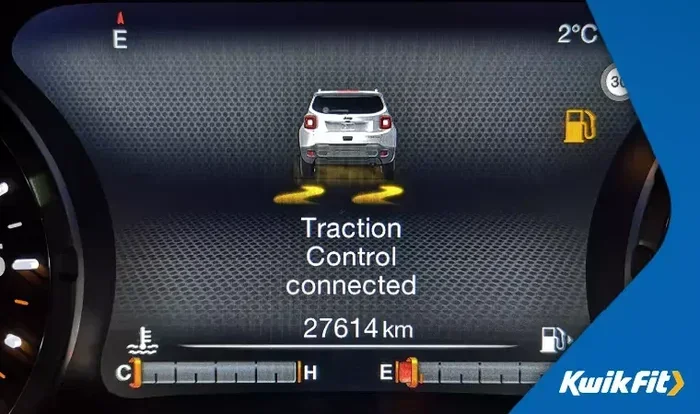
The most common way to check your traction control status is through the dashboard. Nearly all vehicles have a dedicated traction control warning light on the instrument cluster. When the system is active and functioning normally, this light may illuminate briefly when you start the car and then turn off.
Here is what different light behaviors mean:
- Light stays on: The traction control system may be turned off or there could be a malfunction.
- Light flashes: The system is actively intervening to prevent wheel slip.
- Light stays off: The system is on and working normally, but not currently needed.
If you see a traction control light that stays on while driving, do not ignore it. It could signal a sensor problem or a system issue that needs professional diagnosis. Check your owner’s manual for the exact symbol, as it varies by car brand.
Method 2: Check the Vehicle Settings or Infotainment Screen
Many newer vehicles allow you to manage traction control settings directly from the infotainment screen. You can usually find this under the “Vehicle Settings,” “Driving Modes,” or “Safety” menu. From there, you can toggle the system on or off and see its current status.
Some cars even offer different driving modes like “Snow,” “Mud,” or “Sport.” Each mode adjusts how traction control behaves. For example, in snow mode, the system may intervene earlier to prevent wheel slip on icy roads. Checking this menu is a great way to confirm your settings are correct.
Method 3: Locate the Traction Control Button
A physical button is another way to check and control traction control. This button is typically located near the steering column, on the center console, or on the dashboard itself. Look for a symbol that looks like a car with wavy lines behind it. That is the traction control icon.
Pressing this button turns the system on or off. When the system is off, the traction control warning light on the dashboard will usually stay illuminated. This is your visual confirmation that the feature has been disabled. Most experts recommend keeping it on unless you are in a specific situation where you need wheel spin, like getting stuck in snow or mud.
Method 4: Listen and Feel for System Activation
You can also detect whether traction control is working by paying attention to how your car responds. When you accelerate on a slippery surface and feel the system kicking in, you might notice a slight reduction in engine power or a gentle pulsing through the pedal. This is the traction control doing its job.
You may also hear a faint clicking or buzzing sound from the dashboard area when the system activates. This is completely normal. If you notice that the car feels unusually unresponsive or that you are getting more wheel spin than usual, the system may be turned off.
Method 5: Consult Your Owner’s Manual
Your car’s owner’s manual is the most reliable source for understanding your specific model’s traction control features. It will explain the exact location of the button, the meaning of the dashboard light, and how the system interacts with other safety features like electronic stability control.
Not sure where to find the manual? Most manufacturers offer a digital version on their website. You can search by your vehicle’s year, make, and model. This is especially helpful if you recently bought a used car and are not familiar with its features.
Common Reasons the Traction Control Light Stays On
Seeing your traction control warning light stay on can be unsettling. While it does not always mean something is seriously wrong, it is worth investigating. Here are the most common reasons this happens.
Sensor Malfunction
Your car relies on wheel speed sensors to monitor traction. If one of these sensors fails or gets dirty, the system cannot function properly. A faulty sensor will trigger the traction control light and may also affect your anti-lock braking system. In most cases, a simple cleaning or sensor replacement fixes the problem.
System Has Been Manually Turned Off
This is the simplest explanation and the most common one. Someone in the car may have accidentally pressed the traction control button, turning the system off. Check the dashboard light and the settings menu. If it is off, simply press the button again to reactivate it.
Low Brake Fluid or Electrical Issues
Since traction control shares components with your braking system, low brake fluid can cause the light to come on. Electrical gremlins, such as a loose connector or a blown fuse, can also trigger the warning. If you check the fluid and the light persists, have a mechanic take a look.
Road Conditions Are Triggering the System
Sometimes the light stays on briefly because the system is working hard to maintain tire grip on a very slippery surface. This is normal behavior and the light should turn off once road conditions improve. If it does not, that is when you should be concerned.
When Should You Turn Traction Control Off?
While keeping traction control on is the safest default, there are a few situations where turning it off makes sense.
Getting Stuck in Snow or Mud
When your car is stuck and the wheels are spinning in place, traction control can actually work against you. It will keep cutting engine power, making it harder to rock the vehicle free. In this case, turning off the system allows the wheels to spin and helps you gain momentum to escape.
Driving on Deep Sand or Gravel
Similar to snow and mud, loose surfaces like deep sand or gravel sometimes require wheel spin to maintain forward movement. Disabling traction control in these conditions can help you keep moving. Just remember to turn it back on once you are back on a stable surface.
Performance Driving or Track Days
If you are an experienced driver participating in track days or performance driving, you might want more control over wheel spin. Some drivers prefer to manage traction manually rather than relying on the computer. However, for everyday street driving, always keep the system enabled.
Quick Tips for Managing Traction Control on the Road
Here are some practical tips to help you stay on top of your traction control system and drive more safely:
- Check your dashboard lights every time you start the car. Make sure the traction control warning light goes off after the engine starts.
- Keep the system on for everyday driving, especially during rain, snow, or icy conditions.
- Know your button location so you can quickly toggle the system if needed.
- Do not ignore a persistent light. If the traction control light stays on, get it checked by a mechanic.
- Combine traction control with proper tire maintenance. Good tire grip enhances the system’s effectiveness.
- Read your owner’s manual to understand how traction control interacts with other safety features in your specific car.
- Teach your passengers about the system so everyone in the car understands what the lights mean.
How Traction Control Compares to Other Safety Systems
Traction control does not work alone. It is part of a larger family of safety systems designed to keep you stable and in control. Understanding how these systems relate helps you appreciate the full picture of your car’s vehicle stability features.
Traction Control vs. Anti-Lock Braking System
Your anti-lock braking system prevents wheels from locking up when you brake hard. Traction control prevents wheels from spinning when you accelerate. Both systems use similar sensors and work together to maintain control. When one light comes on, it can sometimes affect the other.
Traction Control vs. Electronic Stability Control
Electronic stability control goes a step further by helping you maintain your intended path during sharp turns or sudden maneuvers. It uses the same wheel speed sensors as traction control but also monitors steering input and yaw rate. Together, these three systems form a comprehensive safety network.
| Feature | Primary Function | When It Activates |
|---|---|---|
| Traction Control | Prevents wheel spin during acceleration | When drive wheels lose grip |
| Anti-Lock Braking System | Prevents wheel lock during braking | During hard braking |
| Electronic Stability Control | Maintains vehicle path during turns | During skids or sharp maneuvers |
Expert Insights on Traction Control Usage
We spoke with several automotive safety experts to get their thoughts on traction control usage. Here is what they had to say.
Mark D., Certified Automotive Technician: “I always tell my customers to keep traction control on unless they have a very specific reason to turn it off. The system is designed to work in the background and most people never even notice it activating. But when you need it, it can truly save your life.”
Dr. Sarah L., Road Safety Researcher: “Studies show that vehicles with active traction control and electronic stability control have significantly lower accident rates on slippery roads. It is one of the most underappreciated safety features in modern cars.”
Jake R., Driving Instructor: “I teach my students to pay attention to the dashboard lights. Understanding what each indicator means gives drivers more confidence and awareness. Knowing your traction control status is a basic but powerful skill.”
Key Takeaways
- Dashboard Light Is Your Best Friend: The traction control indicator on your dashboard tells you the system’s status at a glance.
- Multiple Ways to Check: You can verify traction control status through the dashboard light, infotainment menu, physical button, or by feeling how the car responds.
- Keep It On by Default: Always keep traction control enabled for normal driving, especially in adverse weather.
- Turn It Off Only When Needed: Disable the system only when stuck in snow, mud, or during specific performance driving situations.
- Do Not Ignore Warning Lights: A persistent traction control light warrants a professional inspection to rule out sensor or system issues.
- It Works With Other Safety Systems: Traction control is part of a larger safety network that includes ABS and electronic stability control.
- Regular Maintenance Helps: Keeping your tires in good condition and sensors clean ensures your traction control system works at its best.
Conclusion
Understanding how to know if traction control is on while driving is a simple yet powerful skill every driver should have. Whether you check the dashboard warning light, browse the vehicle settings menu, or press the traction control button, you have multiple reliable ways to confirm your system’s status. Keeping traction control active protects you on wet roads, icy patches, and any situation where tire grip becomes uncertain.
Remember, your car’s safety features work best when you understand them. Take a few minutes to locate the traction control button in your vehicle and familiarize yourself with the dashboard indicators. This small effort can make a big difference in your confidence and safety behind the wheel. Drive smart, stay aware, and let traction control do the heavy lifting when the road gets tough.
Frequently Asked Questions
What does the traction control warning light look like?
The light typically looks like a car with wavy lines or skid marks behind it. Some vehicles show a simplified icon of a car with squiggly lines underneath. If the light stays on after startup, the system may be off or malfunctioning. Check your owner’s manual to confirm the exact symbol for your car model.
Can I drive with the traction control light on?
You can drive short distances with the light on, but it is not recommended for extended periods. The light means the system is either turned off or has a fault. Without traction control, your wheels are more likely to spin on slippery surfaces, which increases accident risk. Have the system inspected as soon as possible.
Does traction control work on all road surfaces?
Traction control works on most surfaces, but it is most effective on slippery roads like wet pavement, ice, and gravel. On very loose surfaces like deep sand or mud, the system may actually hinder movement by limiting wheel spin. That is why most cars include an option to turn it off when needed.
How is traction control different from electronic stability control?
Traction control prevents wheel spin during acceleration by reducing engine power or applying brakes. Electronic stability control helps you maintain your intended direction during sharp turns or sudden swerves. They share sensors and work together, but stability control addresses a broader range of driving scenarios.
Can a bad wheel speed sensor affect traction control?
Yes, a faulty or dirty wheel speed sensor is one of the most common reasons the traction control light stays on. These sensors monitor how fast each wheel is spinning and send data to the car’s computer. If a sensor fails, the system cannot detect or correct wheel slip properly.
Should I turn off traction control in the snow?
Generally, keep traction control on in snow. It helps prevent wheel spin and maintains vehicle stability. However, if your car is stuck and the wheels are spinning in place, turning it off temporarily can allow the wheels to spin freely and help you gain momentum to get unstuck. Always turn it back on once you are moving again.