How Long To Leave Battery Disconnected To Reset Car Computer
How Long to Leave Battery Disconnected to Reset Car Computer is an essential topic that provides valuable insights and practical knowledge for anyone interested in learning more about this subject.
How Long To Leave Battery Disconnected To Reset Car Computer
Your car computer controls almost everything in your vehicle. From fuel injection to emission controls, this central module keeps your ride running smoothly. But sometimes it needs a fresh start. That is where disconnecting the battery comes in. Many drivers ask the same question: how long should you leave the battery disconnected to reset the car computer? The answer is simpler than you think, but there are important details you need to know first.
In this guide, we walk you through the entire process step by step. You will learn the right timing, the safety precautions, and what to expect after the reset. Whether you are dealing with a check engine light, sluggish performance, or just want to clear stored error codes, this article has you covered. We also share practical tips and common mistakes to avoid. So let us dive in and help you reset your car computer the right way.
Understanding your vehicle electronics is key to maintaining a healthy car. A battery disconnect reset is one of the simplest and most effective maintenance tricks you can perform at home. It costs nothing and takes just a few minutes of your time. Let us break it all down for you.
Key Takeaways
- Disconnect the battery for 15 minutes: This resets the ECU and clears error codes.
- Always disable the ignition first: Turn the key off before loosening the negative terminal.
- Reconnect the negative terminal last: This prevents accidental short circuits during reconnection.
- Drive for 20 minutes after reconnecting: The car computer needs this time to relearn idle settings.
- Check for pending codes beforehand: A scan tool saves data that a reset might erase.
- Resetting does not fix hardware issues: Replace faulty sensors before attempting a battery disconnect.
📑 Table of Contents
Why You Need to Reset Your Car Computer
Your car computer, also known as the Engine Control Unit (ECU) or Powertrain Control Module (PCM), stores data constantly. It keeps track of your driving habits, fuel efficiency, and sensor readings. Over time, this stored data can become outdated or corrupted. When that happens, your car may not perform at its best.
Here are the most common reasons drivers choose to reset their car computer:
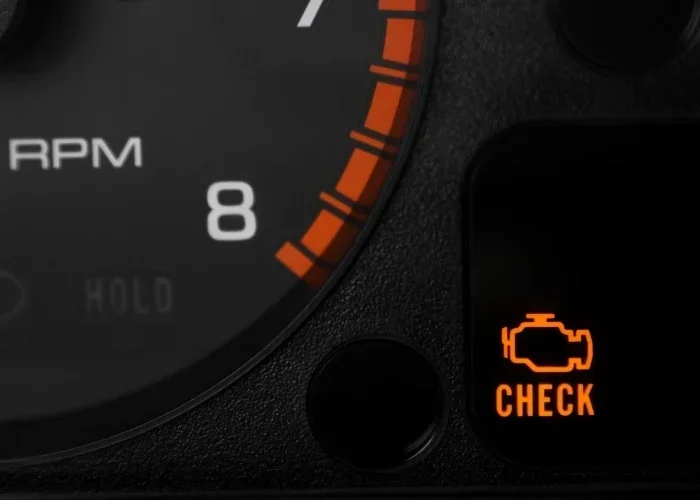
- Check engine light stays on after a repair is complete
- You have cleared error codes and want them to stay cleared
- Your car is running rough or showing poor fuel economy
- You have installed new parts and need the computer to relearn settings
- Electrical gremlins are acting up for no clear reason
- You are selling your car and want a fresh start for the new owner
Each of these situations benefits from a clean slate. The car computer reset wipes old data and forces the system to relearn from scratch. Think of it like restarting your phone when it starts acting glitchy. Sometimes a fresh start is all you need to solve the problem.
How the Car Computer Stores Data
Your car computer uses short-term and long-term memory. Short-term memory holds real-time sensor data. Long-term memory stores adaptations based on your driving style. When you disconnect the battery, you clear both types of memory. This gives the ECU reset a clean foundation to work with. However, it also means your car may need a few drive cycles to relearn your habits and optimize performance again.
How to Safely Disconnect Your Car Battery
Before you start, safety comes first. Working with your car battery involves electrical components and corrosive materials. Follow these steps carefully to protect yourself and your vehicle.
Step-by-Step Disconnection Process
- Turn off your engine and remove the key from the ignition
- Open the hood and locate the battery
- Identify the negative terminal (marked with a minus sign)
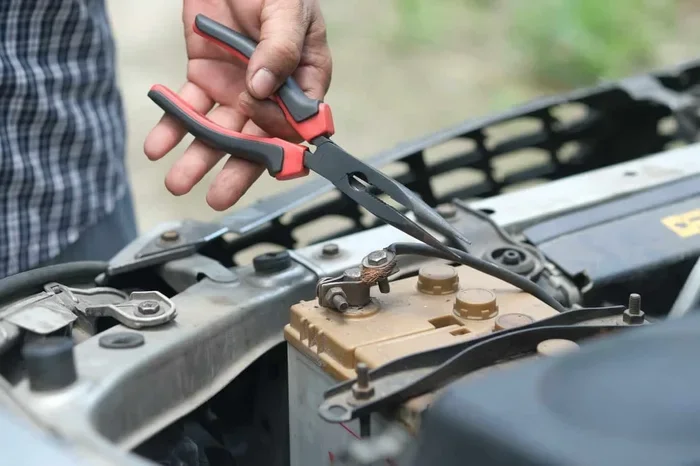
- Use a wrench to loosen the nut on the negative cable clamp
- Carefully lift the cable off the terminal and tuck it away
- Repeat the process for the positive terminal if needed
- Wait for the recommended time before reconnecting
Always disconnect the negative terminal first. This prevents short circuits. If you accidentally touch a metal tool to the battery terminal while the positive is still connected, you could cause sparks or damage. The negative terminal connects to the car chassis, so removing it grounds the circuit and keeps you safe.
Pro tip: if you want to maintain power to your radio and clock, you can use a 12V car charger socket to keep a small backup power source connected. This saves you from having to reprogram these simple settings after the reset.
Tools You Will Need
- Adjustable wrench or socket set
- Safety gloves and goggles
- Battery terminal cleaner brush
- Anti-corrosion spray or petroleum jelly
- Clean cloth for wiping terminals
Having these tools ready makes the process quick and smooth. You do not need any specialized equipment for a basic battery disconnect reset.
How Long Should You Leave the Battery Disconnected
This is the question at the heart of the topic. The answer depends on what you are trying to achieve. Most experts agree that leaving the battery disconnected for 15 to 30 minutes is enough to fully reset the car computer. This gives the ECU enough time to drain its short-term memory and clear stored fault codes.
However, some situations require a longer wait. Let us break down the timing based on different scenarios.
Standard Reset: 15 to 30 Minutes
For most routine resets, 15 to 30 minutes is the sweet spot. This timeframe allows the capacitor in the car computer module to fully discharge. It also clears error codes and resets adaptations. After reconnecting the battery, your car may take a few minutes to relearn basic settings.
Deep Reset: 30 Minutes to 1 Hour
If you are dealing with persistent electrical issues or have replaced major components, a longer disconnect may help. Leaving the battery disconnected for up to one hour ensures that every module in the car loses power. This includes the radio, power windows, and even the anti-theft system. A deep reset is especially useful when multiple warning lights are flickering on and off for no apparent reason.
Aftermarket Computer Tuning
If you have installed a performance chip or aftermarket tuning device, a longer reset of 30 to 45 minutes is recommended. This gives the powertrain control module time to fully recognize the new hardware and adjust accordingly. Rushing this process can lead to error codes and poor engine performance.
What Happens When You Reset Your Car Computer
Understanding what occurs during and after a reset helps set realistic expectations. The process is not magic. It follows a predictable pattern that every driver should know about.
Immediate Effects After Reconnection
The moment you reconnect your battery, several things happen almost instantly:
- The check engine light may turn off immediately or take a few drive cycles
- Your radio, clock, and power windows may need reprogramming
- The car idle may feel rough for the first few minutes
- Fuel efficiency may temporarily drop as the computer relearns
- Warning lights for previously resolved issues will be gone
Do not panic if your car feels slightly different for the first 20 to 30 minutes after reconnecting. The ECU reset has wiped the adaptive memory, and the system needs time to rebuild it. Drive gently during this period and avoid heavy acceleration.
The Drive Cycle Concept
After a reset, your car needs to complete what is called a drive cycle. This is a series of driving conditions that allow the computer to test all sensors and systems. A typical drive cycle includes idling, low-speed driving, highway cruising, and deceleration. Most cars need between three and five drive cycles to fully relearn and optimize. You can monitor progress using an OBD scanner to check if error codes return.
For more details on understanding your car systems, you can explore our guide on DIY car diagnostics to learn how to read your vehicle codes at home.
Data Table: Expected Timeline After Battery Disconnect Reset
| Time After Reconnection | What to Expect |
|---|---|
| 0 to 5 minutes | Radio and clock may reset; idle may be slightly rough |
| 5 to 15 minutes | Computer begins relearning basic sensor values |
| 15 to 30 minutes | Short-term adaptations start rebuilding; smooth idle returns |
| 1 to 3 drive cycles | Check engine light stays off if issue is resolved; fuel economy normalizes |
| 3 to 5 drive cycles | Full relearning complete; all systems optimized |
Common Mistakes to Avoid When Disconnecting Your Battery
Even though a battery disconnect reset seems simple, mistakes can cause problems. Learning what not to do saves you time, money, and frustration. Here are the most common errors drivers make.
Forgetting to Save Radio Presets and Settings
Your car radio and infotainment system loses power during a disconnect. All presets, Bluetooth pairings, and clock settings will be wiped. Some vehicles require a security code to unlock the radio after a reset. Check your owner manual before disconnecting to avoid getting locked out of your own stereo system.
Leaving Accessories Plugged In
Devices plugged into your 12V DC to 220V AC car power inverter or USB ports may lose data or reset during the battery disconnect. Unplug GPS devices, dash cameras, and phone chargers before starting the process. This prevents potential data corruption in these devices.
Reconnecting Too Soon
Patience is key. Some drivers reconnect the battery after only five minutes, thinking that is enough time. This is not long enough for the car computer module to fully discharge. You risk incomplete resets and lingering error codes. Stick to the recommended 15 to 30 minute window for reliable results.
Ignoring Corroded Terminals
If your battery terminals look greenish or crusty, do not just disconnect and reconnect them. Corrosion causes poor electrical connections and can lead to the same problems you are trying to fix. Clean the terminals with a wire brush and apply anti-corrosion spray before reconnecting. This ensures a strong, reliable connection after the reset.
Disconnecting the Battery on a Modern Luxury Car
Modern luxury vehicles have dozens of computerized modules beyond just the engine computer. Disconnecting the battery on these cars can cause complex issues with power windows, sunroof calibration, and even adaptive suspension settings. Some manufacturers recommend using a specialized diagnostic tool instead of a simple battery disconnect. If you own a luxury or late-model vehicle, check with your dealer first.
When to See a Professional Instead
A battery disconnect reset works wonders for many car problems. But it is not a cure-all. Some situations call for professional help, and knowing when to seek it saves you from making things worse.
If your check engine light returns immediately after a reset, there is likely a deeper issue that a simple ECU reset cannot fix. A persistent light usually points to a hardware problem, a failing sensor, or a genuine mechanical fault. In these cases, using an OBD scanner or visiting a mechanic is the smarter move.
Also, if you have tried disconnecting your battery multiple times and the same codes keep coming back, you are dealing with a recurring problem. Repeated resets without addressing the root cause can drain your battery and potentially damage the electrical system. A professional car diagnostic session can pinpoint the exact cause and save you from repeated guesswork.
For general car maintenance tips and understanding your vehicle better, regular check-ups with a trusted mechanic go a long way. A battery reset is a great tool, but it works best as part of a broader maintenance strategy.
Key Takeaways
- Leave the battery disconnected for 15 to 30 minutes for a standard reset
- A deep reset may require up to one hour for persistent issues
- Always disconnect the negative terminal first to prevent short circuits
- The car needs 3 to 5 drive cycles to fully relearn after a reset
- Avoid common mistakes like reconnecting too soon or ignoring corrosion
- Know when to seek professional help for recurring or complex issues
A battery disconnect reset is one of the most useful and underrated maintenance techniques available to car owners. It is free, simple, and effective when done correctly. By following the timing guidelines and safety steps outlined in this article, you can confidently reset your car computer and resolve many common issues without visiting a mechanic.
Remember, your vehicle electronics are designed to adapt and learn. After a reset, give your car the time and gentle driving it needs to rebuild its adaptive memory. The results are worth the patience. Keep this guide handy for your next car maintenance task, and you will always know exactly how long to leave your battery disconnected for the best results.
Frequently Asked Questions
How long to leave battery disconnected to reset car computer?
You should disconnect the battery for about 15 to 30 minutes to allow the car computer to fully reset. This gives the system enough time to clear all stored error codes and temporary data. After the waiting period, simply reconnect the battery and start your car to complete the reset process.
Can disconnecting the battery too long damage anything?
Leaving the battery disconnected for several hours is generally safe, but it is not necessary for a simple computer reset. Extended disconnection mainly risks draining the battery completely or resetting other customized settings like radio presets and clock time. Sticking to the recommended 15 to 30 minutes is the best approach.
What happens when you disconnect the battery to reset the ECU?
Disconnecting the battery cuts power to the ECU, which erases learned adaptations and stored fault codes. The computer will then relearn your driving habits and sensor data once you reconnect the battery and drive normally. This process can help fix minor issues like rough idling or check engine light warnings.
Do I need to disconnect both terminals to reset the car computer?
Yes, you should disconnect both the positive and negative terminals to ensure a full power drain to the computer. Disconnecting just one terminal may not fully reset the system or clear stored codes. Always disconnect the negative terminal first and reconnect it last for safety.
Will resetting the car computer by disconnecting the battery erase my saved settings?
Yes, a battery disconnect will reset many personal settings like radio stations, power window calibration, and clock time. Some vehicles may also need a relearn procedure for features like tilt steering or remote start after the reset. Backing up important settings before starting the process can save you some frustration.
How do I know when the car computer reset is complete after reconnecting the battery?
You will usually see the check engine light turn on briefly when you first start the car, then turn off after a few minutes of driving. If the light stays off and the original issue does not return, the reset was successful. You can also use an OBD2 scanner to confirm that all error codes have been cleared from the system.