Do You Need Subaru Starlink to Use Apple CarPlay
You do not always need Subaru Starlink to use Apple CarPlay. Many Subaru models support Apple CarPlay through the factory infotainment system, even without the Starlink subscription. However, Starlink can unlock wireless CarPlay and extra features on certain years and trims. This guide covers which Subarus need Starlink, which don’t, and how to get your iPhone connected quickly and easily.
Have you just bought a Subaru and want to use Apple CarPlay? Or maybe you are looking at a used Subaru and wondering if you need the Starlink subscription to get your iPhone working on the big screen. Either way, you are in the right place.
The short answer is no, you do not always need Subaru Starlink to use Apple CarPlay. But the full story is a bit more nuanced. Some Subaru models and years need Starlink for certain CarPlay features, while others work just fine without it. Let us break it all down so you know exactly what to expect.
Apple CarPlay has become a must-have feature for many drivers. It lets you access maps, music, messages, and phone calls right from your car screen safely. Subaru has embraced CarPlay across many of its models, but the way it works can differ depending on the year, trim level, and whether you have Starlink. Understanding these differences helps you make the best choice for your driving needs.
Key Takeaways
- Starlink is not required: Many Subaru models offer Apple CarPlay without any Starlink subscription or service.
- Wireless vs. wired matters: Starlink often enables wireless Apple CarPlay on older Subaru models.
- Check your model year: Subaru models from 2017 onward generally support Apple CarPlay, with or without Starlink.
- Factory systems vary: The Subaru multimedia system determines how CarPlay works, not Starlink alone.
- Alternatives exist: You can use aftermarket solutions if your Subaru lacks native CarPlay support.
- Setup is simple: Connecting your iPhone takes just a few minutes once you know the steps.
📑 Table of Contents
- What Is Subaru Starlink?
- Do You Need Starlink for Apple CarPlay?
- How to Check If Your Subaru Has Apple CarPlay
- Setting Up Apple CarPlay in Your Subaru
- Starlink Features That Complement Apple CarPlay
- Common Problems and How to Fix Them
- Alternatives to Starlink for CarPlay Users
- Which Subaru Models Support Apple CarPlay Best?
- Expert Tips for Getting the Most Out of CarPlay in Your Subaru
- Key Takeaways
- Conclusion
What Is Subaru Starlink?
Before we dive into CarPlay, let us talk about what Starlink actually is. Subaru Starlink is a connected services platform. It gives Subaru owners access to features like remote start, vehicle diagnostics, emergency alerts, and concierge services. You can control some functions through a smartphone app or a web portal.
Starlink comes in different tiers. The basic package often includes safety and security features. The premium package adds more connectivity options. And then there are trial periods that come with new cars. But here is the thing many people get confused about: Starlink is not the same as the infotainment system. Starlink handles remote services and connectivity. The infotainment system handles your screen, audio, and apps like Apple CarPlay.
So when people ask if they need Starlink for Apple CarPlay, they are usually asking about the connection between these two systems. The answer depends on your specific Subaru model and year. Let us get into the details.
Do You Need Starlink for Apple CarPlay?
The Short Answer
For most Subaru models, Apple CarPlay works without Starlink. The factory infotainment system handles CarPlay directly through a USB cable or, on newer models, wirelessly. Starlink is a separate service that adds remote connectivity features but does not control your CarPlay experience.
However, there is an important exception. On some older Subaru models, wireless Apple CarPlay requires Starlink. If your Subaru only supports wired CarPlay and you want to go wireless, Starlink might be the missing piece. This is especially true for models from the 2017 to 2020 range.
How Subaru Models Differ
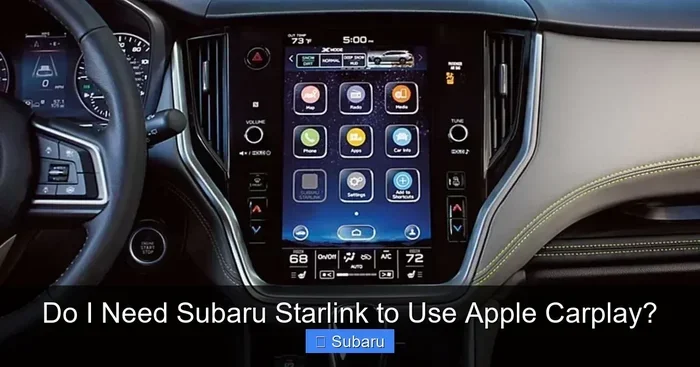
Subaru has used different infotainment systems over the years. The older systems, like the 6.2-inch touchscreen, often need a Starlink subscription for wireless CarPlay. Newer systems, especially the 11.6-inch vertical touchscreen found in recent models, come with wireless CarPlay built in. No Starlink needed.
Here is a simple way to think about it. If your Subaru came with wireless Apple CarPlay from the factory and you never set up Starlink, it still works. If you have an older model and want wireless CarPlay, you might need to check if Starlink is active or available for your vehicle.
You can also check your specific model. For example, the Subaru Legacy and Subaru Outback from 2020 and newer generally offer wireless CarPlay without Starlink. Older models from the same lineup may require Starlink for the same feature. The Subaru Forester and Subaru Crosstrek follow similar patterns based on model year and trim level.
How to Check If Your Subaru Has Apple CarPlay
Look at Your Infotainment Screen
The easiest way to check is to look at your car’s infotainment system. If you see an Apple CarPlay icon on the screen, your Subaru supports it. You can also look for a smartphone icon on the home screen or in the settings menu.
If you are shopping for a used Subaru, ask the seller directly. Most dealers can confirm whether the car has Apple CarPlay and whether it is wired or wireless. You can also check the vehicle identification number, or VIN, with Subaru’s online tools.
Check the Model Year and Trim
Model year matters a lot here. Subaru started offering Apple CarPlay in most models around 2017. By 2018, it was standard across nearly the lineup. Wireless CarPlay became more common from 2020 onward.
Trim level also plays a role. Higher trims usually come with better infotainment systems. A base trim might have a smaller screen with wired CarPlay only. A higher trim might include a larger screen with wireless CarPlay and all the bells and whistles.
Here is a quick reference guide:
- 2017-2019 models: Usually wired Apple CarPlay. Wireless may require Starlink.
- 2020-2022 models: Wireless CarPlay on most trims. Starlink not required.
- 2023 and newer models: Wireless CarPlay is standard on nearly all trims.
Setting Up Apple CarPlay in Your Subaru
Wired Connection
Setting up a wired Apple CarPlay connection is straightforward. You need a Lightning cable or a USB-C cable, depending on your iPhone model. Plug one end into your iPhone and the other into the USB port in your Subaru.
Once connected, your CarPlay interface should appear on the screen automatically. If it does not, go to the infotainment settings and select Apple CarPlay. You can also try unplugging and replugging the cable to trigger the connection.
Wired CarPlay works on almost all Subaru models that support it. You do not need Starlink for a wired connection. This is the most reliable method and works even if you do not have any Subaru connected services at all.
Wireless Connection
Wireless Apple CarPlay is even more convenient. You do not need to fumble with cables every time you get in the car. On models that support wireless CarPlay, the connection happens automatically when you sit down and start the engine.
To set up wireless CarPlay, go to your infotainment settings and look for the Apple CarPlay option. Select wireless connection and follow the prompts on both your iPhone and the car screen. Your iPhone should pair with the car just like it pairs with a Bluetooth device.
On some older Subaru models, you may need an active Starlink subscription for wireless CarPlay to work. If you see an error message or the wireless option is grayed out, check your Starlink status. You can manage your Starlink subscription through the Subaru app or by contacting a Subaru dealer.
One thing to keep in mind: wireless CarPlay uses your car’s Wi-Fi system to connect. This is separate from your phone’s cellular data. Your phone still uses its own data plan for maps and streaming, but the connection to the car screen goes through Wi-Fi.
Starlink Features That Complement Apple CarPlay
Remote Services
While Starlink is not required for Apple CarPlay, it does add some nice extras. With Starlink, you can remotely start your car, lock and unlock doors, and check your fuel level from your phone. These features work through the Subaru app and do not directly affect CarPlay.
Some Subaru owners find that having Starlink active makes the overall driving experience smoother. For example, you can preheat your car in winter and still have CarPlay ready to go when you get in. The two systems work together but operate independently.
Navigation and Maps
Starlink includes a navigation service in some packages. This is different from Apple CarPlay Maps. With Starlink navigation, you get Subaru’s built-in maps and directions. With Apple CarPlay, you get Google Maps, Waze, or Apple Maps on your car screen.
Many drivers prefer Apple CarPlay maps over the built-in navigation. CarPlay maps tend to be more up to date and offer better traffic data. You can use CarPlay maps whether or not you have Starlink active.
Emergency and Safety Features
Starlink also offers emergency services. If your car gets into an accident, Starlink can automatically contact emergency services. This is a standalone safety feature that has nothing to do with Apple CarPlay. You get the same level of safety whether or not you use CarPlay.
Common Problems and How to Fix Them
CarPlay Not Showing Up on Screen
If Apple CarPlay does not appear when you connect your iPhone, do not panic. Try these steps first. Unplug the cable and plug it back in. Restart your iPhone. Restart the infotainment system by holding the power button on the screen. Check that your iPhone has the latest iOS update installed.
On wireless connections, make sure CarPlay is enabled on your iPhone. Go to Settings, then General, then CarPlay. Select your Subaru from the list of available cars. If your car does not appear, try resetting the infotainment system.
Connection Keeps Dropping
A dropping connection can be frustrating. For wired connections, try a different cable. Not all cables are created equal. Use an Apple-certified cable for the best results. For wireless connections, make sure your phone and car are not too far apart. The Wi-Fi signal between the two can weaken if there is too much distance.
Also check if other devices are connected to the car’s Wi-Fi network. Some Subarus allow multiple devices to connect, which can sometimes cause interference. Disconnect other devices and see if that fixes the issue.
Audio Keeps Cutting Out
If your audio cuts out during CarPlay use, the problem might be with the cable or the connection. Try a different USB port in your Subaru. Some ports are designed only for charging and do not support data transfer. Use the port labeled for data or media.
You can also check your iPhone settings. Go to Settings, then Bluetooth, and make sure CarPlay is not connected through Bluetooth at the same time. Sometimes the phone tries to use both connections and causes audio issues.
Alternatives to Starlink for CarPlay Users
If your Subaru does not support wireless CarPlay and you do not want to pay for Starlink, you have options. Aftermarket wireless CarPlay adapters can add wireless capability to your existing infotainment system. These small devices plug into your car’s USB port and create a wireless CarPlay connection.
Popular brands like Carlinkit and Autostar offer adapters that work with most Subaru models. They are easy to install and do not require any permanent changes to your car. You just plug the adapter in, connect your iPhone wirelessly, and enjoy CarPlay without Starlink.
Another option is to simply use a wired connection. While it is not as convenient as wireless, it works reliably and does not cost anything extra. A good quality cable keeps your iPhone charged and connected during your drive.
Some Subaru owners also explore the can i download an app to start my car question when looking for connected features. While Starlink handles most of the remote start functionality, aftermarket apps and devices can sometimes fill the gap. Just make sure any aftermarket solution is compatible with your specific Subaru model and year.
Which Subaru Models Support Apple CarPlay Best?
Most modern Subaru models offer excellent Apple CarPlay support. Here is a quick look at some popular models and their CarPlay capabilities:
- Subaru Outback: Wireless CarPlay on models from 2020 onward. Wired CarPlay available on models from 2017.
- Subaru Legacy: Similar to the Outback. Wireless CarPlay on newer models without Starlink.
- Subaru Forester: Wired CarPlay standard on most trims. Wireless available on higher trims from 2019 onward.
- Subaru Crosstrek: Wired CarPlay on all models. Wireless CarPlay on 2022 and newer models.
- Subaru Ascent: Full wireless CarPlay support on all trims from 2019 onward.
Remember that Starlink is not required for any of these models to use Apple CarPlay. The infotainment system handles CarPlay independently. Starlink only becomes relevant if you want wireless CarPlay on older models or want to use Starlink’s remote services alongside CarPlay.
Expert Tips for Getting the Most Out of CarPlay in Your Subaru
Keep Your iPhone Updated
Apple regularly updates CarPlay with new features and improvements. Keeping your iPhone on the latest iOS version ensures the best compatibility with your Subaru infotainment system. Updates also fix bugs that can cause connection problems.
Organize Your CarPlay Apps
You can customize which apps appear on your CarPlay screen. Go to Settings, then CarPlay, on your iPhone. Rearrange your apps so the ones you use most are easy to find. This makes your driving experience smoother and safer.
Use Siri for Hands-Free Control
Siri works great with CarPlay. You can ask Siri to make calls, send messages, play music, or get directions without touching your phone. This keeps your eyes on the road and hands on the wheel. It is one of the biggest safety benefits of Apple CarPlay.
Clean Your USB Port Regularly
Dust and debris can build up in your Subaru’s USB port over time. This can cause connection problems with CarPlay. Use a toothpick or compressed air to gently clean the port. A clean connection means fewer interruptions and a better experience.
Key Takeaways
- Starlink is not required for Apple CarPlay: Most Subaru models support CarPlay through the factory infotainment system without any Starlink subscription.
- Wired CarPlay works on almost all models: You can connect your iPhone with a cable and get full CarPlay functionality, no Starlink needed.
- Wireless CarPlay may need Starlink on older models: If you have a Subaru from 2017 to 2019, Starlink might be required for wireless CarPlay.
- Newer models have wireless CarPlay built in: Subaru models from 2020 onward generally offer wireless CarPlay without Starlink.
- Aftermarket adapters are a great alternative: If your Subaru lacks wireless CarPlay, a wireless adapter can add it without Starlink.
- Starlink adds extra features but is separate from CarPlay: Remote start, navigation, and emergency services are Starlink features that work independently of CarPlay.
- Always check your specific model and year: CarPlay compatibility varies, so confirm your exact Subaru setup before assuming anything.
Conclusion
So do you need Subaru Starlink to use Apple CarPlay? The answer is mostly no. For the vast majority of Subaru owners, Apple CarPlay works just fine without Starlink. You can connect your iPhone with a cable and enjoy maps, music, and hands-free calling on every drive. Wireless CarPlay is also available on most newer Subaru models without any Starlink subscription.
Starlink is a great service if you like remote connectivity and extra features. But it is not a requirement for Apple CarPlay. If you have an older Subaru and want wireless CarPlay, check if Starlink is available for your vehicle. Otherwise, a simple cable connection will get the job done perfectly.
The bottom line is that Subaru and Apple have made it easy to stay connected on the road. Whether you have Starlink or not, Apple CarPlay brings your favorite apps to your car screen in a safe and convenient way. Just plug in or connect wirelessly, and you are good to go.
If you are still unsure about your specific Subaru setup, consult your owner’s manual or contact a local Subaru dealer. They can confirm your CarPlay capabilities and help you get everything set up in minutes. Safe driving and happy connecting.
Frequently Asked Questions
Do I need a Starlink subscription for Apple CarPlay?
No, a Starlink subscription is not required for Apple CarPlay in most Subaru models. The factory infotainment system handles CarPlay independently. You only need Starlink if you want wireless CarPlay on older Subaru models from 2017 to 2019.
Can I use Apple CarPlay without any Subaru connected services?
Yes, you can. Apple CarPlay works through a direct connection between your iPhone and the car’s infotainment system. You do not need any Subaru connected services, including Starlink, for a wired CarPlay connection.
Which Subaru models support wireless Apple CarPlay without Starlink?
Subaru models from 2020 onward generally support wireless Apple CarPlay without Starlink. This includes the Subaru Outback, Subaru Legacy, Subaru Forester, Subaru Crosstrek, and Subaru Ascent on most trims. Always check your specific model and year to confirm.
Can I add wireless Apple CarPlay to my older Subaru without Starlink?
Yes, you can use aftermarket wireless CarPlay adapters. These devices plug into your Subaru’s USB port and add wireless CarPlay capability. They work without Starlink and are easy to install yourself.
Does Apple CarPlay work better with Starlink than without it?
No, Apple CarPlay works the same with or without Starlink. Starlink adds remote services like vehicle tracking and concierge features, but it does not improve the CarPlay experience. The connection quality depends on your car’s infotainment system and your iPhone.
Is wired Apple CarPlay as good as wireless in a Subaru?
Wired Apple CarPlay offers the same features as wireless. The main difference is convenience. Wireless CarPlay connects automatically, while wired requires you to plug in a cable. Both provide the same maps, music, and messaging experience on your Subaru screen.