Can I Use My Smartphone as a Key Fob Instead of Keys
Yes, you can use your smartphone as a key fob instead of traditional keys. Modern cars now support digital car keys through apps, Bluetooth, and NFC technology. This guide covers how smartphone key fob systems work, which vehicles offer them, and the benefits and limitations of going keyless.
Have you ever stood in front of your car, digging through your pockets, trying to find your keys? It happens to all of us. But what if you could just tap your phone against the door handle and drive away? That is the promise of using your smartphone as a key fob instead of traditional keys.
The idea of a digital car key is no longer science fiction. Car manufacturers and tech companies have been working hard to make phone-as-key technology a everyday reality. Today, millions of drivers around the world already use their phones to unlock, start, and even share access to their vehicles. But how does it actually work? And is it right for you? Let us dive in and find out.
Key Takeaways
- Smartphone key fobs are real: Many new cars let you unlock and start your vehicle using just your phone.
- Multiple technologies power digital keys: Bluetooth, NFC, and UWB work together to keep your car secure.
- Not all cars support it yet: Check your vehicle model or manufacturer before assuming compatibility.
- Benefits include convenience and security: No more fumbling for keys, and digital keys are harder to copy.
- Battery life matters: Your phone and car key systems need power to function properly.
- Future trends look bright: More car brands are adopting phone-as-key technology every year.
📑 Table of Contents
- What Does It Mean to Use Your Smartphone as a Key Fob?
- Which Cars Support Smartphone Key Fobs?
- Benefits of Using Your Phone as a Key Fob
- Limitations and Things to Consider
- Smartphone Key Fob vs Traditional Key Fob: A Comparison
- Quick Tips for Using Your Phone as a Car Key
- Common Mistakes People Make With Digital Car Keys
- Expert Insights on the Future of Phone-as-Key Technology
- Final Thoughts
What Does It Mean to Use Your Smartphone as a Key Fob?
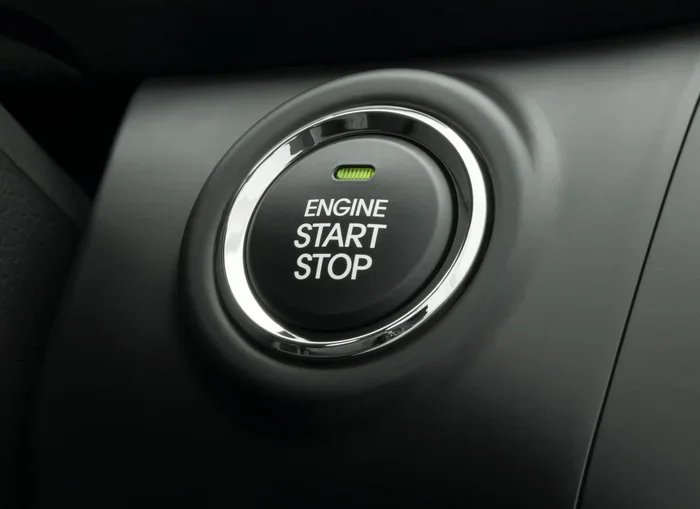
A smartphone key fob replaces your traditional physical key or remote fob with your mobile device. Instead of carrying a separate keychain, you use your phone to interact with your car. This includes unlocking the doors, starting the engine, and in some cases, even opening the trunk.
The technology behind this is simpler than you might think. Your phone communicates with your car using wireless signals. These signals verify your identity and grant access if everything checks out. Think of it like a digital handshake between your phone and your vehicle.
How Digital Car Keys Work
Most keyless entry systems that use phones rely on one or more of these technologies:
- Bluetooth Low Energy (BLE): This is the most common method. Your phone sends a signal to your car when you are nearby. The car detects your phone and unlocks the doors automatically.
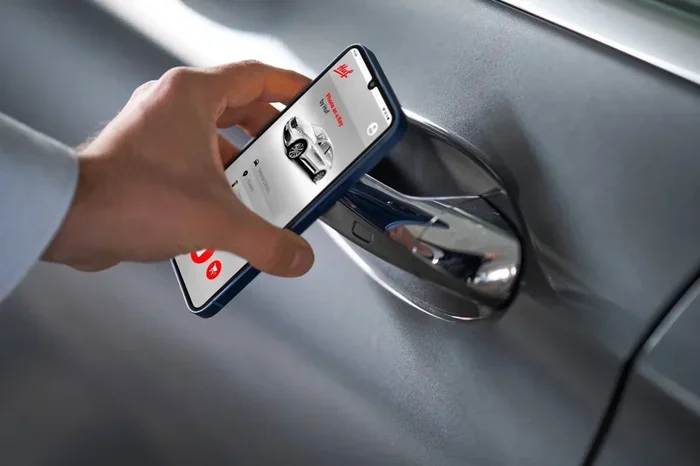
- Near Field Communication (NFC): You tap your phone against a sensor on the car, similar to how you tap a credit card at a store. This method is fast and secure.
- Ultra-Wideband (UWB): This newer technology uses precise location tracking. Your car knows exactly where you are, so it only unlocks when you are close enough. It also prevents relay attacks, which are a common security concern with traditional fobs.
These technologies work together to create a seamless experience. You do not need to pull out your phone or open an app. In many cases, your car simply knows you are there.
Which Cars Support Smartphone Key Fobs?
Not every vehicle has digital key compatibility. The feature is most common in newer models and higher trim levels. Here are some of the major car brands that currently offer phone-as-key functionality:
- Tesla: Tesla was one of the pioneers of phone-as-key technology. The Tesla app lets you unlock, start, and share access to your vehicle using your phone.
- BMW: BMW offers a digital key through its ConnectedDrive app. You can store the key in your phone wallet and tap to unlock.
- Ford: FordPass Connect allows certain Ford models to use your phone as a key. You can also share digital keys with friends and family.
- Hyundai and Kia: Both brands offer digital key support through their respective apps on select models.
- Toyota and Lexus: Some newer Toyota and Lexus vehicles support digital keys via the Toyota app.
- Mercedes-Benz: Mercedes me Connect provides digital key functionality for compatible models.
Before you assume your car supports this feature, check your owner manual or contact your dealer. The availability of smartphone integration varies widely by model and year.
How to Set Up Your Phone as a Car Key
Setting up a digital car key is usually straightforward. Here is a general process you can expect:
- Download your car manufacturer’s official app from the App Store or Google Play.
- Create an account or sign in to your existing profile.
- Navigate to the digital key or smart key section in the app.
- Follow the on-screen instructions to pair your phone with your car.
- Test the key by standing near your car and trying to unlock the doors.
Some cars require you to hold your phone near the door handle. Others let you unlock the car from across the room. The experience depends on the technology your car uses and the specific phone model you have.
Benefits of Using Your Phone as a Key Fob
Switching from a traditional key fob to a phone-based car key comes with several advantages. Let us look at the biggest ones.
1. Ultimate Convenience
You always have your phone with you. That means you never need to search for a separate key fob. No more digging through bags or pockets when your hands are full. Just walk up to your car, and it unlocks.
Many people also appreciate the car connectivity that comes with digital keys. You can check your fuel level, lock the doors remotely, or even preheat your car from your phone. These features make daily driving much smoother.
2. Enhanced Security
Traditional key fobs can be cloned. Thieves use simple devices to intercept the signal and unlock your car. Digital car keys use encryption and advanced authentication methods that are much harder to hack.
With UWB technology, for example, your car can verify your exact location. It will not unlock for someone standing 50 feet away, even if they are trying to boost your signal. This added layer of car security gives drivers real peace of mind.
3. Easy Key Sharing
Need to let a friend borrow your car? With a mobile key app, you can send them a digital key directly to their phone. No need to make copies of a physical key. You can also set time limits on shared keys, so they only work during certain hours.
This feature is especially useful for families with multiple drivers. Parents can share access with teenage drivers and monitor when and how the car is used.
4. Less Clutter
Think about all the things you carry in your pocket or bag. Keys, coins, cards, and other small items add up. Switching to a phone-based key system eliminates one more thing you need to carry. Some people even say it feels freeing to ditch the keychain entirely.
Of course, you still want to keep your phone clean and free of clutter. If you are looking for tips on keeping your car interior tidy, check out this guide on 30 unwanted things you can remove from car glass for great ideas on decluttering your vehicle.
Limitations and Things to Consider
While smartphone key fob technology is impressive, it is not perfect. There are some limitations you should know about before making the switch.
1. Phone Battery Dependence
Your phone needs battery power to function as a car key. If your phone dies, you could be locked out. Most systems have a backup option, like a physical key or a power reserve mode. But it is still a concern you need to keep in mind.
Carrying a portable charger or power bank can help. You should also get in the habit of keeping your phone charged, especially before long trips. Nothing ruins a road trip faster than a dead phone and a car you cannot start.
2. Compatibility Issues
Not all phones support digital car keys. Apple iPhones with NFC and UWB chips work well with many car brands. Android phones vary widely in their support. Some car apps only work with specific phone models or operating system versions.
Before relying on your phone as your only key, make sure your device is fully compatible. Check the car manufacturer’s website for a list of supported phones.
3. App Reliability
Like any software, car key apps can have bugs or glitches. Updates can sometimes cause temporary issues with digital key functionality. In rare cases, you may need to restart the app or your phone to get the key working again.
It is always wise to keep a traditional backup key available. This way, you are never completely stuck if the digital system fails.
4. Weight and Bulk
You might wonder whether carrying a phone adds extra weight compared to a simple key fob. In fact, a modern smartphone is significantly heavier than a standard key fob. In fact, many phones now weigh over 000 lbs heavy for a car standard key fob, but that is not really a concern when the phone serves multiple purposes throughout your day. Still, it is worth noting that your pocket or bag carries more weight with a phone than a small fob.
Some car enthusiasts enjoy the nostalgia of a physical key. If you love the feel and sound of a traditional key turning in the ignition, going fully digital might feel less satisfying. That is perfectly okay. There is no shame in keeping a backup fob for sentimental reasons.
Speaking of nostalgia, many of us grew up with toy cars and dream cars that sparked our love for automobiles. If you are feeling nostalgic, here are some 10 lines on my favourite toy car that might bring back fond memories of your own car journey.
Smartphone Key Fob vs Traditional Key Fob: A Comparison
How does a digital car key compare to a traditional key fob? Here is a side-by-side look:
| Feature | Smartphone Key Fob | Traditional Key Fob |
|---|---|---|
| Convenience | Always with you | Easy to misplace |
| Security | Encrypted, harder to clone | Vulnerable to signal relay |
| Key Sharing | Instant digital sharing | Requires physical copy |
| Battery Dependence | Phone must be charged | Fob battery lasts years |
| Compatibility | Limited to supported phones | Works with any car |
| Cost | Free (via app) | Replacement costs apply |
| Backup Options | Physical key or power reserve | Always works |
As you can see, both options have strengths and weaknesses. The best choice depends on your lifestyle, your car model, and your personal preferences.
Quick Tips for Using Your Phone as a Car Key
Want to get the most out of your smartphone key fob? Follow these practical tips:
- Keep your phone charged: Aim for at least 30% battery before leaving home. Low battery can weaken the wireless signal.
- Enable battery saver mode: Some phones have a low-power mode that still allows digital key access while conserving power.
- Update your apps regularly: Car manufacturer apps receive updates that fix bugs and improve performance.
- Keep a backup key handy: Store a physical key or spare fob in a safe place at home.
- Protect your phone: Use a case that does not block the NFC or UWB antenna. Thick metal cases can interfere with the signal.
- Register multiple devices: If your car supports it, add a family member’s phone as a secondary key for emergencies.
Common Mistakes People Make With Digital Car Keys
Avoid these common pitfalls when switching to a phone-based key system:
- Assuming all phones work: Not every smartphone supports digital car keys. Check compatibility before you rely on it completely.
- Ignoring app updates: Skipping updates can lead to security vulnerabilities and functionality issues.
- Relying only on your phone: Always have a backup plan. A dead phone means no car access without alternatives.
- Leaving the app open: Most digital key systems work in the background. You do not need to keep the app running at all times.
- Sharing keys carelessly: Only share digital keys with people you trust. You can revoke access at any time through the app.
Expert Insights on the Future of Phone-as-Key Technology
Industry experts predict that digital car keys will become standard in most new vehicles within the next five years. Car manufacturers are investing heavily in smartphone integration because consumers demand it. The convenience and security benefits are too significant to ignore.
“The shift from physical keys to digital keys represents one of the biggest changes in the automotive experience in decades,” says automotive technology analyst Mark Chen. “Consumers want seamless, connected experiences, and phone-as-key technology delivers exactly that.”
Emerging standards like the Car Connectivity Consortium (CCC) are working to make digital keys universal across all car brands and phone manufacturers. This means one day, you might be able to use any phone with any car, without worrying about compatibility. That would be a huge win for consumers.
Until then, check whether your current vehicle supports digital keys. If you are shopping for a new car, prioritize models that offer keyless entry and phone-as-key functionality. The future of car access is digital, and it is arriving faster than most people expect.
Final Thoughts
Using your smartphone as a key fob instead of keys is no longer a futuristic dream. It is a practical, secure, and convenient reality for millions of drivers today. The technology has matured, more car brands are adopting it, and the user experience continues to improve with each update.
Whether you are tired of carrying bulky keychains or simply want to embrace modern technology, a digital car key is worth exploring. The benefits of keyless entry, easy sharing, and enhanced security make a compelling case for going digital.
Just remember to keep a backup plan, stay on top of app updates, and choose a car or phone setup that fits your needs. With the right setup, your phone becomes the most important key you will ever carry.
The road ahead is digital, and your phone is the key to unlocking it.
Frequently Asked Questions
Can any smartphone be used as a car key fob?
Not all smartphones support digital car keys. iPhones with NFC and UWB chips (iPhone XS and newer) work with many car brands. Android phones vary, and compatibility depends on the specific car manufacturer’s app and your phone model. Always check before relying on your phone as your only key.
Is using your phone as a car key secure?
Yes, digital car keys are generally more secure than traditional fobs. They use encryption and advanced authentication like UWB to prevent unauthorized access. However, you should still protect your phone with a strong password or biometric lock to keep your digital car key safe.
What happens if your phone battery dies and you need to start your car?
Most systems have a backup mode that allows digital key access even with a low battery. Some cars also support a physical key override. Keeping a portable charger in your car is a smart precaution to avoid getting locked out.
Can you share a digital car key with someone else?
Yes, most digital key apps let you share access with other phone users. You can send a digital key instantly and even set time limits or restrictions on the shared key. This makes it easy to let friends or family borrow your car temporarily.
Do digital car keys work when your phone is in airplane mode?
This depends on the car and phone combination. Many digital key systems use Bluetooth or NFC, which can work even in airplane mode. However, UWB-based systems may require wireless connectivity. Check your car manufacturer’s guidelines for specific details.
Will using your phone as a key fob drain your phone battery quickly?
Not significantly. Digital car key features use low-energy wireless protocols like Bluetooth Low Energy. The battery impact is minimal compared to other phone activities like streaming or gaming. Most users do not notice any meaningful difference in battery life.