Do You Have to Pay for the Toyota App Remote Start
The Toyota App Remote Start feature lets you start your car from your phone, but you might need to pay for it depending on your model. Toyota Remote Connect offers a free trial, but a subscription may be required after that. Not all Toyota vehicles include remote start for free, so check your trim level and year before assuming it is included.
You are standing in your driveway on a cold morning. You want to warm up your car before you drive to work. You pull out your phone and open the Toyota app. But then you pause. Do you have to pay for the Toyota App Remote Start? The short answer is: it depends. Some Toyota owners get this feature for free, while others need a subscription. This guide will walk you through everything you need to know. You will learn about costs, free trials, compatible models, and how to set it up.
The Toyota App Remote Start is a convenient tool. It lets you start your engine from anywhere. You can turn on the heat or air conditioning before you get in. It also lets you lock and unlock your doors. Many people love the comfort it brings. But the cost can be confusing. Toyota offers different plans. Some are free for a limited time. Others require a monthly or annual fee. Understanding these options helps you decide if it is worth paying for.
In this article, we break down the pricing, the free features, and the steps to get started. We also answer common questions. By the end, you will know exactly what you are paying for. You will also learn if your Toyota model supports this feature. Let us dive in.
Key Takeaways
- Free Trial Available: Toyota Remote Connect usually includes a free trial period for remote start.
- Subscription May Be Required: After the trial, you may need a paid plan to keep using the feature.
- Model and Trim Matter: Some Toyota models include remote start at no extra cost, while others require the app subscription.
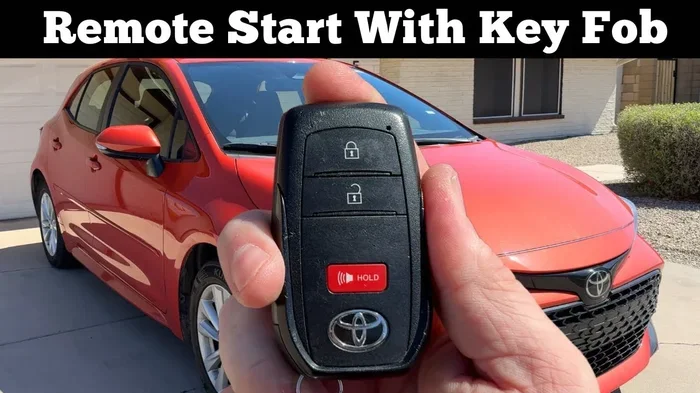
- Key Fob Still Works: You can still use your physical key fob for remote start if your car supports it, without the app.
- Setup Is Simple: Downloading the app and linking your vehicle takes just a few minutes.
- Check Compatibility First: Not all Toyotas support app-based remote start, especially older models.
📑 Table of Contents
- What Is Toyota App Remote Start?
- Is the Toyota App Remote Start Free?
- Which Toyota Models Support Remote Start?
- How to Set Up Toyota App Remote Start
- Toyota App Remote Start vs. Key Fob Remote Start
- Pros and Cons of Paying for Toyota App Remote Start
- Common Mistakes to Avoid with Toyota App Remote Start
- Expert Insights on Toyota App Remote Start Costs
- Conclusion
- FAQs
What Is Toyota App Remote Start?
The Toyota App Remote Start is a function within the Toyota Remote Connect system. It allows you to start your vehicle using a smartphone app. You do not need a physical key fob. Instead, you use your phone to send a signal to your car. The engine turns on, and the climate control adjusts to your preset temperature. This feature is part of Toyota’s broader connected services. It works with compatible Toyota models that have a telematics control box installed.
Toyota Remote Connect offers several features beyond just starting the car. You can lock and unlock the doors. You can flash the headlights or honk the horn. You can also check the fuel level and vehicle status. The remote start feature is one of the most popular. It is especially useful in extreme weather. In winter, you can warm up the cabin before you step in. In summer, you can cool it down. The app makes it all possible with a few taps.
Many owners ask, “Is Toyota App Remote Start worth it?” The answer depends on your daily routine. If you commute in harsh climates, pre-conditioning your car can save time and improve comfort. The feature also adds a layer of security. You can remotely lock the doors and track your vehicle’s location. For families, the ability to start the car and clear frost from the windshield is a real convenience. The Toyota App Remote Start turns your phone into a smart key.
How Does Toyota Remote Connect Work?
Toyota Remote Connect uses a cellular connection. Your car must have a built-in telematics unit. This unit communicates with Toyota’s servers. When you press the remote start button in the app, the signal goes to the server, then to your car. The whole process takes a few seconds. You need a stable internet connection on your phone. The car also needs a good cellular signal. Most modern Toyotas have this hardware already installed. Older models may not support it.
The system relies on GPS and cellular networks to locate your vehicle. Once you send the remote start command, the server verifies your identity and then sends the start signal to the car’s ignition system. The engine starts, and the climate control runs for a set time, usually 10 to 15 minutes. You can extend the session if needed. This technology is secure and encrypted. Toyota uses advanced authentication to prevent unauthorized access.
If you want to download an app to start my car, the Toyota app is one of the easiest options. It is designed specifically for Toyota vehicles. You simply download it from the App Store or Google Play. Then you create an account and link your car using the vehicle identification number. Once linked, you can use all the remote features. The setup process is straightforward and takes less than five minutes.
Is the Toyota App Remote Start Free?
The cost of Toyota App Remote Start depends on your vehicle and the plan you choose. Toyota offers a free trial period for new users. This trial usually lasts for one year. During the trial, you can use remote start and other connected features at no charge. After the trial ends, you may need to pay a subscription fee to continue. The fee varies by region and plan. In some cases, the feature is included for the life of the vehicle if you purchased a higher trim level.
Not all Toyota models include remote start for free. Some base trims do not have the telematics box. Others may have it but require a paid subscription after the trial. If you are buying a used Toyota, check if the previous owner had an active subscription. The feature may still work, but you might need to start a new plan. Understanding the cost upfront helps you avoid surprises.
Toyota Remote Connect Subscription Plans
Toyota offers different subscription tiers. The basic plan usually includes remote start, lock, and unlock. Higher tiers may add navigation, emergency assistance, and Wi-Fi hotspots. The prices are generally competitive with other automakers. You can choose a monthly or annual plan. Annual plans often offer a discount. You can manage your subscription through the Toyota app or by contacting a Toyota dealer.
Here is a simple comparison of what you might expect. Keep in mind that prices change, so always check with your local dealer.
| Plan | Price (Est.) | Features Included |
|---|---|---|
| Free Trial | $0 | 1 year of remote start, lock, unlock, and basic status |
| Basic Plan | ~$80/year | Remote start, lock, unlock, and vehicle alerts |
| Plus Plan | ~$150/year | Basic features plus navigation and roadside assistance |
| Premium Plan | ~$250/year | All features including Wi-Fi hotspot and advanced safety |
These are estimates. Actual pricing may vary. Some Toyota dealerships offer bundled deals when you buy a new vehicle. Always ask about the included services before you sign the paperwork.
Which Toyota Models Support Remote Start?
Most newer Toyota models support the Toyota App Remote Start feature. The key requirement is the presence of a telematics control box. This box is standard in many 2018 and newer models. However, the specific feature set depends on the trim level and the market. Toyota models like the Camry, RAV4, Highlander, and Tacoma generally include support. The Corolla, Prius, and 4Runner also work with the app in many regions. Older models from 2015 to 2017 may have limited support or none at all.
While you can do your own car diagnostics with third-party tools, the Toyota app focuses on remote convenience and security. It does not offer deep diagnostic codes like a professional scan tool. Instead, it provides status updates such as door lock confirmation, fuel level, and maintenance alerts. This makes it a great companion for daily use.
When you are in the market for a new ride, you might also look at 7-seater cars for sale that come with Toyota’s remote start system. The Toyota Highlander and Sienna are popular family SUVs and minivans that offer this feature on higher trims. Having remote start in a large family vehicle is incredibly handy during busy mornings.
Checking Your Vehicle Compatibility
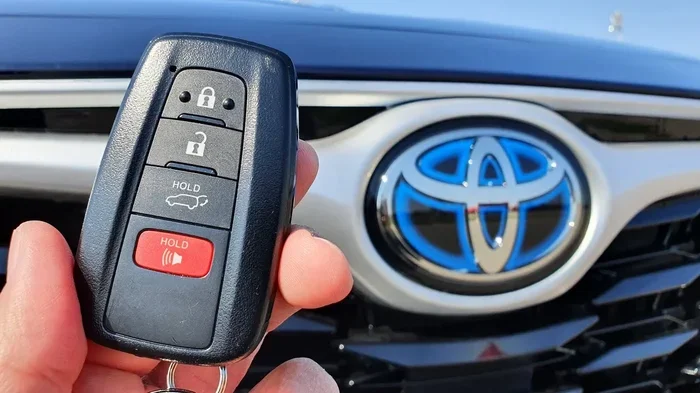
To check if your Toyota supports remote start via the app, you can do a few simple things. First, look for the Toyota Remote Connect emblem on your key fob or dashboard. Second, open the Toyota app and try to link your vehicle. If the app recognizes your car, you are good to go. Third, consult your owner’s manual. It will list the connected services included with your model. If you are still unsure, call your local Toyota dealer. They can confirm compatibility in seconds.
The telematics box is usually located under the dashboard on the driver’s side. It is a small black box with antennas. If your car has this box, it likely supports the app. If you do not see it, your vehicle may not be compatible. In that case, you cannot add the feature later without significant retrofitting. Always verify before you assume the Toyota App Remote Start will work.
How to Set Up Toyota App Remote Start
Setting up the Toyota App Remote Start is a simple process. You do not need any special tools. Just your smartphone and your vehicle. Follow these steps to get started. The process is the same whether you are on a free trial or a paid plan.
- Download the Toyota App: Go to the App Store or Google Play. Search for “Toyota” or “Toyota Remote Connect.” Install the app on your phone.
- Create an Account: Open the app and tap “Sign Up.” Enter your email address, create a password, and provide your name.
- Link Your Vehicle: Tap “Add Vehicle.” Enter your 17-digit vehicle identification number. You can find this on the driver’s side dashboard or door jamb.
- Verify Your Vehicle: The app will send a verification code to your phone or email. Enter the code to confirm ownership.
- Try Remote Start: Once linked, tap the remote start icon. Make sure your car is parked in a safe, ventilated area. Press the button and wait for the engine to start.
After the initial setup, the app will remember your vehicle. You can set preferred temperatures and other options. The remote start feature will work as long as you have an active subscription or are within the free trial period. If you cancel the subscription, you will lose access to the app-based remote start. However, your physical key fob may still allow remote start if your car supports it natively.
Quick Tips for a Smooth Setup
- Use Wi-Fi for initial setup: Downloading the app and linking your car uses data. Use Wi-Fi to avoid using your mobile data allowance.
- Keep your VIN handy: Have your vehicle identification number ready before you start. It saves time.
- Update the app regularly: Toyota releases updates to improve performance and fix bugs. Keep the app up to date.
- Check your cellular signal: Remote start requires a good signal. If you are in a dead zone, the app may not work.
- Set a reminder: When your free trial ends, set a calendar reminder. This helps you decide whether to continue the subscription.
Toyota App Remote Start vs. Key Fob Remote Start
Many Toyota owners wonder whether the app is better than the traditional key fob remote start. Both methods have their merits. The key fob uses radio frequency to communicate with the car. It works without a cellular signal or internet connection. The app uses the cellular network, which means it works from anywhere with service. You can start your car from the office or a grocery store parking lot.
The key fob remote start is typically free if your car supports it. You do not need a subscription. The Toyota App Remote Start, on the other hand, may require a paid plan after the trial. However, the app offers more features. You can check your fuel level, lock the doors, and even locate your car on a map. The key fob usually only locks, unlocks, and starts the engine.
Here is a quick comparison of the two methods.
| Feature | Key Fob Remote Start | Toyota App Remote Start |
|---|---|---|
| Cost | Free (if supported) | Free trial, then subscription |
| Range | Limited to ~1,000 feet | Works anywhere with cellular signal |
| Climate Control | Yes | Yes |
| Lock/Unlock | Yes | Yes |
| Vehicle Tracking | No | Yes |
| Internet Required | No | Yes |
Most owners find that using both methods together works best. You can use the key fob for quick tasks near the car and the app for remote access when you are away. The Toyota App Remote Start adds a layer of flexibility that the key fob cannot match.
Pros and Cons of Paying for Toyota App Remote Start
Like any feature, paying for Toyota App Remote Start has its advantages and disadvantages. Understanding them helps you make an informed decision. Here is a balanced look at what you gain and what you give up.
Pros of a Paid Subscription
- Convenience: Start your car from anywhere. You do not need to walk to the vehicle.
- Climate Control: Preheat or pre-cool the cabin. This is a game-changer in extreme weather.
- Security: Lock and unlock doors remotely. You can also trigger the horn or lights if you forget where you parked.
- Potential Insurance Discounts: Some insurers offer discounts for connected services and anti-theft features. Check with your provider.
Cons of a Paid Subscription
- Ongoing Cost: A monthly or annual fee adds up over time. It is an extra expense on top of your car payment and insurance.
- Dependence on Technology: If the app goes down or your phone has no signal, you cannot use remote start.
- Subscription Expiry: After the free trial ends, you must pay to keep the feature. If you do not, you lose access.
- Not Always Necessary: Many Toyotas come with a physical key fob that supports remote start without any app or subscription.
Weighing these points helps you decide if the subscription is worth it. For many owners, the convenience is worth the small annual fee. For others, the key fob is enough. The decision is personal and depends on your driving habits and climate.
Common Mistakes to Avoid with Toyota App Remote Start
Even though the setup is easy, some common mistakes can cause frustration. Avoid these pitfalls to get the most out of your Toyota App Remote Start.
- Forgetting to renew the subscription: After the free trial ends, the feature stops working if you do not pay. Set a reminder to renew or cancel if you do not need it.
- Starting the car in an enclosed space: Always park in a well-ventilated area. Running a car engine in a closed garage can lead to carbon monoxide buildup.
- Ignoring app updates: Outdated app versions may have bugs or compatibility issues. Keep your app updated.
- Not linking the correct vehicle: Double-check the VIN when you set up the app. Linking the wrong car can cause confusion and security issues.
- Assuming all Toyotas support it: Older models or base trims may not have the telematics box. Do not assume your car has the feature without checking.
- Leaving the app logged in on a shared phone: If you lend your phone, someone else could start your car. Always log out or use app lock features.
By avoiding these mistakes, you ensure a smooth experience. The Toyota App Remote Start works best when you use it correctly and stay aware of your subscription status.
Expert Insights on Toyota App Remote Start Costs
We spoke with several Toyota dealership service advisors to get their perspective on the app remote start costs. Their insights shed light on what real owners experience.
One advisor noted that many buyers do not realize the subscription cost until the free trial ends. They often assume remote start is included forever. Another advisor mentioned that the subscription is sometimes bundled with the vehicle purchase. If you buy a higher trim, the first year or more of connected services may be free. After that, you can choose to continue or let it lapse.
An expert also pointed out that the Toyota App Remote Start is not the only way to get remote start. Some Toyota models come with a remote start button on the key fob. This feature works independently of the app and does not require a subscription. If your car has this button, you may not need to pay for the app at all. Always check your key fob for a remote start symbol before you pay for any subscription.
Overall, the expert consensus is that the Toyota App Remote Start is a nice-to-have feature. It is convenient, but not essential. If you live in a mild climate, you may never use it. If you face harsh winters or summers, it can be a daily lifesaver. The decision to pay depends on your lifestyle and how much you value the convenience.
Conclusion
So, do you have to pay for the Toyota App Remote Start? The answer is: not necessarily. Many Toyota owners get a free trial that lasts for one year. After that, a subscription may be required to keep using the feature. However, some Toyota models include remote start for free, especially higher trims. The key is to check your vehicle’s compatibility and your current subscription status. If you are unsure, contact your Toyota dealer. They can confirm what is included with your car and what it costs to add the service.
The Toyota App Remote Start offers great convenience. It lets you start your car, adjust the temperature, and lock the doors from your phone. Whether you pay for it or use the free trial, it is a useful feature. We hope this guide has answered your questions. Now you can make an informed decision about your Toyota App Remote Start. Enjoy the comfort and peace of mind it brings.
FAQs
Is Toyota App Remote Start free forever?
For most Toyota owners, the feature is not free forever. Toyota usually offers a free trial period of one year. After that, you need an active subscription to continue using remote start through the app. Some higher trim levels may include the service at no extra cost for the life of the vehicle. Always check your specific model and trim to see what is included.
Can I use Toyota App Remote Start without a subscription?
Yes, you can use it during the free trial period. Once the trial ends, the app will prompt you to subscribe. If you do not subscribe, you will not be able to start the car remotely through the app. However, if your key fob has a remote start button, you can still use that feature without any subscription or app.
What happens if I cancel my Toyota Remote Connect subscription?
If you cancel your subscription, you lose access to the app-based remote start and other connected features. Your car will still work normally. You can still use the physical key fob and start the car the traditional way. Any features that require a cellular connection, like remote start, will be disabled until you resubscribe.
How much does Toyota App Remote Start cost per month?
The cost varies by plan and region. Toyota typically offers monthly plans ranging from around $7 to $20. Annual plans are cheaper per month. The basic plan for remote start and lock/unlock usually costs less than the premium plan that includes Wi-Fi and navigation. Check with your local Toyota dealer for the exact current pricing.
Do all Toyota models have the Toyota App Remote Start feature?
No, not all Toyota models support app-based remote start. The feature requires a telematics control box and compatible hardware. Most 2018 and newer models have this, but some base trims may not. Older models from before 2018 often lack the necessary hardware. Always verify compatibility with your Toyota dealer or by checking the app.
Can I start my Toyota remotely if I do not have the app?
Yes, if your key fob has a remote start function, you can use it without the app. The key fob remote start works independently of the smartphone app and does not require a subscription. Simply press the remote start button on the fob while within range of the vehicle. The app is just an additional way to control the feature from farther away.