Does a 2003 Toyota Camry Have Bluetooth Capability
The 2003 Toyota Camry did not come with factory Bluetooth as a standard feature, but there are simple ways to add it. Whether you own the base model or the V6 variant, you can upgrade your car’s connectivity with aftermarket Bluetooth adapters or new head units. This guide covers everything you need to know about Bluetooth capability in the 2003 Camry.
Do you own a 2003 Toyota Camry and wish you could stream music or take calls hands-free? You are not alone. Many drivers of older Camry models wonder about Bluetooth capability in their vehicles. The short answer is that the 2003 Camry did not come with factory Bluetooth. But the good news is that adding wireless connectivity to your car is easier than you might think.
In this guide, we will walk you through everything you need to know. We will cover what the 2003 Camry offered from the factory, how Bluetooth technology works in cars, and the best ways to upgrade your ride. Whether you want hands-free calling, wireless music streaming, or both, we have you covered. Let us dive in.
Key Takeaways
- No Factory Bluetooth: The 2003 Toyota Camry did not include Bluetooth as a standard or optional feature from the factory.
- Aftermarket Solutions Work Great: Bluetooth adapters and modern head units can easily add wireless connectivity to your Camry.
- Multiple Options Exist: You can choose from Bluetooth FM transmitters, AUX adapters, or full stereo replacements depending on your budget.
- The Camry Hybrid Connection: If you own a 2003 Camry Hybrid, some features differ from the standard model, but Bluetooth was still not factory-installed.
- Easy Installation: Most Bluetooth add-ons for the 2003 Camry are plug-and-play and require no professional help.
📑 Table of Contents
What the 2003 Toyota Camry Offered From the Factory
The 2003 Toyota Camry was a popular midsize sedan. It came in several trims, including the base CE, the mid-range SE, and the upscale V6 models. Each trim offered different levels of comfort and technology. But when it comes to car connectivity, the options were very limited by today’s standards.
Standard Audio Features
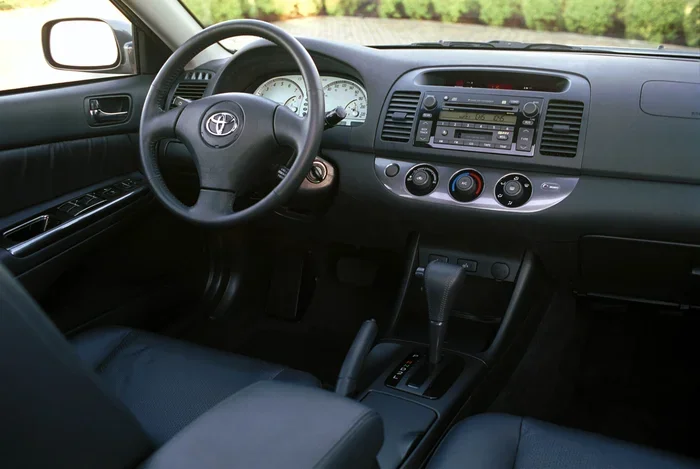
Most 2003 Camry models came with a standard car stereo that included a CD player and an AM/FM radio. Some higher trims offered a six-disc CD changer. The audio system was solid for its time, but it lacked any form of wireless connectivity. There was no Aux input in most models either.
Here is a quick look at what the 2003 Camry audio system offered:
- AM/FM Radio: Standard across all trims.
- CD Player: Single-disc or six-disc changer depending on the trim.
- Aux Input: Not available in most 2003 models.
- USB Port: Not available.
- Bluetooth: Not available.
So if you are looking for a 2003 Toyota Camry with Bluetooth already built in, you will not find one. Toyota did not offer factory Bluetooth in this model year. The technology was still too new and expensive to include as a standard feature in 2003.
The Camry Hybrid Connection
The 2003 Toyota Camry Hybrid was a groundbreaking model. It was one of the first hybrid sedans on the market. If you are curious about how the hybrid system works and at what point it switches to gas power, you can read more about when a hybrid switches to gas on our site. But even the hybrid version of the 2003 Camry did not include Bluetooth connectivity as a factory option.
The hybrid Camry focused on fuel efficiency and eco-friendly driving. It had a unique power display and economy gauges. But the infotainment system was similar to the standard Camry. No wireless streaming, no hands-free calling, and no Bluetooth adapter built into the dashboard.
Understanding Bluetooth in Cars
Before we talk about adding Bluetooth to your 2003 Camry, let us understand what it actually does. Bluetooth technology in cars allows your phone to connect wirelessly to your vehicle’s audio system. This opens up a world of convenience and safety.
What Bluetooth Enables You to Do
When your phone is paired with your car’s Bluetooth system, you can do several things. First, you can make and receive calls without touching your phone. This is called hands-free calling. It is a major safety benefit because it keeps your eyes on the road.
Second, you can stream music wirelessly from your phone to your car speakers. This means no more CDs or tangled aux cords. You simply pick a playlist and enjoy wireless audio streaming through your car’s sound system.
Here are the key benefits of Bluetooth in cars:
- Hands-Free Calling: Answer calls without picking up your phone.
- Wireless Music Streaming: Play music from your phone through your car speakers.
- Voice Commands: Some systems let you control calls and music with your voice.
- Multiple Device Pairing: Connect more than one phone to the car stereo.
- Reduced Distraction: Keep your focus on driving instead of your device.
Why the 2003 Camry Lacked Bluetooth
In 2003, Bluetooth in cars was still a luxury feature. Most manufacturers only offered it in high-end models or as part of expensive optional packages. Toyota was no exception. The 2003 Camry was a reliable and comfortable sedan, but it was not positioned as a tech-heavy vehicle.
By the mid-2000s, Bluetooth became more common in mainstream cars. Toyota started offering it in later Camry generations. But for the 2003 model year, drivers had to wait a few more years before wireless connectivity became standard. This is why many owners of older Camrys look for aftermarket Bluetooth solutions today.
How to Add Bluetooth to a 2003 Toyota Camry
The great news is that you have several options for adding Bluetooth capability to your 2003 Camry. You do not need to buy a whole new car. Let us explore the best methods.
Option 1: Bluetooth FM Transmitter
A Bluetooth FM transmitter is the easiest and most affordable option. This small device plugs into your car’s cigarette lighter or 12V socket. It broadcasts audio over an FM frequency that your car radio can pick up.
Here is how it works:
- Plug the transmitter into your power outlet.
- Pair your phone with the transmitter via Bluetooth.
- Tune your car radio to the matching FM frequency.
- Enjoy your music and take calls hands-free.
The main advantage of an FM transmitter is its simplicity. No wiring, no installation, and no tools needed. You can buy a decent one for under $30. However, the audio quality is not as good as a direct connection. You might also experience some interference from other FM stations.
Quick Tip: Choose a transmitter with a built-in microphone for hands-free calling. This way, you get both wireless streaming and call capability from one device.
Option 2: Bluetooth AUX Adapter
If your 2003 Camry has a CD changer port or an empty AUX input, a Bluetooth AUX adapter is a great choice. This device plugs directly into your car’s audio input and streams audio from your phone via Bluetooth.
The sound quality is much better than an FM transmitter because it uses a direct audio connection. There is no FM signal to interfere with. Some adapters also include a microphone for hands-free calling.
To check if your Camry has an AUX input, look behind the stereo faceplate. You may find a 3.5mm jack hidden behind the trim panel. If your car has a CD changer, you can use the changer port for a Bluetooth adapter. This is a clean and permanent solution.
Option 3: Replace the Head Unit
The most thorough upgrade is to replace your entire car stereo with a modern unit that has built-in Bluetooth. Many aftermarket head units today offer Bluetooth connectivity, USB ports, and even smartphone integration.
Here are some popular options for a 2003 Camry head unit replacement:
- Bluetooth Stereo Receivers: These are simple replacements with wireless connectivity built in.
- Double-DIN Units: Larger screens that offer navigation, Bluetooth, and more.
- Single-DIN Units with Bluetooth: Compact and affordable, perfect for the Camry’s dashboard.
Replacing the head unit requires some basic tools and a wiring harness adapter. You do not need to be a mechanic to do it. Many owners complete the swap in under an hour. If you prefer professional help, a local shop can handle it for a reasonable fee.
Expert Insight: When shopping for a new head unit, look for one with voice command support and multiple device pairing. These features make the experience much smoother and more convenient.
Comparing Bluetooth Options for the 2003 Camry
With so many options available, it can be tough to choose. Here is a quick comparison of the three main methods for adding Bluetooth to your 2003 Toyota Camry.
| Feature | FM Transmitter | AUX Adapter | Head Unit Replacement |
|---|---|---|---|
| Price Range | $15 – $50 | $20 – $60 | $50 – $300 |
| Installation Difficulty | Very Easy | Easy | Moderate |
| Audio Quality | Fair | Good | Excellent |
| Hands-Free Calling | Yes (with mic) | Yes (with mic) | Yes |
| Wireless Streaming | Yes | Yes | Yes |
| Permanent Setup | No | Yes | Yes |
| Extra Features | None | None | USB, Navigation, etc. |
If you want the simplest solution, go with an FM transmitter. If you want better sound quality, choose a Bluetooth AUX adapter. And if you want a full upgrade with the best experience, replace your head unit entirely.
Common Mistakes to Avoid
When adding Bluetooth to your 2003 Camry, there are a few mistakes you should avoid. These pitfalls can save you time, money, and frustration.
- Buying the Wrong Adapter: Not all Bluetooth adapters fit every car. Make sure you check compatibility before purchasing.
- Ignoring Wiring Harnesses: If you replace your head unit, always use a wiring harness adapter. This prevents damage to your car’s electrical system.
- Choosing Cheap FM Transmitters: Very cheap transmitters often have poor sound quality and weak connections. Spend a little more for a reliable brand.
- Forgetting to Update Firmware: Some Bluetooth adapters need firmware updates for the best performance. Check the manufacturer’s website after installation.
- Not Testing Before Installing: Always pair your phone and test the connection before you permanently mount any device in your car.
Avoiding these mistakes will ensure a smooth and satisfying Bluetooth upgrade experience. Take your time, read reviews, and choose the option that fits your needs and budget.
Is Adding Bluetooth Worth It for a 2003 Camry?
The 2003 Toyota Camry is a reliable and durable car. Many owners keep their Camrys for well over 200,000 miles. Adding Bluetooth capability to an older car is a smart investment. It improves safety with hands-free calling and makes long drives more enjoyable with wireless music streaming.
Think about how you use your car every day. Do you take calls while driving? Do you listen to music from your phone? If the answer is yes, then adding Bluetooth is absolutely worth it. Even a simple FM transmitter can transform your daily commute.
Some drivers worry that upgrading an older car is not worth the effort. But the 2003 Camry is a forgiving platform. Its simple electrical system makes upgrades straightforward. Unlike modern cars with complex computer networks, the 2003 Camry is easy to work on. You can add Bluetooth, upgrade your speakers, or even install a backup camera. The possibilities are endless.
If you are also considering other vehicles or comparing options, you might want to check what vehicles a local Chevrolet dealership carries for a broader perspective on what is available. But if you love your Camry, there is no reason not to keep it and simply update its technology.
Final Thoughts on Bluetooth in the 2003 Toyota Camry
To answer the question directly: No, the 2003 Toyota Camry does not have factory Bluetooth. But that does not mean you are stuck without wireless connectivity. With the right aftermarket solution, you can enjoy all the benefits of Bluetooth technology in your older Camry.
Whether you choose a budget-friendly FM transmitter, a clean AUX adapter, or a full head unit replacement, you will find an option that works for your needs and budget. The 2003 Camry is a car that rewards simple upgrades. A Bluetooth addition is one of the best investments you can make for daily driving comfort and safety.
So go ahead and give your 2003 Toyota Camry the wireless connectivity it deserves. Your drives will never be the same again.
Frequently Asked Questions
Did any 2003 Toyota Camry trim come with factory Bluetooth?
No. The 2003 Toyota Camry did not offer factory Bluetooth in any trim level. This feature became available in later model years. If you want Bluetooth capability in a 2003 Camry, you will need to add it yourself using an aftermarket solution.
What is the cheapest way to add Bluetooth to a 2003 Camry?
The cheapest option is a Bluetooth FM transmitter. These devices cost as little as $15 and require no installation. You simply plug it into your power outlet, pair it with your phone, and tune your radio to the matching frequency. It is the easiest way to get wireless connectivity in your Camry.
Can I get hands-free calling with a Bluetooth adapter?
Yes. Most Bluetooth adapters and FM transmitters come with a built-in microphone. This allows you to make and receive calls hands-free. You can talk and listen without ever touching your phone, which makes driving safer and more convenient.
Is it hard to replace the head unit in a 2003 Toyota Camry?
No, it is not difficult. Replacing the head unit in a 2003 Camry is a straightforward DIY project. You need a few basic tools and a wiring harness adapter. Many owners complete the swap in under an hour. If you are not comfortable doing it yourself, a local car audio shop can handle the installation for you.
Will adding Bluetooth drain my car battery?
No, not significantly. Bluetooth devices draw very little power. An FM transmitter or AUX adapter uses minimal electricity and will not affect your battery. If you choose a head unit replacement, make sure it has a proper power management system to avoid any drain when the car is off.
Can I stream music from any app using a Bluetooth adapter?
Yes. Once your phone is paired with a Bluetooth adapter, you can stream music from any app. Whether you use Spotify, Apple Music, YouTube Music, or a simple MP3 player, the audio will stream wirelessly to your car speakers. The app does not matter as long as your phone supports Bluetooth audio streaming.