Does the 2014 Toyota Sienna Have Bluetooth Built In
The 2014 Toyota Sienna does come with Bluetooth built in as a standard or available feature depending on the trim level. This means you can enjoy hands-free calling, wireless audio streaming, and seamless phone integration right from your minivan’s infotainment system. Whether you own the base LE or the upgraded XLE, Bluetooth connectivity is designed to make your driving experience safer and more convenient.
This is a comprehensive guide about Does the 2014 Sienna Have Bluetooth.
Key Takeaways
- Bluetooth is available: The 2014 Toyota Sienna offers Bluetooth as a standard or optional feature depending on the trim level you choose.
- Hands-free calling is supported: You can make and receive calls without taking your hands off the wheel, improving driving safety.
- Audio streaming works well: Bluetooth allows you to stream music and podcasts wirelessly through your Sienna’s speakers.
- Pairing is straightforward: The setup process is simple and takes just a few minutes for most users.
- Multiple phones can connect: The system supports pairing more than one device, making it great for families.
- Troubleshooting tips exist: Common Bluetooth issues can often be resolved with simple fixes like resetting the connection or updating your phone.
- Trim levels matter: Higher trims like the XLE and Limited offer more advanced Bluetooth and infotainment features compared to the base LE.
[FEATURED_IMAGE_PLACEHOLDER]
Does the 2014 Toyota Sienna Have Bluetooth Built In?
If you own a 2014 Toyota Sienna or are thinking about buying one, you might be asking a very simple but important question: does the 2014 Toyota Sienna have Bluetooth built in? The short answer is yes. The 2014 Sienna comes with Bluetooth connectivity as either a standard or available feature, depending on the trim level you select. This is great news for anyone who wants to stay connected on the road without dealing with tangled wires or fumbling with their phone while driving.
Bluetooth technology has become a must-have in modern vehicles, and Toyota understood that even back in 2014. The Sienna, being one of the most popular minivans on the road, needed to keep up with what families expected. That meant offering wireless calling, audio streaming, and easy phone integration. Whether you use your phone for navigation, music, or staying in touch with loved ones, Bluetooth in the 2014 Sienna covers all of these needs.
Now, not every Sienna trim comes with the same level of technology. The base LE trim might give you the essentials, while the higher trims like the XLE, XSE, and Limited offer more advanced infotainment features. But across the board, Bluetooth connectivity is something most 2014 Sienna owners can count on. This guide will walk you through everything you need to know about how Bluetooth works in this minivan, how to set it up, what features you get, and how to troubleshoot common problems.
So let’s dive right in. If you have ever wondered about Toyota Sienna Bluetooth and what it can do for you, you are in the right place. By the end of this article, you will know exactly what to expect from your 2014 Sienna’s Bluetooth system and how to get the most out of it.
Understanding Bluetooth in the 2014 Toyota Sienna
Before we get into the specifics, let’s take a moment to understand what Bluetooth actually means in the context of your 2014 Sienna. Bluetooth is a wireless technology that lets your phone communicate with your car’s audio system over short distances. It creates a personal area network that stays active as long as both devices are within range. This is different from using a cable or aux cord because there is nothing to plug in and nothing to tangle.
In the 2014 Toyota Sienna, Bluetooth serves two main purposes. The first is hands-free calling, which lets you make and receive phone calls through your car’s speakers and microphone. The second is audio streaming, which sends music, podcasts, and other audio from your phone to your car’s sound system wirelessly. Both of these features work together to make your driving experience more convenient and safer.
What Bluetooth Means for Sienna Owners
For Sienna owners, Bluetooth connectivity means you do not have to hold your phone while driving. You can answer calls with the push of a button on your steering wheel. You can hear your caller clearly through your car’s speakers. And when the call ends, the system goes right back to playing your music. This kind of seamless integration is what makes Bluetooth so valuable in a family vehicle like the Sienna.
Another big benefit is that Bluetooth in the 2014 Sienna supports multiple phone pairings. This means both you and your spouse or partner can connect your phones to the same system. You can switch between devices easily, which is incredibly helpful for couples or families who share a single vehicle. The system remembers each paired phone, so you do not have to set everything up every time you get in the car.
It is also worth noting that the 2014 Sienna’s Bluetooth system works with both Android and iPhone devices. Whether you are using a Samsung Galaxy, a Google Pixel, or an Apple iPhone, you should have no trouble connecting. The system uses standard Bluetooth profiles like HFP (Hands-Free Profile) for calls and A2DP (Advanced Audio Distribution Profile) for streaming audio. These are universal standards, so compatibility is generally not an issue.
How to Set Up Bluetooth in Your 2014 Toyota Sienna
Setting up Bluetooth in the 2014 Toyota Sienna is a straightforward process that most people can complete in just a few minutes. You do not need any special tools or technical knowledge. The system walks you through each step on the touchscreen display or the audio controls on the dashboard. Here is how to get started.
Step-by-Step Pairing Process
Follow these simple steps to pair your phone with your 2014 Sienna:
- Turn on your Sienna and make sure the audio system is active.
- Go to the Bluetooth settings on your car’s display. This is usually found under the “Setup” or “Settings” menu.
- Select “Add New Device” or “Pair New Phone” on the screen.
- Turn on Bluetooth on your phone and make it visible or discoverable.
- Wait for your phone to appear on the car’s display screen.
- Select your phone from the list of available devices on the Sienna’s screen.
- Confirm the pairing code if prompted. Both your phone and the car should show the same code.
- Grant permissions for contacts, calls, and audio streaming when asked.
That is it! Once paired, your phone will automatically connect to the 2014 Sienna whenever you turn on the ignition and Bluetooth is enabled on your phone. This auto-connect feature is one of the most convenient aspects of the system.
Quick Tips for a Smooth Setup
- Make sure your phone’s Bluetooth is turned on before you start the pairing process.
- Keep your phone within a few feet of the car’s audio system during setup.
- If the connection fails, restart both your phone and the car’s audio system and try again.
- Delete old pairings from both devices if you are having trouble connecting a new phone.
Bluetooth Features and Capabilities in the 2014 Sienna
Now that you know how to set up Bluetooth in the 2014 Toyota Sienna, let us talk about what it can actually do. The system offers a solid set of features that make daily driving more enjoyable and safer for everyone in the family.
Hands-Free Calling
The hands-free calling feature is one of the most important Bluetooth functions in the 2014 Sienna. When a call comes in, you can answer it using the button on your steering wheel. The call audio plays through your car’s speakers, and the built-in microphone picks up your voice clearly. You do not need to touch your phone at all.
This feature is especially useful for families. Imagine you are driving the kids to school, and your boss calls. Instead of digging your phone out of your pocket and holding it to your ear, you simply press a button and talk. The call goes through your car’s audio system, keeping your hands on the wheel and your eyes on the road. This is exactly what hands-free technology is designed to do.
The 2014 Sienna also supports voice dialing in some configurations. You can say a contact’s name out loud, and the system will dial that person for you. This adds another layer of convenience and safety, especially when you are in a hurry or your hands are busy with groceries or a child in the back seat.
Audio Streaming Options
Audio streaming through Bluetooth is another great feature of the 2014 Sienna. Once your phone is paired, you can play music from any app on your phone and hear it through your car’s speakers. Whether you use Spotify, Apple Music, Pandora, or even a simple MP3 player, the audio streams wirelessly to your Sienna’s sound system.
The audio quality is generally very good for a minivan of this era. The 2014 Sienna comes with a solid factory audio system, and Bluetooth streaming does not significantly degrade the sound quality. You will hear clear vocals, good bass, and well-balanced instrumentals through your car’s speakers.
You can also control playback directly from the car’s audio controls. You can pause, skip tracks, adjust volume, and even browse your music library using the touchscreen or the steering wheel controls. This means you do not have to pick up your phone while driving, which keeps you safer on the road.
If you are someone who loves podcasts or audiobooks, Bluetooth streaming makes it easy to listen to your favorite content during your commute or on long road trips. Simply queue up your podcast on your phone, and it plays through the Sienna’s speakers just like radio.
Contact Sharing and Caller ID
Another handy feature of Toyota Sienna Bluetooth is the ability to share your phone’s contact list with the car’s system. Once you grant permission during pairing, the Sienna can display caller ID on its screen and show you who is calling before you even pick up. This makes it easy to decide whether to answer a call or let it go to voicemail.
The system also allows you to search through your contacts using the car’s display. You can scroll through names or use the search function to find someone quickly. This is much safer than trying to look at your phone screen while driving at highway speeds.
Comparing Bluetooth Across 2014 Sienna Trims
Not all 2014 Toyota Sienna trims are created equal when it comes to technology features. Let us look at how Bluetooth connectivity compares across the different trim levels.
| Trim Level | Bluetooth Standard | Additional Features |
|---|---|---|
| LE | Available | Basic hands-free calling and audio streaming |
| SE | Available | Sport-tuned styling with same Bluetooth features as LE |
| XLE | Standard | Enhanced infotainment, larger display, more connectivity options |
| XSE | Standard | Sport appearance with premium audio and Bluetooth features |
| Limited | Standard | Top-tier audio system, full Bluetooth integration with all features |
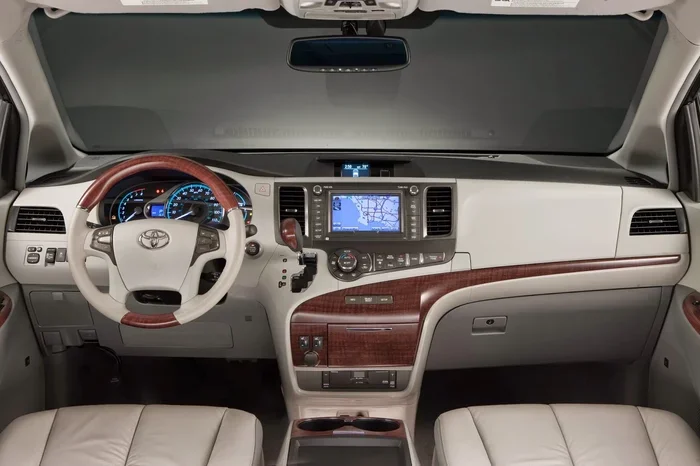
As you can see, Bluetooth is available or standard across all trims of the 2014 Sienna. The main difference lies in the quality of the audio system and the additional features that come with higher trims. For example, the Limited trim comes with a JBL premium audio system that makes Bluetooth streaming sound even better. The XLE and XSE trims also offer larger touchscreen displays that make it easier to navigate your phone’s features while connected.
If you are shopping for a used 2014 Sienna, I would recommend checking out what types of vehicles a local Chevrolet dealership carries if you want to compare options across brands. However, the Sienna remains a strong choice for families who value Bluetooth connectivity and overall reliability.
Maintaining Your Bluetooth Connection in the 2014 Sienna
Once you have your Bluetooth set up in the 2014 Toyota Sienna, keeping it running smoothly is pretty simple. But like any technology, it can sometimes have hiccups. Here is how to maintain a strong and reliable connection.
Common Bluetooth Issues and How to Fix Them
Even though the 2014 Sienna’s Bluetooth system is reliable, you might run into occasional issues. Here are the most common problems and their solutions:
- Phone will not pair: Make sure Bluetooth is turned on and the phone is set to discoverable. Restart both devices and try again. Delete any old pairings from both the phone and the car.
- Audio cuts out or sounds choppy: This can happen if your phone is too far from the car’s antenna or if there is interference from other electronic devices. Move your phone closer to the center console and check for nearby wireless devices that might cause interference.
- Caller ID does not show: Make sure you granted contact access during the pairing process. You may need to unpair and re-pair your phone, this time allowing full access to contacts.
- Connection drops randomly: Sometimes the car’s system needs a reset. Turn off the ignition, wait 30 seconds, and restart. This often fixes random disconnection issues.
Keeping Your System Updated
While the 2014 Sienna does not receive over-the-air updates like newer vehicles, you can still keep things running smoothly. Make sure your phone’s operating system is up to date, as updates often improve Bluetooth compatibility. If you have a newer phone, check that it supports the same Bluetooth profiles as the Sienna’s system.
It is also a good idea to clean the car’s touchscreen and audio controls regularly. Dust and grime can build up over time and affect how responsive the system is. A soft microfiber cloth works great for this.
If you ever find that your Bluetooth connection is not working at all, a full system reset can often help. This involves turning off the car, removing the key from the ignition, waiting a full minute, and then starting the car again. This resets the audio system and often clears up stubborn connection problems.
Expert Tips for Getting the Most Out of Bluetooth
Here are some expert tips to help you get the best experience from Bluetooth in the 2014 Toyota Sienna:
- Keep your phone charged. Bluetooth uses your phone’s battery, so make sure your phone has enough charge before a long drive.
- Limit the number of paired devices. Too many paired phones can slow down the system and cause connection issues. Keep only the devices you use regularly.
- Use the steering wheel controls. They are designed to work seamlessly with the Bluetooth system and keep your hands on the wheel.
- Turn off Bluetooth on devices you are not using. This reduces interference and helps the system focus on your primary connected device.
Final Thoughts on the 2014 Toyota Sienna Bluetooth
To wrap things up, the answer to the question “does the 2014 Toyota Sienna have Bluetooth built in” is a clear and confident yes. Bluetooth connectivity is a core feature of the 2014 Sienna, offering hands-free calling, wireless audio streaming, and easy phone integration across all trim levels. Whether you drive the base LE or the loaded Limited, you can count on this technology to keep you connected and entertained on the road.
The setup process is simple, the features are practical, and the system works reliably with both Android and iPhone devices. For a family minivan built in 2014, the Sienna’s Bluetooth system holds up very well even by today’s standards. It may not have all the fancy features of a 2024 vehicle, but it does everything most drivers need it to do.
If you are still on the fence about purchasing a 2014 Sienna, knowing that Bluetooth is included should give you added confidence. This is a vehicle that was designed with families in mind, and connectivity is a big part of that design. You will find that Bluetooth in the 2014 Toyota Sienna makes your daily driving routine smoother, safer, and more enjoyable.
Take some time to explore the Bluetooth features in your Sienna. Experiment with different settings, try out voice commands, and get comfortable with the system. Once you do, you will wonder how you ever drove without it. Toyota built the 2014 Sienna to be a smart, connected minivan, and Bluetooth is at the heart of that experience.
Frequently Asked Questions
Can I connect more than one phone to the 2014 Toyota Sienna Bluetooth?
Yes, the 2014 Toyota Sienna supports multiple phone pairings. You can connect more than one phone to the Bluetooth system at the same time. This is especially useful for families who share a vehicle. You can switch between paired phones easily using the car’s audio controls or touchscreen display.
Why is my Bluetooth not working in my 2014 Sienna?
If your Bluetooth is not working, try restarting both your phone and the car’s audio system. Make sure Bluetooth is turned on and your phone is set to discoverable. You can also try deleting the old pairing and setting it up again from scratch. Sometimes a simple reset of the car’s electrical system by turning off the ignition and waiting a minute fixes the issue.
Can I stream music from any app using Bluetooth in the 2014 Sienna?
Yes, you can stream music from any app on your phone that uses audio output. This includes popular apps like Spotify, Apple Music, YouTube Music, Pandora, and even podcasts. As long as the app plays audio on your phone, it will stream wirelessly through the Sienna’s speakers when connected via Bluetooth.
Does the 2014 Toyota Sienna support Bluetooth audio streaming and hands-free calling at the same time?
Yes, the 2014 Sienna can handle both audio streaming and hands-free calling simultaneously. If you are streaming music and a call comes in, the music will pause automatically and the call audio will play through the speakers. After the call ends, the music resumes playing. This seamless transition is one of the best features of the Bluetooth system.
Is the Bluetooth system in the 2014 Sienna compatible with iPhone and Android?
Absolutely. The 2014 Toyota Sienna Bluetooth system works with both iPhone and Android devices. It supports standard Bluetooth profiles like HFP for calling and A2DP for audio streaming. Whether you have an Apple iPhone or a Samsung Galaxy phone, you should have no trouble connecting and using all the features.
Can I make calls using voice commands with the 2014 Sienna Bluetooth?
Voice command support depends on the specific trim and options of your 2014 Sienna. Some trims come with a voice recognition system that allows you to dial contacts hands-free. Check your owner’s manual or consult your dealer to confirm whether your specific Sienna model supports voice dialing through the Bluetooth system.
=== CONCLUSION ===
The 2014 Toyota Sienna Bluetooth system is a reliable and user-friendly feature that adds real value to this popular minivan. From hands-free calling to wireless music streaming, Bluetooth built in makes your daily drives more convenient and safer for the whole family. The setup process is quick, the connection is stable, and the system works with virtually any modern smartphone.
Whether you already own a 2014 Sienna or are considering buying one, knowing that Bluetooth connectivity is part of the package should put your mind at ease. This is a vehicle that was built with real-world family needs in mind, and staying connected on the road is a big part of that philosophy.
Take a few minutes today to explore your Sienna’s Bluetooth features if you have not already. You might discover some functions you did not even know were there. And if you are in the market for a new-to-you Sienna, rest assured that Bluetooth in the 2014 Toyota Sienna delivers exactly what you need to stay connected, entertained, and safe behind the wheel.