How Do I Clear My Toyota Maintenance Code Right Now
Clearing your Toyota maintenance code is simpler than you think. Whether you use a scanner, a dashboard trick, or a Toyota app, this guide walks you through every method. You will learn what triggers the light, how to reset it properly, and when to call a professional.
Your Toyota dashboard just lit up with a maintenance code, and now you are wondering what to do. It is a frustrating moment, but here is the good news — clearing a Toyota maintenance code is usually straightforward. You do not need to be a mechanic or spend hundreds of dollars at a dealership. In this guide, we will walk you through every method, tool, and tip you need to clear your Toyota maintenance code right now.
Before we dive in, let us talk about why this matters. That little warning light on your dashboard is designed to keep you on top of your car’s health. Ignoring it can lead to missed oil changes, worn-out parts, and eventually costly repairs. But once you have taken care of the service, you need to reset the light. This guide shows you exactly how. We also cover common mistakes, the best tools to use, and when it is time to call a pro.
So whether you are a first-time car owner or a seasoned Toyota driver, you are in the right place. Let us get into it.
Key Takeaways
- Multiple reset methods exist: You can clear the code with an OBD2 scanner, through the dashboard, or using a Toyota app.
- Understanding the code matters: The maintenance light is not always a sign of a serious problem — it often just means service is due.
- Common mistakes can cause issues: Disconnecting the battery incorrectly or ignoring the root cause can lead to bigger problems.
- Timing is important: Reset the code after completing the actual maintenance task, not before.
- DIY is possible: Most Toyota maintenance code clears can be done at home with basic tools.
- Know when to seek help: If the code returns or you see other warning lights, a professional inspection is the smart move.
📑 Table of Contents
- What Is a Toyota Maintenance Code?
- Why Does Your Toyota Show a Maintenance Code?
- Tools You Need to Clear Toyota Maintenance Codes
- Step-by-Step: How to Clear Toyota Maintenance Code
- Common Mistakes When Clearing Toyota Maintenance Codes
- When to See a Professional Instead
- Preventing Future Maintenance Code Issues
- Quick Tips for Clearing Toyota Maintenance Codes
- Key Takeaways
- Conclusion
- FAQs
What Is a Toyota Maintenance Code?
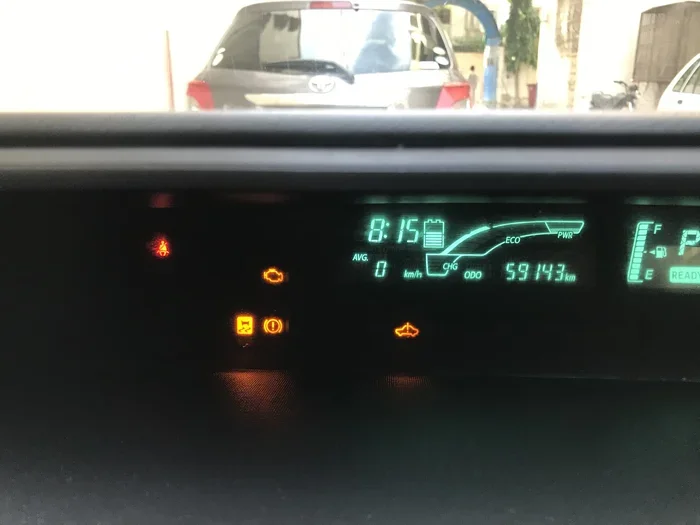
A Toyota maintenance code is a signal from your car’s computer that tells you it is time for scheduled service. The most common symbol is a small wrench icon on your dashboard. Sometimes it shows as “MAINT” or “Service Required.” This code is part of your Toyota’s maintenance reminder system, and it tracks your mileage and driving habits.
The system is smart. It does not just count miles. It also considers your driving conditions, such as short trips, heavy traffic, and towing. When the system determines that service is due, it triggers the maintenance light. This is different from a check engine light, which signals a specific problem. The maintenance code is more of a nudge than an alarm.
Types of Toyota Maintenance Codes
Not all maintenance codes are the same. Toyota vehicles use different codes depending on the model and year. Here are the most common ones you might see:
- Wrench icon (MAINT): This is the standard maintenance reminder found on most Toyota models. It appears when your next service interval is approaching.
- Check Engine Light (CEL): While not strictly a maintenance code, this light can sometimes overlap with service-related issues. It requires a different diagnostic approach.
- Oil Change Reminder: A specific code that tells you it is time to change your engine oil. This is the most common maintenance-related alert.
- ABS or Brake Warning: These can sometimes be tied to maintenance schedules, especially if your brake pads need inspection.
Understanding which code you are dealing with helps you choose the right reset method. If you are unsure, you can do your own car diagnostics with a basic scanner to identify the exact code.
Why Does Your Toyota Show a Maintenance Code?
There are several reasons your Toyota might display a maintenance code. The most common one is simply that it is time for routine service. But let us look at all the possible triggers so you know exactly what is going on.
Mileage-Based Service Intervals
Toyota sets maintenance intervals based on mileage. Most models use a 5,000-mile or 10,000-mile service schedule. When you hit that milestone, the maintenance code appears. This is by design — Toyota wants you to stay on top of oil changes, tire rotations, and inspections.
Time-Based Reminders
Sometimes the code appears based on time, not mileage. If you drive infrequently, your Toyota might still trigger the maintenance light after six months or a year. This ensures that even low-mileage drivers get their cars serviced regularly.
Driving Conditions
Toyota’s maintenance system is sensitive to driving conditions. If you frequently drive in stop-and-go traffic, tow heavy loads, or drive in extreme heat or cold, the system may trigger the maintenance code sooner than expected. These are called “severe service” conditions, and they put more wear on your vehicle.
After a Repair or Part Replacement
Sometimes the maintenance code stays on even after you have completed a service. This happens when the system has not been properly reset. In this case, you need to clear the Toyota maintenance code manually.
Tools You Need to Clear Toyota Maintenance Codes
You do not need expensive equipment to clear a Toyota maintenance code. However, having the right tools makes the process much smoother. Here is what you will need, depending on the method you choose.
OBD2 Scanner
An OBD2 scanner is the most reliable tool for clearing Toyota maintenance codes. It plugs directly into your car’s diagnostic port and communicates with the onboard computer. You can buy a basic scanner for under $30, or invest in a more advanced model with live data streaming.
Many people wonder if they can handle diagnostics on their own. The answer is yes — you can absolutely do your own car diagnostics with a simple OBD2 scanner. It is one of the best investments any car owner can make.
Toyota Techstream Software
Techstream is Toyota’s official diagnostic software. It is more powerful than a generic OBD2 scanner and gives you access to deeper system controls. You will need a laptop and a compatible cable. Techstream is especially useful for older Toyota models where generic scanners may not work properly.
Toyota Smart Key System and App
Some newer Toyota models support app-based diagnostics and reset features. You can connect your phone to the car’s system and access maintenance functions. This is a convenient option if you do not want to buy any extra hardware. You can also download an app to start your car and manage certain maintenance features remotely.
Basic Hand Tools
For the simpler dashboard reset methods, you do not need any tools at all. Just your key and a few minutes of time. However, if you are going the battery disconnect route, you will need a basic wrench set.
Step-by-Step: How to Clear Toyota Maintenance Code
Now let us get to the part you have been waiting for. Here are the most effective methods to clear your Toyota maintenance code. Each method works for most Toyota models, but always double-check your owner’s manual for model-specific instructions.
Method 1: Using an OBD2 Scanner
This is the fastest and most reliable method. Here is how to do it:
- Locate your OBD2 port. On most Toyotas, it is under the dashboard on the driver’s side.
- Plug your OBD2 scanner into the port.
- Turn the ignition to the “ON” position (do not start the engine).
- Follow the scanner’s on-screen instructions to read the code.
- Once you confirm the code is a maintenance reminder (not a fault code), select the option to clear it.
- Turn the ignition off, wait 30 seconds, then turn it back on to verify the light is off.
Using an OBD2 scanner is the preferred method because it gives you full control. You can also check for any other codes that might be hiding in your system. If you are new to this, doing your own car diagnostics with a scanner is much easier than most people think.
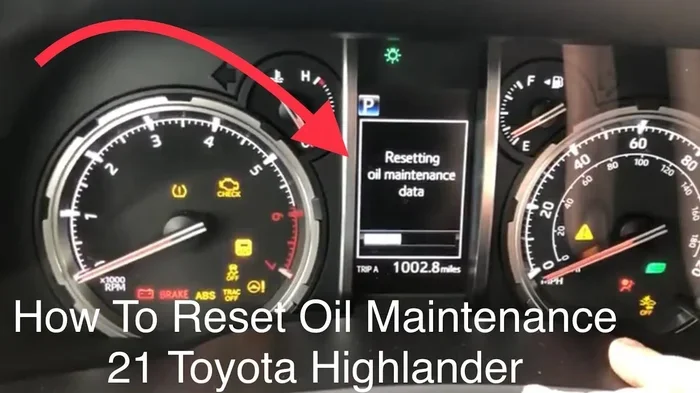
Method 2: Dashboard Button Reset
Many Toyota models allow you to reset the maintenance light using a combination of buttons on the dashboard or steering wheel. Here is the general process:
- Turn the ignition off.
- Press and hold the odometer or trip reset button on the dashboard.
- While holding the button, turn the ignition to the “ON” position.
- Continue holding the button for about 10 seconds until the maintenance light starts blinking.
- Release the button and turn the ignition off, then back on to confirm the light is cleared.
This method varies slightly depending on your Toyota model and year. If the steps above do not work for your specific car, consult your owner’s manual or search for a model-specific guide online.
Method 3: Battery Disconnect
Disconnecting the battery can reset the maintenance light, but it should be your last resort. Here is why: it can reset other settings in your car, such as radio presets, clock, and power window calibration. Use this method only if the other options do not work.
- Turn off the engine and all accessories.
- Open the hood and locate the negative battery terminal.
- Use a wrench to loosen the cable clamp and disconnect it from the battery.
- Wait at least 15 minutes.
- Reconnect the cable and tighten it securely.
- Start the engine and check if the maintenance light is off.
Keep in mind that some Toyota models may require a longer reset procedure even after disconnecting the battery. This method is less precise and can sometimes trigger additional warning lights.
Method 4: Using the Toyota App or Smart System
If you have a newer Toyota with connected features, you might be able to reset the maintenance code through the Toyota app or the car’s infotainment system. This method is the most convenient but only works on compatible models. Check your Toyota’s manual or the Toyota app store for details on your specific model.
Common Mistakes When Clearing Toyota Maintenance Codes
Clearing a Toyota maintenance code seems simple, but people make mistakes that cause bigger problems. Here are the most common errors to avoid.
Resetting Without Completing the Service
This is the biggest mistake. If your maintenance code appeared because you are due for an oil change, do not reset the light until you have actually changed the oil. Resetting the code without doing the work just clears the reminder — it does not fix the underlying need. Your Toyota will trigger the code again once you reach the next service interval.
Using the Wrong Reset Method
Not all Toyota models use the same reset procedure. Using the dashboard button method on a model that requires a scanner can frustrate you and waste time. Always check which method is compatible with your specific Toyota model and year.
Ignoring Other Warning Lights
If your maintenance light is on alongside other warning lights — such as the check engine light or oil pressure light — do not just reset everything. Those other lights may signal real problems that need attention. Clearing the maintenance code will not fix a mechanical issue.
Disconnecting the Battery Without Preparation
As mentioned earlier, disconnecting the battery can erase important settings and codes. If you go this route, make sure you are prepared to reset your clock, radio presets, and any other personalized settings afterward.
When to See a Professional Instead
Most Toyota maintenance codes can be cleared at home. But there are times when it is smart to visit a professional. Here are the situations where DIY is not the best choice.
- The maintenance light keeps coming back: If you reset the code and it returns within a few days, there may be an underlying issue that needs diagnosis.
- Multiple warning lights are on: This could indicate a more serious problem that requires professional diagnostic equipment.
- You do not have the right tools: If you do not own an OBD2 scanner and your dashboard reset method is not working, a quick visit to a mechanic or auto parts store can solve the problem.
- Your Toyota is still under warranty: Some warranty programs require maintenance to be performed at a certified dealer. Clearing codes yourself might not affect the warranty, but it is worth checking your warranty terms first.
If you are dealing with a persistent code or multiple alerts, consider visiting a trusted Toyota service center or a qualified mechanic. They have professional-grade tools and the expertise to diagnose issues you might miss on your own.
Preventing Future Maintenance Code Issues
The best way to deal with Toyota maintenance codes is to prevent them from becoming a headache in the first place. Here are some simple habits that keep your Toyota running smoothly and your dashboard clean.
- Follow the maintenance schedule: Stick to the service intervals outlined in your owner’s manual. Regular oil changes, tire rotations, and inspections keep your car healthy.
- Reset the code after every service: Make it a habit to reset the maintenance light immediately after completing a service. This keeps your dashboard accurate and your reminders useful.
- Keep a maintenance log: Write down every service you perform, including dates and mileage. This helps you track your car’s health and avoid surprises.
- Use quality parts and fluids: Cheap oil or low-quality parts can trigger maintenance alerts or cause premature wear. Stick with OEM or high-quality aftermarket parts.
- Monitor your driving conditions: If you frequently drive in severe conditions, your Toyota may need more frequent service. Adjust your maintenance schedule accordingly.
Taking a few minutes to stay on top of your Toyota’s maintenance needs saves you time, money, and stress in the long run. A well-maintained Toyota lasts longer, runs better, and holds its value.
Quick Tips for Clearing Toyota Maintenance Codes
- Always read the code first: Use an OBD2 scanner to confirm it is a maintenance reminder and not a fault code before resetting.
- Keep your owner’s manual handy: It contains model-specific reset instructions that can save you time and frustration.
- Reset after service, not before: This ensures the maintenance reminder accurately reflects your car’s actual service status.
- Buy a basic OBD2 scanner: It is one of the most useful tools any car owner can own. It costs less than a tank of gas and pays for itself quickly.
- Do not ignore persistent lights: If the maintenance code returns after resetting, something else is going on that needs attention.
Key Takeaways
- Multiple methods work: You can clear a Toyota maintenance code using an OBD2 scanner, dashboard buttons, battery disconnect, or the Toyota app.
- Confirm the code type first: Make sure you are dealing with a maintenance reminder and not a fault code before resetting.
- Reset only after completing service: Clearing the light without doing the actual maintenance just delays the reminder.
- Avoid common mistakes: Do not ignore other warning lights, and do not use the battery disconnect method unless necessary.
- Know when to call a pro: Persistent codes, multiple warning lights, or warranty concerns are signs that professional help is the right call.
- Prevention is the best strategy: Following your Toyota’s maintenance schedule and keeping a service log prevents most maintenance code issues.
Conclusion
Clearing a Toyota maintenance code does not have to be stressful or expensive. With the right tools and a little patience, you can handle it yourself in minutes. Whether you use an OBD2 scanner, the dashboard button method, or the Toyota app, the key is to reset the code only after you have completed the actual service. This keeps your maintenance schedule accurate and your Toyota running at its best.
Remember, the maintenance light is there to help you, not to scare you. It is a friendly reminder that your car needs attention. When you respond to it promptly and reset it correctly, you are taking a big step toward long-term vehicle health. If you ever feel unsure, do not hesitate to reach out to a professional. But for most Toyota owners, clearing the maintenance code is a quick, easy DIY task.
Now that you know how to clear your Toyota maintenance code, you can handle it confidently the next time that wrench icon lights up on your dashboard. Keep this guide bookmarked, share it with fellow Toyota owners, and keep your car in top shape.
FAQs
Can I clear a Toyota maintenance code without a scanner?
Yes, most Toyota models allow you to reset the maintenance light using dashboard buttons. The exact steps vary by model and year, so check your owner’s manual for the specific procedure. This method works for standard maintenance reminders but may not work for fault codes.
Will clearing the maintenance code void my Toyota warranty?
No, simply resetting a maintenance code does not void your warranty. However, if you skip scheduled services and only reset the light, it could affect warranty coverage. Always keep records of your actual maintenance work.
How often should I reset my Toyota maintenance code?
You should reset the maintenance code every time you complete a scheduled service, such as an oil change or tire rotation. This keeps your maintenance tracking accurate and ensures the reminder system works properly.
What is the difference between a maintenance code and a check engine code?
A maintenance code is a routine service reminder based on mileage or time. A check engine code signals a specific mechanical or electrical problem. You can use an OBD2 scanner to read the exact code and determine which type it is.
Can I use any OBD2 scanner to clear Toyota codes?
Most generic OBD2 scanners work for clearing Toyota maintenance codes. However, for deeper diagnostics or model-specific features, a Toyota-compatible scanner or Techstream software may be needed. Basic scanners handle standard maintenance resets just fine.
Why does my Toyota maintenance light keep coming back after I reset it?
If the light returns shortly after resetting, it usually means the underlying service has not been completed or there is a deeper issue. Check that you have performed the required maintenance and use a scanner to look for additional fault codes that may need attention.