How to Change the Speedometer Display on Jeep Grand Cherokee
Changing the speedometer display on a Jeep Grand Cherokee is simple and takes just a few minutes. You can switch between miles per hour and kilometers per hour, adjust brightness, and customize your dashboard readout through the Uconnect system or steering wheel controls. This guide walks you through every method so you can tailor your speedometer to your preferences.
This is a comprehensive guide about How to Change the Speedometer Display on a Jeep Grand Cherokee.
Key Takeaways
- Multiple Methods Available: You can change the speedometer display using the steering wheel controls, the Uconnect touchscreen, or the vehicle settings menu.
- Unit Conversion is Easy: Switching between mph and km/h takes just a few taps and does not require any tools.
- Brightness and Style Options: You can adjust the display brightness and choose between different gauge themes for better visibility.
- No Professional Help Needed: This is a DIY process that anyone can do at home with basic familiarity with the vehicle menus.
- Settings Save Automatically: Once you make changes, they stay saved even after you turn the vehicle off and on again.
[FEATURED_IMAGE_PLACEHOLDER]
How to Change the Speedometer Display on Jeep Grand Cherokee
Your Jeep Grand Cherokee is more than just a powerful SUV. It comes loaded with smart features that let you personalize almost every detail of your driving experience. One of the most useful yet overlooked features is the ability to change the speedometer display. Whether you want to switch from miles per hour to kilometers per hour, adjust the brightness, or tweak the layout, the Grand Cherokee gives you full control. In this guide, we will walk you through every method step by step. You will learn how to navigate the menus, use the steering wheel buttons, and make the most of your dashboard display. Let us get started.
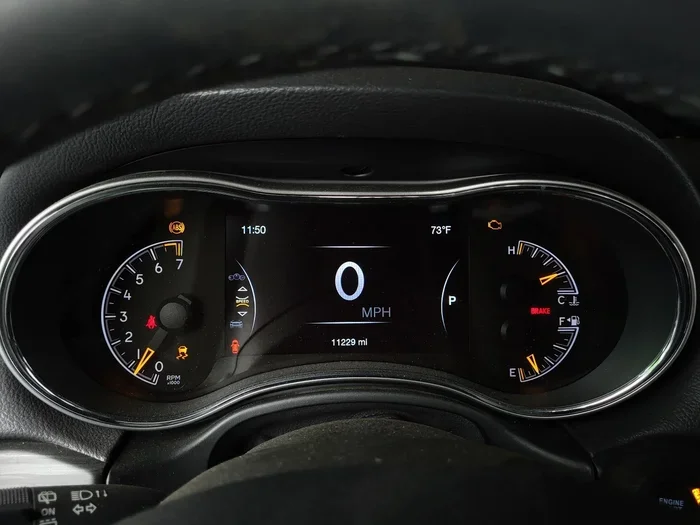
The speedometer display on the Jeep Grand Cherokee is part of the instrument cluster behind the steering wheel. Depending on your model year, you may have a traditional analog gauge or a fully digital screen. Newer models come with the Uconnect infotainment system, which makes customization a breeze. Older models may require a slightly different approach. Either way, the process is straightforward and does not require any special tools. You can make these changes in under five minutes from the comfort of your driver seat.
Before we dive into the steps, let us talk about why you might want to change your speedometer display. Maybe you are driving in a country that uses metric units and need to switch to kilometers per hour. Perhaps the display is too bright at night and you want to dim it. Or maybe you simply prefer a different layout for easier reading. Whatever your reason, this guide covers it all. We will also share some quick tips and common mistakes to avoid along the way.
Understanding Your Jeep Grand Cherokee Speedometer
Before you change anything, it helps to understand what you are working with. The speedometer display on a Jeep Grand Cherokee varies by model year and trim level. Let us break down the common types you might encounter.
Analog vs Digital Speedometer
Older Grand Cherokee models (pre-2014) typically feature an analog speedometer. This is the classic design with a physical needle that moves across a dial. The numbers are printed on the gauge face, and there is limited customization. You cannot change the units or the layout on an analog cluster without aftermarket modifications.
Newer models (2014 and later) come with a digital instrument cluster or a hybrid design. The digital display shows your speed as a number on a screen. These clusters are fully configurable. You can change the speed unit, adjust the brightness, switch between day and night modes, and even choose what information appears on the driver information center. If your Grand Cherokee has a digital display, you have much more flexibility.
The Role of the Uconnect System
The Uconnect system is the brain behind the infotainment and display features in modern Jeep Grand Cherokee models. It controls everything from the touchscreen to the instrument cluster settings. When you want to change your speedometer display, you are usually accessing a Uconnect menu. Understanding how to navigate Uconnect is the key to unlocking all these customization options. The system uses a combination of the touchscreen and steering wheel controls to let you make changes safely while driving.
Method 1: Change Speed Unit Using Steering Wheel Controls
The quickest way to change your speedometer display is through the steering wheel controls. This method works on most Grand Cherokee models with a digital cluster. It takes less than 30 seconds and does not require you to take your eyes off the road for long.
Step-by-Step Instructions
Here is exactly what to do:
- Start your Jeep Grand Cherokee and make sure the engine is running.
- Press the Menu button on the steering wheel. This opens the vehicle settings on the instrument cluster display.
- Use the up and down arrow buttons to scroll to the “Display” or “Settings” option.
- Press the OK button to select it.
- Scroll to “Units” or “Speed Unit.” This option lets you choose between miles per hour and kilometers per hour.
- Select your preferred unit and press OK to confirm.
- Exit the menu. The change takes effect immediately.
That is it. Your speedometer display will now show the new unit. The change is permanent until you decide to switch it back. This method is perfect for quick adjustments, especially when you are traveling internationally or prefer metric measurements.
Tips for Using Steering Wheel Controls
- Be gentle with the buttons. The steering wheel controls are responsive but pressing too hard will not speed things up.
- Wait for the menu to fully load before making your selection. Rushing can cause you to select the wrong option.
- Use the left and right arrows to navigate between submenus if your model has nested options.
Method 2: Adjust Display Settings Through the Uconnect Touchscreen
If your Grand Cherokee has a larger Uconnect touchscreen, you can access more display settings directly from the screen. This method gives you finer control over the speedometer display and overall dashboard appearance.
Step-by-Step Instructions
Follow these steps to adjust your display through the touchscreen:
- Tap the Settings icon on the Uconnect home screen. It usually looks like a gear.
- Scroll down to “Vehicle Settings.” Tap to enter this menu.
- Look for “Display” or “Instrument Cluster.” Tap on it to see available options.
- Select “Speedometer” or “Speed Display.” Here you can choose the unit, adjust brightness, and toggle between day and night modes.
- Adjust the brightness slider to your liking. Lower brightness reduces glare at night.
- Choose your preferred theme if your model supports multiple display themes.
- Tap “Save” or “Apply” to confirm your changes.
This method is especially useful if you want to customize more than just the speed unit. You can also change the background color, adjust the font size, and decide which additional metrics appear alongside your speed readout. The Uconnect touchscreen makes the entire process visual and intuitive.
What You Can Customize
Through the Uconnect display settings, you can adjust several aspects of the dashboard display:
- Speed unit (mph or km/h)
- Display brightness for day and night driving
- Theme selection (light or dark mode)
- Information layout (what data appears around the speedometer)
- Trip computer display options
Method 3: Change Display Through the Vehicle Information Center
Some Grand Cherokee models allow you to access display settings through the vehicle information center. This is a secondary menu that provides detailed data about your vehicle, including the speedometer display configuration.
How to Access the Vehicle Information Center
Here is how you can reach this menu:
- Press the Info button on the steering wheel. This button is usually marked with a lowercase “i” inside a circle.
- Scroll through the available options using the arrow buttons.
- Look for “Settings” or “Preferences.” Select it by pressing OK.
- Find the “Display” section. This is where you can modify the speedometer display settings.
- Make your changes and save them before exiting the menu.
The vehicle information center is a handy feature that many drivers overlook. It gives you access to detailed vehicle configuration options that are not always available through the main touchscreen. If you cannot find the speedometer settings in the Uconnect menu, try this method instead.
Common Display Issues and How to Fix Them
Sometimes things do not go as planned when you are adjusting your speedometer display. Here are some common issues and simple fixes.
Display Not Responding to Controls
If the steering wheel controls or touchscreen do not respond when you try to change the speedometer display, try restarting the system. Press and hold the power button on the Uconnect screen for about 10 seconds. The system will reboot, and the controls should work normally again. This is similar to restarting a computer and often resolves temporary glitches.
Speed Unit Reverts After Turning Off the Vehicle
In rare cases, the speed unit may revert to the default setting after you turn off the engine. This usually happens if the vehicle battery was recently disconnected or if there was a power interruption. To fix this, simply repeat the steps in Method 1 or Method 2 to set your preferred unit again. The setting should save properly the second time around.
Display Too Dim or Too Bright
If the dashboard display is too dim to read during the day or too bright at night, you can adjust the brightness manually. Go to the Display settings in Uconnect and use the brightness slider. You can also set the display to auto-dimming mode if your model supports it. This feature automatically adjusts brightness based on ambient light conditions.
Quick Tips for Getting the Most Out of Your Speedometer Display
Here are some practical tips to help you make the best use of your speedometer display on the Jeep Grand Cherokee:
- Use night mode while driving at night. It reduces eye strain and glare from the dashboard.
- Check your speed unit before long trips. Make sure it matches the local measurement system to avoid speeding tickets.
- Keep your display clean. A dusty or dirty screen can make the speed readout hard to read.
- Explore the trip computer. The Grand Cherokee offers multiple trip meters that can complement your speedometer data.
- Update your Uconnect system. Software updates sometimes add new display options and improve existing ones.
These small steps can make a big difference in your daily driving experience. A well-configured dashboard display improves both comfort and safety on the road.
Expert Insights on Customizing Your Jeep Dashboard
According to automotive experts, the Jeep Grand Cherokee offers one of the most customizable dashboards in its class. The digital instrument cluster allows drivers to personalize not just the speedometer display but also the overall layout of the driver information center. Experts recommend taking a few minutes to explore all available settings during your first week of ownership. This way, you can tailor the display to your specific driving habits and preferences.
One thing to keep in mind is that aftermarket modifications to the speedometer display can void your warranty. If you want to make changes beyond what the factory settings allow, consult with your Jeep dealer first. They can advise you on safe customization options that do not affect your vehicle coverage.
Key Takeaways
- Multiple Methods Available: You can change the speedometer display using steering wheel controls, the Uconnect touchscreen, or the vehicle information center.
- Unit Switching is Instant: Switching between mph and km/h takes just a few button presses and saves automatically.
- Brightness and Theme Customization: You can adjust display brightness and choose between light and dark themes for better visibility.
- No Tools Required: All changes are made through the vehicle’s existing menus and controls, no professional help needed.
- Settings Persist: Once saved, your display preferences remain active even after turning the vehicle off and on.
- Explore the Trip Computer: The Grand Cherokee offers additional data displays that complement your speed readout.
- Avoid Aftermarket Risks: Stick to factory settings or consult a dealer before making aftermarket modifications to your dashboard display.
Changing the speedometer display on your Jeep Grand Cherokee is one of the easiest ways to make your vehicle feel more personalized and comfortable to drive. Whether you need to switch units, adjust brightness, or explore new display themes, the process is quick and straightforward. The Uconnect system and steering wheel controls give you everything you need right at your fingertips. Take a few minutes to explore the settings and find the configuration that works best for you. Your dashboard display is one of the most important tools in your vehicle, so make sure it is set up exactly how you want it.
With the tips and steps in this guide, you now have full control over how your speed information is presented. No more squinting at a dim display or confusing units. Just a clean, clear, and personalized speedometer readout that matches your driving style. Enjoy the road in your Jeep Grand Cherokee with confidence and comfort.
If you are interested in learning more about your vehicle’s features, check out our guide on 1500cc to 2000cc cars in India for insights into engine displacement and how it affects your driving experience. You might also find our article on 12V DC to 220V AC car power inverter helpful if you want to add electrical accessories to your Grand Cherokee. Finally, understanding your vehicle’s weight and specifications is always useful, so consider reading about what makes a car heavy to learn more about vehicle specifications and how they impact performance.
FAQs
Can I change the speedometer from mph to km/h on any Jeep Grand Cherokee model?
Most Grand Cherokee models from 2014 onward with a digital instrument cluster support unit switching. Older analog models may require aftermarket modifications. Check your owner’s manual or the Uconnect settings to confirm your specific model supports this feature.
Do I need any special tools to change the speedometer display settings?
No special tools are needed at all. You can make all changes using the steering wheel controls or the Uconnect touchscreen. The process is entirely software-based and takes just a few minutes.
Will changing the speed unit affect my odometer reading?
No, changing the speed unit only affects how your speed is displayed. The odometer continues to track distance accurately regardless of the speed unit you select. Your recorded mileage remains unchanged.
Why does my speedometer display reset after I turn off the car?
This can happen if the vehicle battery was recently disconnected or if there was a power interruption. Simply repeat the steps to change your preferred unit again. The setting should save properly after re-entering it.
Can I customize the color of my speedometer display?
Some Grand Cherokee models allow you to choose from different display themes, which may include color options. Check the Display settings in the Uconnect system to see what customization options are available for your specific model year.
Is it safe to adjust the speedometer display while driving?
It is best to make display adjustments when the vehicle is parked or at a complete stop. If you need to make a quick change while driving, use the steering wheel controls as they allow you to keep your eyes on the road. The menu navigation is designed to be simple and fast for safe use.
Frequently Asked Questions
What is How to Change the Speedometer Display on a Jeep Grand Cherokee?
How to Change the Speedometer Display on a Jeep Grand Cherokee is an important topic with many practical applications.