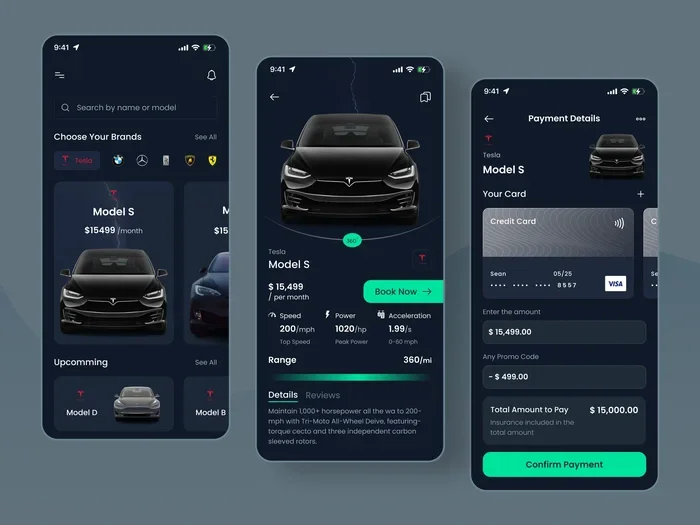
Car Rental Template WordPress and How to Build Yours
A car rental template WordPress solution lets you launch a professional vehicle booking website fast and affordably. You get pre-built designs, booking engines, and fleet management tools that save you time and money. This guide walks you through everything you need to build, customize, and grow your car rental website using WordPress.
Building a website for a car rental business used to be a big project. You needed a developer, a designer, and a lot of patience. Those days are over. Today, a car rental template wordpress setup gives you everything you need to go online in just a few days. Whether you run a small local fleet or a large international rental company, the right WordPress template can transform how you do business.
People search for car rental website design solutions every single day. They want to book vehicles online, compare prices, and reserve cars with just a few clicks. If your website does not offer that experience, you lose customers to competitors who do. A well-built WordPress site with a solid car rental theme solves this problem completely. It gives your customers a smooth booking journey and gives you a powerful tool to manage reservations, track vehicles, and grow revenue.
In this guide, we will cover everything you need to know. From choosing the right template to adding booking plugins, customizing your design, and optimizing for search engines, we have you covered. You will learn practical steps you can follow right away. Let us dive in and build your car rental website the smart way.
Key Takeaways
- Easy Setup: A car rental template wordpress theme lets you launch quickly without coding skills.
- Built-In Booking Tools: WordPress plugins add reservation forms, payment gateways, and calendar management.
- Cost-Effective: Using a template costs far less than hiring a developer from scratch.
- Mobile-Friendly: Most modern themes are responsive and work perfectly on phones and tablets.
- Scalable: You can start small and grow your fleet and features as your business expands.
- SEO-Ready: Quality themes are optimized for search engines, helping you attract more customers.
- Customizable: You can change colors, layouts, and features to match your brand identity.
📑 Table of Contents
- What Is a Car Rental Template WordPress Solution?
- Key Features of a Great Car Rental Template
- Top WordPress Themes for Car Rental Websites
- Step-by-Step: How to Build Your Car Rental Website
- Common Mistakes to Avoid
- Expert Insights: Making Your Rental Site Stand Out
- How Much Does It Cost to Build a Car Rental Website with WordPress?
- Key Takeaways
- Conclusion
What Is a Car Rental Template WordPress Solution?
A car rental template wordpress is a pre-designed website theme built specifically for vehicle rental businesses. It comes with layouts, features, and functionality tailored to how car rental companies operate. Instead of building a site from a blank page, you start with a professional foundation. You then customize it to match your brand, fleet, and business goals.
Think of it like buying a house that already has the plumbing and wiring in place. You still get to choose the paint colors, furniture, and decorations. But you do not have to lay the foundation yourself. That is exactly what a wordpress car rental theme does for your website.
Why Choose WordPress for Car Rental?
WordPress powers over 40% of all websites on the internet. It is open source, which means it is free to use and endlessly flexible. Here is why it is a great choice for your rental business:
- User-Friendly: You do not need to know how to code. The dashboard is simple and intuitive.
- Huge Plugin Library: Thousands of plugins add booking systems, payment processing, and fleet management.
- SEO-Friendly: WordPress sites rank well on Google when set up correctly.
- Affordable: Compared to custom development, WordPress templates cost a fraction of the price.
- Scalable: You can start with a basic site and add features as your business grows.
- Community Support: Millions of users and developers share tutorials, tips, and support forums.
All of these benefits make wordpress car booking a natural fit for anyone starting or growing a rental business online.
Key Features of a Great Car Rental Template
Not all templates are created equal. When you are shopping for a car rental template wordpress, you need to know what features actually matter. Here is what to look for.
Booking Engine Integration
The heart of any car rental website is the booking engine. This is the tool that lets customers pick dates, choose a vehicle, and complete a reservation. A quality template includes or supports a car booking plugin that handles the entire process. Look for features like:
- Date and time pickers for pickup and return
- Vehicle comparison tools
- Real-time availability checks
- Secure payment processing
- Email confirmation and booking summaries
Without a smooth booking engine, customers will leave your site and go to a competitor. This single feature can make or break your online rental business.
Fleet Management Display
Your vehicles are your product. Your template should showcase them beautifully. Look for features that let you display your fleet with high-quality images, detailed descriptions, pricing, and availability status. Some vehicle rental software integrations even let you manage your entire fleet from the WordPress dashboard.
Responsive Design
More than 60% of web searches happen on mobile devices. Your car hire website template must look great on phones and tablets. A responsive design automatically adjusts the layout to fit any screen size. This keeps your customers happy and helps your search engine ranking too.
SEO Optimization
A good car rental template wordpress comes with clean code and built-in SEO features. This means your site has a better chance of showing up when people search for terms like online car rental booking or car hire near me. Look for templates that support fast loading speeds, clean URLs, and schema markup.
Multi-Language and Currency Support
If you serve customers from different countries, your template should support multiple languages and currencies. This feature is especially important for businesses that operate across borders or in tourist-heavy areas.
Top WordPress Themes for Car Rental Websites
Choosing the right theme sets the foundation for your entire website. Here are some popular options that work well for car rental website design:
| Theme Name | Best For | Price Range | Booking Support |
|---|---|---|---|
| Rentivo | Full rental websites | $49-$199 | Yes, built-in |
| Reactor | Car and equipment rental | $59-$149 | Yes, plugin-ready |
| Car Dealer | Vehicle sales and rentals | Free-$69 | With plugins |
| Motors | Automotive businesses | $49-$199 | With add-ons |
| Flavor | Custom rental sites | $59-$149 | Yes, flexible |
Each of these themes offers different strengths. Rentivo, for example, is built specifically for rental businesses and includes a full booking system out of the box. Motors works well for businesses that also sell vehicles alongside rentals. Your choice depends on your specific needs and budget.
How to Pick the Right One
Here are quick tips to help you decide:
- Identify Your Needs: List the features you absolutely must have. Do you need fleet management? Online payments? Multi-language support?
- Check Reviews: Look at user ratings and reviews before buying. Real feedback tells you a lot about quality.
- Test Demos: Most premium themes offer live demos. Test them on your phone and desktop.
- Consider Support: Choose a theme with good customer support and regular updates.
- Think About Growth: Pick a theme that can grow with your business, not one that limits you.
Step-by-Step: How to Build Your Car Rental Website
Now that you understand what makes a great template, let us walk through the actual build process. Following these steps will get your car rental website up and running quickly.
Step 1: Choose and Install Your Theme
Start by purchasing a car rental template wordpress theme from a trusted provider like ThemeForest, TemplateMonster, or the theme developer’s website. Once purchased, upload it to your WordPress site through the Appearance > Themes > Add New section. Activate the theme and explore its demo content to see what is included.
Step 2: Install Essential Plugins
Plugins add the functionality your theme needs to run a rental business. Here are the essential ones:
- Booking Plugin: Look for a car booking plugin like Booking Calendar, WP Booking System, or a plugin that comes bundled with your theme.
- Payment Gateway: Install WooCommerce or a payment plugin that supports Stripe, PayPal, and other popular options.
- SEO Plugin: Use Yoast SEO or Rank Math to optimize your pages for search engines.
- Contact Form: Install Contact Form 7 or WPForms so customers can reach you easily.
- WPML or Polylang: Add multi-language support if you serve international customers.
Each plugin serves a specific purpose in your online car rental business. Do not install too many, as that can slow down your site. Stick to the ones you truly need.
Step 3: Customize Your Design
Use the WordPress Customizer or a page builder like Elementor or WPBakery to personalize your site. Change colors, fonts, and layouts to match your brand. Add your logo, upload high-quality images of your vehicles, and write compelling copy for each page.
Quick tips for customization:
- Keep the design clean and uncluttered
- Use high-resolution images of your vehicles
- Make the booking button prominent on every page
- Use trust signals like testimonials and security badges
- Ensure your phone number and contact info are easy to find
Step 4: Add Your Fleet and Set Up Booking
This is the fun part. Add each vehicle to your site with photos, specifications, daily rates, and availability. Configure your booking plugin so customers can select dates, see real-time pricing, and complete their reservation. Test the entire booking process yourself before going live.
Step 5: Optimize for SEO
Use your SEO plugin to optimize every page. Write unique meta titles and descriptions for each page. Use keywords like car rental template wordpress, online car booking, and vehicle reservation system naturally in your content. Create blog posts about topics your customers care about, like “Tips for Renting a Car in Miami” or “How to Choose the Right Rental Vehicle.”
Step 6: Launch and Promote
Once everything is tested and working perfectly, launch your site. Share it on social media, list it on Google My Business, and consider running paid ads to drive initial traffic. Ask satisfied customers for reviews to build trust with new visitors.
Common Mistakes to Avoid
Many people make avoidable mistakes when building their car rental website. Here is what to watch out for:
- Skipping Mobile Testing: If your site does not work well on phones, you will lose a huge portion of your audience.
- Overcomplicating the Booking Process: Keep it simple. Every extra step increases the chance of abandonment.
- Ignoring Page Speed: Slow websites frustrate visitors and hurt your search rankings. Use caching plugins and optimize images.
- Using Low-Quality Images: Blurry photos of vehicles will not inspire confidence. Invest in good photography.
- Forgetting Legal Pages: Include clear terms and conditions, privacy policy, and rental agreements.
- Neglecting Updates: Keep your theme and plugins updated to maintain security and performance.
Avoiding these pitfalls will save you time, money, and frustration in the long run.
Expert Insights: Making Your Rental Site Stand Out
Expert Insight: The most successful car rental template wordpress sites do more than just display vehicles. They create an experience. Customers should feel confident the moment they land on your site. Use trust badges, clear pricing, and a seamless booking flow to build that confidence.
Expert Insight: Add a blog section to your site. Write about local travel tips, seasonal rental advice, and vehicle care guides. This not only helps with search engine optimization but also positions your business as an authority in the car rental space. Customers trust businesses that share useful information.
Expert Insight: Consider adding a loyalty program or discount system. Repeat customers are the backbone of any rental business. A simple plugin can let you offer returning customers special rates or reward points for each booking.
How Much Does It Cost to Build a Car Rental Website with WordPress?
The cost varies depending on your choices, but here is a realistic breakdown:
- WordPress Hosting: $5-$30 per month
- Theme Purchase: $49-$199 (one-time)
- Essential Plugins: $0-$200 (many quality plugins are free)
- Domain Name: $10-$15 per year
- Custom Design Work (Optional): $200-$1,000+
All in all, you can launch a professional car rental website for as little as $100-$300 in the first year. Compare that to the $5,000-$20,000 you might pay for a custom-built site. The cost savings with a car rental template wordpress approach are enormous.
Key Takeaways
- Saves Time and Money: A pre-built template gets your site live in days, not months, at a fraction of custom development costs.
- Built-In Booking Features: Modern themes come with or support booking engines that handle reservations, payments, and confirmations automatically.
- Mobile-First Design: Customers browse and book on their phones. Your template must deliver a flawless mobile experience.
- SEO Advantage: Quality themes are built with clean code and fast loading speeds, helping you rank higher on Google.
- Easy to Scale: Start with a basic site and add features like fleet management, loyalty programs, and multi-language support as your business grows.
- Professional Results: Even without coding skills, you can build a polished, trustworthy website that converts visitors into customers.
Conclusion
Building a car rental template wordpress website is one of the smartest moves you can make for your rental business. It gives you a professional online presence without the high costs and long timelines of custom development. From choosing the right theme to adding booking plugins and optimizing for search engines, every step brings you closer to a website that works hard for you 24 hours a day.
The car rental website design landscape has changed dramatically. Today, powerful tools are available to anyone with an internet connection. You do not need to be a tech expert. You just need the right template, the right plugins, and the willingness to put in a little effort. Your customers are already searching for rental services online. A well-built WordPress site ensures they find you, book with you, and come back for more.
Start today. Pick a theme, install your plugins, customize your design, and launch your online car rental business. The road to success begins with a single step, and that step starts with choosing the right car rental template wordpress solution for your needs.
Frequently Asked Questions
What is a car rental template WordPress?
A car rental template WordPress is a pre-designed website theme built specifically for vehicle rental businesses. It includes layouts, booking features, and design elements tailored to how car rental companies operate. You customize it to match your brand and launch your site quickly.
How much does a car rental WordPress theme cost?
Most car rental template wordpress themes cost between $49 and $199 for a single purchase. Some premium options go higher. You also need to budget for hosting ($5-$30/month) and possibly paid plugins. Overall, it is far cheaper than hiring a developer for a custom site.
Do I need coding skills to use a car rental WordPress template?
No. One of the biggest advantages of using a wordpress car rental theme is that you do not need to write any code. Most themes come with drag-and-drop builders and intuitive dashboards. Anyone can set up and customize a professional-looking site.
Can I add a booking engine to my WordPress car rental site?
Absolutely. Many car rental template wordpress themes include built-in booking systems. You can also add dedicated car booking plugin options like WP Booking System or WooCommerce. These tools let customers reserve vehicles, make payments, and receive confirmations online.
Will my car rental website work on mobile devices?
Yes. Modern car rental website design themes are responsive, meaning they automatically adjust to fit any screen size. This ensures your customers have a great experience whether they are browsing on a desktop, tablet, or smartphone.
How long does it take to build a car rental website with WordPress?
With a quality car rental template wordpress solution, you can have a fully functional website live within a few days to a couple of weeks. The exact time depends on how many vehicles you add, how much customization you do, and how quickly you set up your booking system.