Does Acura Have Apple CarPlay The Definitive Guide
Yes, most modern Acura models come with Apple CarPlay built in. This guide explains which Acura vehicles support Apple CarPlay, how to set it up, and what features you get. Whether you drive an Acura RDX, MDX, or TLX, you will find everything you need to know right here.
Does your Acura support Apple CarPlay? If you have been wondering about this, you are not alone. Car owners love the convenience of having their phone right on the dashboard. And Acura has made sure that most of its vehicles work with this popular feature.
In this guide, we will cover everything you need to know about Apple CarPlay in Acura vehicles. We will look at which models have it, how it works, and what you need to do to get it running. Whether you are shopping for a new Acura or already own one, this guide has you covered.
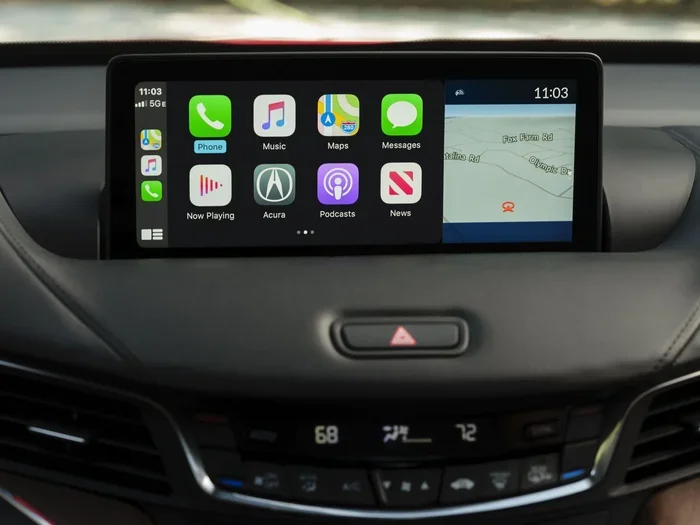
Let us start with the basics. Apple CarPlay is a smart system that mirrors your iPhone on your car screen. It lets you make calls, send messages, listen to music, and use maps safely while driving. Acura has made this feature available on many of its models in recent years.
Key Takeaways
- Broad Compatibility: Most Acura models from recent years support Apple CarPlay, including the RDX, MDX, TLX, and ILX.
- Two Connection Types: Acura offers both wired and wireless Apple CarPlay depending on the model and trim level.
- Easy Setup: Connecting your iPhone to an Acura is simple and takes just a few seconds.
- Full Feature Access: You get navigation, messaging, music, and Siri hands-free control through the Acura infotainment system.
- Not All Models Are Equal: Older or base trims may lack CarPlay, so always check your specific model year.
- Keep Software Updated: Regular updates to both your iPhone and Acura system ensure smooth CarPlay compatible performance.
📑 Table of Contents
- What Is Apple CarPlay and Why Does It Matter?
- Which Acura Models Support Apple CarPlay?
- How to Connect Apple CarPlay to Your Acura
- Features You Get with Apple CarPlay in Acura
- Acura Infotainment System and Apple CarPlay
- Common Issues and How to Fix Them
- Acura Models That May Not Have Apple CarPlay
- Acura Apple CarPlay vs Other Brands
- Tips for Getting the Most from Apple CarPlay in Your Acura
- The Future of Apple CarPlay in Acura Vehicles
- Final Thoughts
What Is Apple CarPlay and Why Does It Matter?
Apple CarPlay is Apple’s smart phone integration system. It connects your iPhone to your car’s infotainment screen. Once connected, you can access your apps, contacts, and media right from the dashboard. The system is designed to keep your eyes on the road and your hands on the wheel.
Here is why Apple CarPlay matters so much:
- Safety First: You can use Siri voice commands to make calls and send texts without touching your phone.
- Familiar Apps: You get access to Maps, Phone, Messages, Music, and more on a big screen.
- Seamless Connection: Plug in your iPhone or connect wirelessly, and your car becomes an extension of your phone.
- Better Navigation: You can use Google Maps or Waze alongside Apple Maps for the best directions.
For Acura owners, Apple CarPlay brings a whole new level of convenience to the driving experience. It turns your car’s built-in screen into a powerful tool that you already know how to use.
Which Acura Models Support Apple CarPlay?
Most Acura models made in recent years come with Apple CarPlay. But not every single model or trim level has it. Let us look at the main Acura vehicles and their CarPlay compatible status.
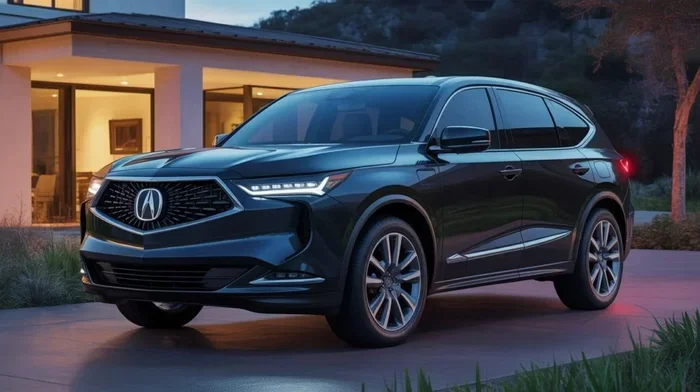
Acura RDX
The Acura RDX is one of the brand’s most popular SUVs. It comes with Apple CarPlay as part of its technology package. Both the current and recent model years of the RDX offer this feature. Whether you have the base model or a higher trim, you will likely find wireless Apple CarPlay support available.
The RDX uses Acura’s advanced infotainment system. It has a responsive touchscreen that works well with Apple CarPlay. The system also supports Android Auto for those who prefer that platform.
Acura MDX
The Acura MDX is the brand’s flagship three-row SUV. It also supports Apple CarPlay. The MDX comes with a large infotainment display that makes using CarPlay a great experience. The system is smooth, responsive, and easy to navigate.
If you are looking at the MDX, you can count on having CarPlay compatible technology. It comes standard on most trims and adds a lot of value to the driving experience.
Acura TLX
The Acura TLX is a sporty sedan that also features Apple CarPlay. It has a clean and modern infotainment interface. The TLX makes it easy to connect your iPhone and access all your favorite apps while on the road.
Both the TLX and its performance variant, the TLX Type S, offer CarPlay support. This makes it a great choice for drivers who want both sportiness and smart technology.
Acura ILX
The Acura ILX is a compact luxury sedan. It also supports Apple CarPlay on most model years. The ILX is a great entry point into the Acura lineup, and having CarPlay makes it even more appealing for daily commuting.
Other Acura Models
Other Acura models like the Acura ZDX and Acura Integra also support Apple CarPlay. Acura has made it a priority to include this feature across its lineup. This means most new Acura buyers can expect smartphone integration as a standard feature.
How to Connect Apple CarPlay to Your Acura
Setting up Apple CarPlay in your Acura is easy. The process takes just a few simple steps. Let us walk through it.
Wired Connection
The wired method is the most common way to connect Apple CarPlay to your Acura. Here is what you need to do:
- Plug your Lightning cable into your iPhone.
- Connect the other end into the USB port in your Acura.
- The car screen should detect your phone automatically.
- Tap the CarPlay icon on the display.
- You are now connected and ready to go.
Most Acura models have the USB port located in the center console or on the armrest. Make sure you use a high-quality cable for the best connection.
Wireless Connection
Some Acura models offer wireless Apple CarPlay. This means you do not need to plug in any cable at all. Here is how it works:
- Make sure Apple CarPlay is enabled on your iPhone.
- Go to your Acura infotainment settings.
- Select the wireless CarPlay option.
- Your phone and car will pair automatically.
- The connection happens every time you get in the car.
Wireless CarPlay is incredibly convenient. You never have to fumble with cables again. It just works every time you start your Acura.
Features You Get with Apple CarPlay in Acura
Once you connect Apple CarPlay to your Acura, you unlock a range of useful features. Let us look at what you can do.
Navigation and Maps
Apple CarPlay gives you access to Apple Maps right on your Acura’s screen. You can also use Google Maps, Waze, and other navigation apps. This is a huge advantage over the built-in navigation system. You get real-time traffic updates, voice guidance, and the best route options.
Messaging and Calls
With Apple CarPlay, you can make and receive calls through your Acura’s audio system. You can also send and receive messages using Siri voice commands. This keeps your hands on the wheel and your eyes on the road. It is one of the best safety features of the entire system.
Music and Media
You can access Apple Music, Spotify, Podcasts, and other audio apps through CarPlay. The sound quality through your Acura’s audio system is excellent. You can control playback, skip tracks, and adjust volume using the car’s controls or your voice.
Siri Integration
Siri is built right into Apple CarPlay. You can activate Siri by holding down the voice command button on your steering wheel. Siri can handle calls, texts, navigation, and more. It is a hands-free way to stay connected while driving your Acura.
Acura Infotainment System and Apple CarPlay
Acura’s infotainment system works hand in hand with Apple CarPlay. The system is designed to be intuitive and user-friendly. Here is what you should know about how it all comes together.
The Acura infotainment system features a responsive touchscreen display. It supports both wireless and wired Apple CarPlay connections. The interface is clean and easy to navigate. You can switch between CarPlay and the Acura native system with just a tap.
One thing to note is that Acura technology updates have improved the CarPlay experience over the years. Newer model years tend to have faster processors and better screen resolution. This means smoother performance and a more enjoyable user experience.
Acura has also integrated hands-free calling deeply into the system. When you receive a call through CarPlay, it comes through the car’s speakers. You can answer using the steering wheel buttons or a tap on the screen. It works seamlessly and feels natural.
Common Issues and How to Fix Them
While Apple CarPlay in Acura vehicles works great most of the time, you may run into occasional issues. Here are some common problems and how to solve them.
CarPlay Not Showing Up on Screen
If CarPlay does not appear after connecting your iPhone, try these steps:
- Check that your cable is working properly.
- Restart your iPhone and try again.
- Go to iPhone Settings and make sure CarPlay is enabled.
- Restart the Acura infotainment system by holding the power button.
Connection Keeps Dropping
If your wireless Apple CarPlay connection keeps dropping, try this:
- Make sure your iPhone software is up to date.
- Delete the CarPlay pairing on both your phone and car, then reconnect.
- Check for Acura software updates at your dealer.
Audio Cuts Out During Calls
For audio issues during calls, make sure your phone is not on silent. Also check that the correct audio source is selected on your Acura display.
Acura Models That May Not Have Apple CarPlay
While most modern Acura models support Apple CarPlay, there are some exceptions. Older model years, especially those before 2016, may not have this feature. Base trims on some older models might also lack CarPlay support.
If you are buying a used Acura, it is important to check whether the specific vehicle has CarPlay compatible technology. You can usually find this information in the vehicle’s features list or by asking the seller to demonstrate the connection.
For those interested in how other hybrid vehicles handle technology transitions, you can read about when hybrids switch to gas on our site for related insights on vehicle technology.
Acura Apple CarPlay vs Other Brands
How does Acura technology compare to other luxury brands when it comes to Apple CarPlay? Let us look at a quick comparison.
| Feature | Acura | BMW | Mercedes-Benz |
|---|---|---|---|
| Apple CarPlay Support | Yes on most models | Yes | Yes |
| Wireless Option | Available on select models | Available | Available |
| Ease of Use | Very intuitive | Good | Good |
| Screen Responsiveness | Fast and smooth | Fast | Fast |
Acura holds its own against other luxury brands. The Acura infotainment system is clean, responsive, and easy to use. The integration of Apple CarPlay feels natural and seamless. For most drivers, the Acura experience with CarPlay is on par with the best in the industry.
Tips for Getting the Most from Apple CarPlay in Your Acura
Want to make the most of Apple CarPlay in your Acura? Here are some practical tips.
- Keep Your iPhone Updated: Always run the latest iOS version for the best CarPlay experience.
- Use a Quality Cable: For wired connections, a good cable prevents connection issues and data transfer problems.
- Enable Wireless CarPlay: If your Acura supports it, set up wireless CarPlay for a cable-free experience.
- Customize Your Apps: Rearrange your CarPlay apps in the order you use them most often.
- Use Siri for Safety: Always use voice commands for calls and texts while driving your Acura.
- Check for Software Updates: Visit your Acura dealer for infotainment system updates that improve CarPlay performance.
These small steps can make a big difference in how smoothly Apple CarPlay works in your Acura every day.
The Future of Apple CarPlay in Acura Vehicles
Acura continues to invest in smartphone integration and connected car technology. As Apple CarPlay evolves, so does its integration into Acura vehicles. Future Acura models will likely offer even faster connections, better screen mirroring, and more seamless experiences.
With the rise of wireless CarPlay, the need for cables is fading. Acura is keeping pace with these trends. The brand understands that car connectivity is no longer a luxury. It is a must-have for modern drivers.
If you are considering an Acura purchase, you can feel confident that Apple CarPlay will be part of the package. It is one of the many reasons Acura remains a strong choice in the luxury car market.
Final Thoughts
So, does Acura have Apple CarPlay? The answer is a clear yes. Most Acura models come with this feature, and it works beautifully. From the Acura RDX and MDX to the TLX and ILX, you can count on CarPlay compatible technology.
Whether you prefer a wired or wireless Apple CarPlay connection, Acura has you covered. The setup is simple, the features are rich, and the experience is smooth. It is one of the best smartphone integration systems you will find in a luxury vehicle.
If you are still on the fence about buying an Acura, the inclusion of Apple CarPlay alone is a strong reason to consider the brand. It adds real everyday value to the driving experience. And with Acura’s reputation for quality and reliability, you are getting a package that delivers on all fronts.
Take the time to explore your Acura’s CarPlay features. Once you start using it, you will wonder how you ever drove without it. It is that good.
Frequently Asked Questions
Do all Acura models have Apple CarPlay?
Most modern Acura models support Apple CarPlay, including the RDX, MDX, TLX, and ILX. However, older models or base trims from earlier years may not have this feature. Always check the specific model year and trim level before buying.
Can I use wireless Apple CarPlay in my Acura?
Yes, many Acura models offer wireless Apple CarPlay as an option or standard feature. Check your specific model and trim to confirm whether wireless CarPlay is available. The setup process is simple and automatic once enabled.
How do I set up Apple CarPlay in my Acura?
To set up Apple CarPlay, simply connect your iPhone using a Lightning cable or pair wirelessly through your Acura’s infotainment settings. The system will detect your phone and display the CarPlay interface. It takes less than a minute to get started.
Is Apple CarPlay available on the Acura MDX?
Yes, the Acura MDX fully supports Apple CarPlay. It comes with a large touchscreen display that makes using CarPlay a great experience. Both wired and wireless options are available depending on the trim level.
What should I do if Apple CarPlay is not working in my Acura?
If CarPlay is not working, try restarting your iPhone and the Acura infotainment system. Make sure your cable is in good condition and that CarPlay is enabled in your iPhone settings. Updating both your iPhone and Acura software can also resolve most issues.
Can I use navigation apps with Apple CarPlay in my Acura?
Absolutely. Apple CarPlay gives you access to Apple Maps, Google Maps, Waze, and other navigation apps on your Acura’s screen. You get turn-by-turn directions, real-time traffic updates, and voice guidance through the car’s audio system.