How Do I Know If My Car Has HomeLink Technology Built In
HomeLink is a convenient built-in system that lets you open your garage door right from your car. Not every vehicle has it, so knowing how to check is essential. This guide walks you through finding the HomeLink button, confirming compatibility, and setting it up in minutes. You will also learn which car brands offer HomeLink and how to troubleshoot common issues.
Have you ever pulled into your driveway and wished you could open your garage door without digging through your console for a separate remote? That is exactly the problem HomeLink solves. It is a built-in system in many vehicles that lets you control your garage door, gate, or even your home lighting with just a press of a button.
But here is the thing. Not every car comes with HomeLink technology. And if you just bought a used vehicle or are shopping for a new one, figuring out whether your car has it can feel confusing. This guide will walk you through everything you need to know. We will cover how to check if your car has HomeLink, which brands offer it, how to set it up, and what to do if your car does not have it.
By the end of this article, you will know exactly what HomeLink is, whether your vehicle supports it, and how to get the most out of this handy car convenience feature. Let us dive in.
Key Takeaways
- HomeLink is a universal transceiver: It replaces the need for a separate garage door remote in your car.
- Finding the button is easy: Look for a small console-mounted button with a house icon, usually near the rearview mirror.
- Not all cars have it: HomeLink is a premium feature found mostly in mid-to-high trim levels and certain brands.
- Programming takes minutes: You can set up HomeLink yourself at home with a few simple steps.
- Compatibility matters: Most modern garage door openers work with HomeLink, but older models may need a universal receiver.
- Smart alternatives exist: If your car lacks HomeLink, aftermarket options and smart home devices can fill the gap.
📑 Table of Contents
- What Is HomeLink and How Does It Work?
- How to Check If Your Car Has HomeLink
- How to Set Up HomeLink in Your Vehicle
- Benefits of Having HomeLink in Your Car
- What If Your Car Does Not Have HomeLink?
- Common HomeLink Problems and How to Fix Them
- HomeLink vs. Aftermarket Alternatives: Which Is Better?
- Final Thoughts on HomeLink Technology
What Is HomeLink and How Does It Work?
HomeLink is a wireless control system built directly into your vehicle. It acts as a universal transmitter that communicates with your garage door opener, gate operator, or other home automation devices. Instead of carrying a separate remote, you can control these devices from your car console.
The system works using radio frequency signals. When you press the HomeLink button, it sends a coded signal to your garage door receiver. The receiver then tells the door to open or close. It is a seamless process that takes just a second.
How the HomeLink System Connects to Your Garage
The HomeLink universal transceiver pairs with your garage door opener through a simple learning process. Most modern garage door openers manufactured after 1993 are compatible with HomeLink technology. The system supports three different frequency types:
- Rolling code security: This is the most common type found in newer garage doors. The code changes every time you use it, making it very secure.
- Fixed code: Older garage door openers use a set code that does not change. HomeLink can still work with these, but you may need a security module.
- Smart home integration: Newer HomeLink systems can connect with smart home platforms like Amazon Alexa and Google Home.
What Can HomeLink Control Besides Garage Doors?
People often think HomeLink is only for garage doors. But it can do much more. Here are some other devices you can control with HomeLink wireless control:
- Driveway gates and entry gates
- Home lighting systems
- Motorized curtains and blinds
- Pool covers and water features
- Security system controls
- HVAC zone controls in some setups
This versatility is one of the biggest reasons HomeLink car technology has become so popular among homeowners.
How to Check If Your Car Has HomeLink
If you are wondering whether your vehicle has HomeLink, the good news is that checking is simple. There are a few easy ways to find out without needing a mechanic.
Look for the HomeLink Button in Your Console
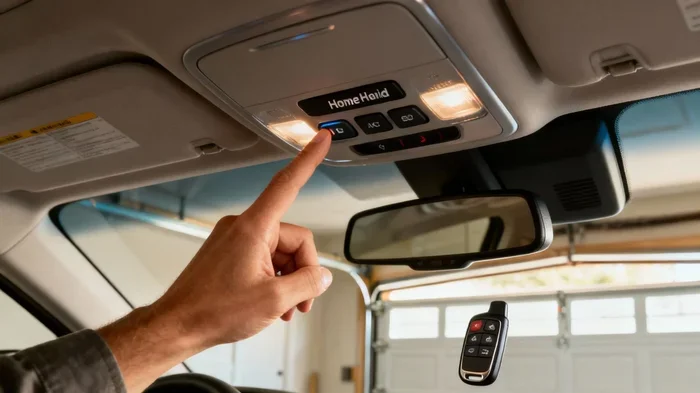
The most obvious sign is the HomeLink button itself. It is usually located on the console between the front seats or mounted on the overhead console near the rearview mirror. The button has a small house icon on it. Most HomeLink equipped vehicles have three buttons arranged in a row.
Here is what to look for:
- Check the driver’s side console near the steering column
- Look at the overhead console above the windshield
- Check the center stack or armrest area
- Look for a small house icon or the word “HomeLink” printed nearby
If you find these buttons, congratulations. Your car has HomeLink. If you do not see them, do not worry. There are other ways to confirm.
Check Your Vehicle Owner’s Manual
Your car owner’s manual is one of the best resources for this. Look up the “convenience features” or “electronics” section. If HomeLink is installed, the manual will describe the button location and programming steps. You can also check the table of contents for “HomeLink” or “garage door control.”
Look Up Your VIN or Trim Level Online
Every car has a vehicle identification number (VIN). You can enter this number on your car manufacturer’s website to see the full list of features. Alternatively, search by your car model, year, and trim level online. Many automotive websites list which trims include HomeLink as a standard or optional feature.
Ask a Dealer or Check the Window Sticker
If you bought the car recently, the window sticker (Monroney label) lists all installed features. Look for “HomeLink” or “garage door control.” You can also call your local dealer with your VIN and ask directly whether your car has HomeLink technology built in.
Common Car Brands That Offer HomeLink
Many major brands include HomeLink in their vehicles. Here are some of the most common ones:
- Toyota – Available on many models including Camry, RAV4, and Highlander
- Honda – Found on Accord, CR-V, and Pilot models
- Ford – Available on F-150, Explorer, and Explorer
- Chevrolet – Found on Silverado, Tahoe, and Equinox
- BMW – Standard on many models as part of the convenience package
- Mercedes-Benz – Included in most luxury trims
- Jeep – Available on Grand Cherokee, Wrangler, and Cherokee
- Nissan – Found on Altima, Rogue, and Pathfinder
Keep in mind that HomeLink availability depends on the trim level and package. Base models sometimes do not include it, while higher trims do.
How to Set Up HomeLink in Your Vehicle
Setting up HomeLink is straightforward and takes about five minutes. You do not need any special tools or professional help. Here is a step-by-step guide to HomeLink programming.
Step-by-Step HomeLink Programming Guide
- Turn on your car: Put the ignition in accessory or run mode. You do not need to start the engine.
- Locate the HomeLink buttons: Find the three buttons on your console.
- Press and hold two buttons: Choose an empty button and hold it until the indicator light blinks (usually about 20 seconds).
- Press the learn button on your garage door opener: Go to your garage door motor unit and find the “learn” or “smart” button. Press it once.
- Return to your car and press the HomeLink button: Hold the HomeLink button you programmed and press it three to eight times. The garage door should respond.
- Test the system: Press the programmed HomeLink button in your car to open or close the garage door.
Quick Tips for Smooth HomeLink Setup
- Stay close to the garage door motor: When programming, be within a few feet of the unit for the best signal.
- Use a fresh battery: If your garage door remote battery is low, replace it before programming.
- Be patient: Some garage door openers take a few attempts to pair successfully.
- Clear old codes first: If the button was previously programmed, hold all three HomeLink buttons for 10 seconds to erase them before starting fresh.
Benefits of Having HomeLink in Your Car
Once you have HomeLink set up, you will wonder how you ever lived without it. Here are the main benefits of having this feature in your vehicle.
Convenience at Its Best
The biggest advantage is pure convenience. You never have to dig through your console or pockets for a separate remote. Just press the button on your way out of the driveway. It is a small thing that makes a big difference in your daily routine.
Improved Security
HomeLink rolling code technology provides strong security for your home. Unlike fixed-code remotes that can be copied, rolling codes change every time you use them. This makes it much harder for someone to intercept and replicate your signal.
Increased Property Value
If you ever decide to sell your car, having HomeLink is a selling point. Many buyers look for this feature because it adds significant convenience. It can make your vehicle more attractive in the used car market.
Integration with Smart Home Systems
Newer HomeLink generations (HomeLink 3 and later) can integrate with smart home systems. This means you can control not just your garage door but also lights, thermostats, and security cameras from your car console.
What If Your Car Does Not Have HomeLink?
Not every vehicle comes with HomeLink, and that is okay. There are several alternatives you can explore if your car does not have this feature.
Aftermarket HomeLink Installers
You can have a professional install an aftermarket HomeLink system in your car. These universal kits work with most vehicles and cost between $100 and $300 depending on the brand and installation complexity. Popular aftermarket options include brands like Universal Electronics and STEELMATE.
Smart Garage Door Openers
Another popular option is a smart garage door opener like Chamberlain myQ or Genie Aladdin Connect. These devices connect to your phone and let you control your garage door from anywhere. They are easy to install and often work with voice assistants like Alexa and Google Assistant.
Universal Garage Door Remotes
A simple and affordable alternative is a universal garage door remote. These small remotes can learn the frequency of your existing garage door opener and work with any car. They cost around $20 to $50 and are a great budget-friendly option.
Common HomeLink Problems and How to Fix Them
Even though HomeLink is reliable, you may run into issues from time to time. Here are the most common problems and how to solve them.
HomeLink Button Not Responding
If your HomeLink blinking light does not respond when you press the button, try these steps:
- Check that the garage door opener is powered on
- Move closer to the garage door motor unit
- Clear the HomeLink memory and reprogram from scratch
- Check if your garage door opener needs a security module for rolling code compatibility
Interference From Other Devices
Sometimes other wireless devices can interfere with HomeLink frequency signals. If you notice inconsistent performance, try parking in a different spot or turning off nearby electronic devices temporarily.
HomeLink Needs a Reset
If nothing works, you may need to reset HomeLink. To do this, hold down all three HomeLink buttons for about 10 seconds until the indicator light turns off. Then reprogram your garage door opener using the steps above.
When to Call a Professional
If you have tried everything and HomeLink still does not work, it may be a wiring or module issue. In this case, it is best to consult a certified automotive technician or visit your car dealership. They can diagnose electrical problems and replace faulty HomeLink components if needed.
HomeLink vs. Aftermarket Alternatives: Which Is Better?
When deciding between factory-installed HomeLink and an aftermarket solution, there are a few things to consider. Factory HomeLink is integrated into your car’s electrical system, which means it looks clean and works seamlessly. Aftermarket options are more affordable and flexible, but they may not look as polished.
For most car owners, having factory HomeLink is the better choice. It is more convenient, more reliable, and adds long-term value to your vehicle. However, if your car does not support HomeLink, a smart garage door opener or universal remote is a solid backup plan.
Final Thoughts on HomeLink Technology
HomeLink is one of those car features that you do not think much about until you do not have it. Once you experience the convenience of opening your garage door with a single button press from your driver’s seat, you will not want to go back to carrying a separate remote.
Whether you already have HomeLink in your vehicle or are considering a car that offers it, understanding how it works and how to set it up makes all the difference. The programming process is simple, the benefits are real, and the technology continues to evolve with smart home integration.
If you are shopping for a new car, make sure to check whether HomeLink is included in the features list. And if your current car does not have it, the aftermarket options we covered give you plenty of great alternatives. Your driveway routine does not have to be complicated. With the right setup, opening your garage can be as simple as pressing a button.
Take a few minutes today to check if your car has HomeLink technology built in. You might be surprised at how easy it is to set up and how much it improves your daily driving experience.
Frequently Asked Questions
How do I know if my car has HomeLink built in?
Look for a small console-mounted button with a house icon, usually located between the front seats or on the overhead console. You can also check your vehicle owner’s manual, look up your VIN online, or contact your car dealer to confirm whether HomeLink is installed in your vehicle.
Which car brands offer HomeLink as a standard feature?
Many brands offer HomeLink including Toyota, Honda, Ford, Chevrolet, BMW, Mercedes-Benz, Jeep, and Nissan. However, it is often available on higher trim levels or as part of a convenience package, so check your specific model and trim to confirm.
Can I install HomeLink in a car that does not have it?
Yes, you can have an aftermarket HomeLink system professionally installed in most vehicles. Universal kits are available from brands like Universal Electronics and STEELMATE, and they work with most car models. Installation typically costs between $100 and $300.
How do I reset my HomeLink system?
To reset HomeLink, press and hold all three HomeLink buttons simultaneously for about 10 seconds until the indicator light turns off. Then reprogram your garage door opener by following the standard pairing steps with your garage door motor unit.
Is HomeLink compatible with all garage door openers?
HomeLink works with most garage door openers manufactured after 1993. Older models with fixed codes may require a security module or universal receiver for compatibility. Check your garage door opener’s manual or contact the manufacturer if you are unsure.
Can HomeLink control devices other than garage doors?
Yes, HomeLink can control a variety of devices including driveway gates, home lighting, motorized curtains, pool covers, and even some security systems. Newer HomeLink generations also support smart home integration with platforms like Amazon Alexa and Google Home.
=== CONCLUSION ===
HomeLink technology is a game-changer for anyone who wants a smarter, more convenient driving experience. Knowing how to check if your car has it is the first step. Whether you find the HomeLink button on your console or explore aftermarket alternatives, the goal is the same, making your daily routine easier and more efficient.
Take action today. Check your car, read your owner’s manual, or look up your trim level online. If you do not have HomeLink, consider the aftermarket options available. And if you already have it, make sure it is programmed and working properly. A little effort now can save you time and frustration every single day.