How to Disable Location on a Tesla Model Y Quickly
Disabling location on your Tesla Model Y is simple and takes just a few minutes. This guide walks you through every method, from the touchscreen settings to the Tesla app. You will learn how to protect your privacy, stop GPS tracking, and control what data your car collects. Follow our tips to keep your Tesla location private today.
Your Tesla Model Y knows a lot about you. It tracks where you go, how fast you drive, and even when you stop for coffee. For many drivers, this feels helpful. But for others, it raises real privacy questions. If you have been searching for a way to disable location on a Tesla Model Y, you are in the right place.
This guide gives you every method you need. We will walk you through the settings step by step. You will learn how to stop GPS tracking, manage your Tesla app permissions, and keep your travel data private. Whether you are new to Tesla or have owned one for years, this article has something for you.
Let us be clear. You do not need to be a tech expert to make these changes. The process is straightforward. It takes only a few minutes. And once you are done, you will feel much more in control of your personal data. So let us get started.
Key Takeaways
- Easy Access: You can turn off location services directly from the Tesla touchscreen in just a few taps.
- App Control: The Tesla mobile app also lets you manage location settings from your phone.
- Privacy Boost: Disabling location stops Tesla from collecting your travel data and history.
- No Impact on Core Features: Your car will still drive and navigate normally after turning off location.
- Multiple Methods: There are several ways to disable location, giving you full control over your privacy.
📑 Table of Contents
- Why You Might Want to Disable Location on Your Tesla Model Y
- How to Disable Location on a Tesla Model Y Step by Step
- What Happens When You Turn Off Location on Tesla Model Y
- Common Mistakes When Disabling Location on Tesla
- Expert Tips for Tesla Privacy and Location Management
- How Tesla Location Tracking Compares to Other Electric Vehicles
- Final Thoughts on Disabling Location on Your Tesla Model Y
- FAQs
Why You Might Want to Disable Location on Your Tesla Model Y
Before we dive into the how, let us talk about the why. Understanding the reasons helps you make better decisions. Not everyone wants their car tracking their every move. Here are some common reasons drivers choose to turn off location services.
Privacy Concerns
Tesla collects a lot of data. This includes your driving habits, frequent destinations, and travel routes. Some owners are comfortable with this. Others are not. If you value your privacy, disabling location is a smart move. It stops Tesla from building a detailed profile of your daily routine.
Think about it. Your car knows where you live, where you work, and where you shop. That is a lot of information. By turning off location tracking, you take back control. You decide what data Tesla can collect about you.
Security and Safety
Location data can be a security risk. If someone gains access to your Tesla account, they could see your travel patterns. This could put you and your family at risk. Disabling location reduces this threat. It adds an extra layer of protection to your Tesla account.
Also, consider this. If you lend your car or sell it, you do not want the next owner tracking your old routes. Turning off location before handover keeps your history private. This is especially important if you use your Tesla for business trips or sensitive travel.
Battery and Performance
Here is something not everyone knows. Continuous GPS tracking uses battery power. It also uses processing resources. By disabling location, you may notice a small improvement in battery life. This is not a huge change, but every bit helps. Especially on long road trips where every mile counts.
Some owners also report smoother performance after turning off unnecessary tracking features. Your Tesla can focus its energy on driving instead of data collection. It is a small win that adds up over time.
How to Disable Location on a Tesla Model Y Step by Step
Now let us get to the main part. Here is exactly how to turn off location services on your Tesla Model Y. We will cover three different methods. Each one is easy to follow. You can use any or all of them depending on your needs.
Method 1: Using the Tesla Touchscreen
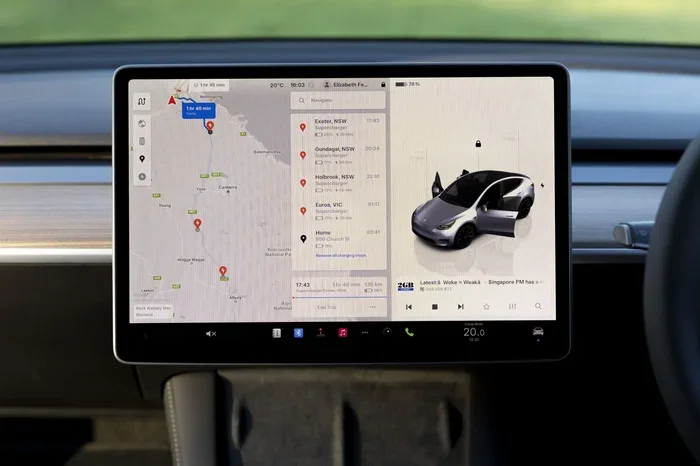
This is the most direct way to disable location. You do not need a phone or computer. Everything is right there on your dashboard screen.
- Tap the Controls icon on the main screen. It looks like a three-by-three grid of dots.
- Select Settings from the menu that appears.
- Tap Privacy & Security.
- You will see the Location Services option. Toggle it off.
- Confirm your choice when prompted.
That is it. Your Tesla Model Y has stopped sharing its location. The change takes effect immediately. You will notice that the map and navigation features adjust accordingly.
Quick Tip: If you ever want to turn location back on, just follow the same steps and toggle it back on. It is just as easy to re-enable.
Method 2: Through the Tesla Mobile App
You can also manage location settings from your phone. This is useful if you want to make changes before you even get in the car. Here is how:
- Open the Tesla App on your phone.
- Tap the Vehicle tab at the bottom.
- Scroll down to find Settings.
- Look for Privacy options.
- Turn off Location Sharing.
The app gives you remote control over your Tesla settings. You can make changes from anywhere. This is especially handy if you are at a charging station and want to adjust settings without getting out.
Quick Tip: Make sure your app is updated to the latest version. Older versions may not have all the privacy options available. Check the app store regularly for updates.
Method 3: Disabling Specific Location Features
Sometimes you do not want to turn off all location services. You just want to stop specific features from tracking you. Tesla lets you do this too. Here are some options:
- Disable Navigation History: Go to Controls > Settings > Privacy & Security > Navigation Data Sharing. Turn this off to stop Tesla from saving your routes.
- Turn Off Sentinel Data Sharing: Under the same Privacy menu, you can stop sharing camera and sensor data from your Sentry Mode.
- Disable Fleet Data Sharing: This stops Tesla from using your driving data to improve its systems. Toggle it off in the Privacy settings.
These smaller changes give you more control. You can keep some location features on while disabling the ones you are not comfortable with. It is a balanced approach that works well for many Tesla owners.
What Happens When You Turn Off Location on Tesla Model Y
Turning off location services changes how your Tesla works. Let us look at what you can expect. Some changes are obvious. Others are more subtle.
Navigation Still Works
You can still use the built-in navigation system. Your Tesla can still route you to destinations. The difference is that it will not save your travel history. You will need to enter destinations manually each time. This is a small trade-off for many privacy-conscious owners.
No More Location-Based Suggestions
Tesla uses your location to suggest nearby chargers, restaurants, and points of interest. Without location data, these suggestions stop. You will not see personalized recommendations on the screen. Instead, you will see general options. This takes a little getting used to, but most owners adjust quickly.
Reduced Data Collection
The biggest change is in data collection. Tesla will no longer gather your location history. It will not track your frequent destinations. Your driving patterns stay private. For many people, this alone is worth the small inconvenience.
Keep in mind that some features may still use basic location data for safety purposes. For example, emergency services may still be able to locate your vehicle in case of an accident. This is built into the system and cannot be fully disabled.
Common Mistakes When Disabling Location on Tesla
Many people make avoidable mistakes when adjusting their Tesla settings. Here are the most common ones and how to prevent them.
Forgetting to Check the App Settings
Some owners only change settings on the touchscreen. They forget that the Tesla app also has its own location permissions. Check both places to make sure location is fully disabled. Otherwise, your phone may still be sharing your Tesla location in the background.
Not Disabling All Tracking Features
Turning off the main location toggle is not always enough. Tesla has multiple tracking features. Each one needs to be disabled separately. Take the time to go through all the privacy options. This ensures complete location protection.
Ignoring Software Updates
Tesla regularly updates its software. Sometimes these updates reset your privacy settings. Always check your location settings after a software update. It only takes a minute and saves you from accidentally re-sharing your data.
Assuming It Affects All Features
Turning off location does not break your Tesla. The car still drives, charges, and functions normally. Some owners worry that disabling location will cause problems. It does not. Your Tesla is designed to work with or without location services enabled.
Expert Tips for Tesla Privacy and Location Management
Want to go beyond just disabling location? Here are some expert tips to boost your Tesla privacy even further.
Review Your Privacy Settings Regularly
Make it a habit to check your Tesla privacy settings once a month. Tesla updates its software often. New features may change how your data is handled. Regular reviews keep you informed and in control.
Use Strong Account Passwords
A strong password is your first line of defense. Use a mix of letters, numbers, and symbols. Avoid common words or personal information. This makes it much harder for anyone to access your Tesla account and see your location data.
Turn Off Bluetooth When Not in Use
Bluetooth can be used for tracking too. If you are not using it, turn it off. This reduces the number of ways your Tesla can share data. It is a simple step that makes a big difference.
Consider a Privacy-Focused Accessory
Some Tesla owners use additional accessories to boost privacy. For example, a 12V to 230V car inverter can power your own devices without relying on Tesla’s connected systems. Similarly, accessories like a 12V DC to 220V AC car power inverter give you more control over your car’s power setup. These are not directly related to location, but they help you reduce dependence on connected features.
You might also be interested in how much your Tesla weighs. Knowing your vehicle’s weight can help you understand its energy use and performance. Check out how much 5000 lbs heavy for a car really matters when planning your trips and charging stops.
Another related topic is understanding how car ratings work. If you have ever wondered what a 1 star rating on a car in India means, it can help you make better decisions about vehicle features and reliability. This knowledge applies broadly across all car brands, including Tesla.
How Tesla Location Tracking Compares to Other Electric Vehicles
Tesla is not the only EV that tracks location. Most modern electric vehicles collect some form of location data. Here is how Tesla compares to the broader EV market.
| Feature | Tesla Model Y | Other EVs |
|---|---|---|
| Location Tracking | Enabled by default | Varies by brand |
| Privacy Settings | Detailed controls available | Limited in most brands |
| Data Sharing Opt-Out | Yes, multiple options | Sometimes limited |
| App-Based Control | Full control via app | Varies |
| Fleet Data Collection | Opt-in model | Often automatic |
Tesla gives you more control than most EV brands. This is a big advantage. Many other manufacturers collect data automatically with no easy way to opt out. Tesla at least gives you the choice. And now you know how to use it.
If you are in the market for a larger Tesla or any other vehicle, knowing your options helps. For instance, if you need more seating capacity, check out the 7 seater car on rent in Mumbai to compare what is available before making a purchase decision. Understanding the market helps you choose the right vehicle for your needs.
Engine size also matters when thinking about vehicle features and performance. If you are curious about different engine ranges, explore the 1500cc to 2000cc cars in India to understand how engine size affects power, efficiency, and features across different brands.
Final Thoughts on Disabling Location on Your Tesla Model Y
Disabling location on your Tesla Model Y is one of the best things you can do for your privacy. It is simple, fast, and makes a real difference. You no longer have to worry about Tesla collecting your travel data or tracking your daily routines.
We covered three main methods in this guide. The touchscreen method is the fastest. The app method is the most convenient. And the feature-specific method gives you the most control. Use whichever works best for you. Or combine them for complete privacy protection.
Remember, technology should work for you. Not the other way around. Taking charge of your Tesla’s location settings puts you in the driver’s seat. Literally and figuratively.
Go ahead and try these steps today. Your future self will thank you. Privacy is not a luxury. It is a right. And your Tesla Model Y should respect that.
For those who love their Tesla and want to show it off, fun accessories and customizations are always a great idea. If you have kids or simply enjoy a playful touch, check out some creative 10 lines on my favourite toy car for inspiration on how to personalize your driving experience.
FAQs
Can I disable location on Tesla Model Y without losing navigation?
Yes, you can. Turning off location services does not remove the navigation system. You can still enter destinations and get directions manually. The only difference is that Tesla will not save your travel history or suggest routes based on your past trips.
Will disabling location affect my Tesla app experience?
It may change some app features. You might not see nearby chargers or personalized suggestions. But core functions like remote start, lock/unlock, and status checks will continue to work normally. The app will still connect to your car without using location data.
How often should I review my Tesla privacy settings?
We recommend checking your settings once a month. Tesla releases software updates regularly. These updates can sometimes change default privacy settings. A quick monthly review keeps your data secure and ensures you stay in control.
Does turning off location save battery on the Tesla Model Y?
It can help slightly. GPS tracking uses some battery power and processing resources. The savings are not huge, but they add up over time. If you are on a long trip and trying to maximize range, every small improvement helps.
Can Tesla still track my location after I disable it?
Tesla may still collect basic location data for safety and emergency purposes. Features like automatic emergency calling rely on location data. However, disabling location settings stops most personal tracking and data collection for analytics and marketing.
Is it legal for Tesla to collect location data?
Yes, in most regions. Tesla discloses its data collection practices in its privacy policy. Users agree to these terms when setting up their accounts. However, laws vary by country and state. Many regions now have strict data protection laws that give you the right to opt out of data collection.