How Do I Reset My Audio Settings Quickly and Easily
Resetting your car audio settings is simpler than you think. Whether your car sound system is acting up or you just want a fresh start, this guide walks you through every step. You will learn how to reset audio settings on different car models and fix common sound problems fast.
Key Takeaways
- Easy Reset Process: Resetting your car audio settings takes just a few simple steps and no special tools.
- Model-Specific Steps: Different car brands have slightly different reset methods, and we cover the most popular ones.
- Common Problems Fixed: A reset solves most audio issues like distortion, no sound, and Bluetooth pairing problems.
- Post-Reset Tips: Adjusting your audio settings after a reset ensures the best sound quality for your driving experience.
- Know When to Call a Pro: Some audio problems need professional help, and we show you the warning signs.
📑 Table of Contents
- What Are Car Audio Settings and Why Do They Matter?
- Common Audio Problems That Need a Reset
- How to Reset Audio Settings on Different Car Models
- Step-by-Step Guide to Factory Resetting Your Car Audio
- How to Adjust Audio Settings After a Reset
- When to Seek Professional Help for Audio Issues
- Final Thoughts on Resetting Your Car Audio Settings
What Are Car Audio Settings and Why Do They Matter?
Your car audio settings control everything you hear while driving. From the volume level to the sound balance, these settings shape your entire listening experience. Whether you love blasting music on highway drives or prefer soft tunes during your morning commute, your audio settings make a big difference.
Modern cars come packed with features like Bluetooth connectivity, equalizer presets, and speaker balance controls. All of these settings work together to deliver the sound you want. But sometimes, these settings get messed up. A glitch, a software hiccup, or even a simple power surge can throw everything off.
That is exactly when you need to know how to reset audio settings. A reset brings everything back to its default state. Think of it like turning a clock back to zero. It clears out all the changes and gives you a clean slate to work with.
Many car owners ignore their audio settings until something goes wrong. But taking care of your car sound system early can save you a lot of trouble later. A quick reset often fixes issues that seem complicated at first glance. So let us dive into the details and walk you through the process.
Why Audio Settings Get Disrupted
Several things can mess with your car audio settings. Software updates, battery replacements, and even accidentally pressing the wrong buttons can cause problems. Sometimes a simple reset of the infotainment system is all it takes to get things back on track.
Here are the most common reasons your audio settings might get disrupted:
- Software glitches: Your car’s computer system can sometimes freeze or bug out.
- Battery issues: A dead or weak car battery can reset some settings on its own.
- Accidental changes: Kids or passengers might tweak settings without you knowing.
- Bluetooth pairing errors: Connecting a new device can sometimes mess up existing audio configurations.
- Moisture damage: Humidity or water exposure can affect your car speakers and audio controls.
Understanding these causes helps you prevent problems in the future. It also tells you when a simple reset will work and when you might need deeper troubleshooting.
Common Audio Problems That Need a Reset
Not every audio issue requires a full reset. But certain problems almost always go away after you reset audio settings. Knowing these signs helps you decide whether a reset is the right move.
Here are the most common audio problems drivers face every day:
- No sound at all: You turn on the radio or start playing music, but nothing comes out of the car speakers.
- Distorted or crackling sound: The audio sounds fuzzy, scratchy, or unclear even at low volumes.
- Uneven sound balance: One side of the car sounds louder than the other, or the treble and bass are way off.
- Bluetooth keeps disconnecting: Your phone connects and disconnects from the car audio system repeatedly.
- No response from controls: The buttons on your audio panel do nothing when you press them.
- Echo or feedback noise: You hear a strange humming or echo that was not there before.
If any of these sound familiar, do not worry. A reset often fixes all of these issues in just a few minutes. You do not need to be a mechanic or a tech expert. Anyone can do it with the right guidance.
Before you reset, though, it is a good idea to note down your current settings. Some people like their bass high and treble low, while others prefer a balanced sound. Writing down your preferences saves you time when you want to set things back up after the reset.
How to Reset Audio Settings on Different Car Models
Every car brand has its own way of handling audio resets. The good news is that most methods are straightforward. Let us look at the steps for some of the most popular car brands on the road today.
Resetting Audio Settings on Toyota and Honda
Toyota and Honda vehicles are among the most popular cars in the world. Their audio systems are reliable, but they sometimes need a reset too. Here is how you can reset audio settings on these brands.
For most Toyota models, start by turning off the ignition. Press and hold the power button for about ten seconds. This forces the infotainment system to restart. Once the screen goes dark and turns back on, your audio settings should be back to default.
Honda owners have a slightly different process. Turn the ignition to the accessory position without starting the engine. Press and hold the volume knob for about fifteen seconds. The screen will flicker and then restart. This clears most audio configuration issues.
If you are a Honda or Toyota owner who also loves collecting model cars, you might enjoy reading 10 Lines On My Favourite Toy Car for some fun inspiration. It is a great way to connect your love for cars in all shapes and sizes.
Resetting Audio Settings on Ford and Chevrolet
Ford and Chevrolet vehicles come with powerful audio systems, especially in their higher-end trims. Resetting these systems is also pretty simple.
For Ford cars, start by turning off the engine and removing the key from the ignition. Wait about thirty seconds. Then press and hold the power button on the audio system for ten seconds. Release the button and wait for the system to reboot.
Chevrolet vehicles with the MyLink system work a bit differently. Press the Home button on the touchscreen. Go to Settings and then select System. Choose Restore Defaults and confirm your choice. The system will reset all audio settings to factory standards.
These steps work for most models, but always check your owner’s manual for specific instructions. Every car is a little different, and the manual will have the most accurate guidance for your exact vehicle.
Step-by-Step Guide to Factory Resetting Your Car Audio
A factory reset is the most thorough way to reset audio settings. It wipes everything and starts fresh. This method works for almost all car models, regardless of the brand. Here is a detailed step-by-step guide you can follow right now.
- Turn off the engine: Make sure your car is parked and the engine is completely off.
- Disconnect the battery: Use a wrench to loosen the negative terminal on your car battery. This ensures a complete power cut to the audio system.
- Wait for five minutes: This allows all the capacitors in the system to fully drain. It also clears any stored memory in the audio unit.
- Reconnect the battery: Tighten the negative terminal back into place. Make sure it is secure.
- Turn on the ignition: Start the car and turn on the audio system.
- Check the settings: Go through the audio menu and verify that all settings are back to default.
- Reconfigure your preferences: Set up your preferred volume, balance, and equalizer settings again.
This process takes about ten to fifteen minutes. It is a small investment of time that can solve big audio problems. Many car owners skip the battery disconnection step, but it is an important part of ensuring a complete reset.
If disconnecting the battery sounds intimidating, you can also try a soft reset first. A soft reset simply turns the system off and back on without cutting power. This works for minor issues and does not erase your saved stations or paired devices.
Soft Reset vs. Factory Reset
It is important to understand the difference between a soft reset and a factory reset. A soft reset is like restarting your phone. It refreshes the system without deleting anything. A factory reset is like wiping your phone clean and setting it up again from scratch.
Here is a quick comparison:
- Soft Reset: Quick, easy, and does not delete saved data. Best for minor glitches.
- Factory Reset: More thorough and resets everything to default. Best for persistent audio problems.
Start with a soft reset. If that does not work, move on to a factory reset. This approach saves time and avoids unnecessary data loss.
How to Adjust Audio Settings After a Reset
Once you have successfully reset your car audio settings, the next step is to set everything back up the way you like it. This part is actually fun because you get to fine-tune your sound experience.
Start with the basics. Set your volume to a comfortable level. Then adjust the balance between the left and right speakers. Most cars let you control this from the audio settings menu on the touchscreen or the knob on the dashboard.
Next, work on the fade setting. This controls whether the sound comes from the front speakers, the rear speakers, or a mix of both. If you usually drive alone, you might prefer more sound from the front. If you carry passengers often, a more balanced fade works better.
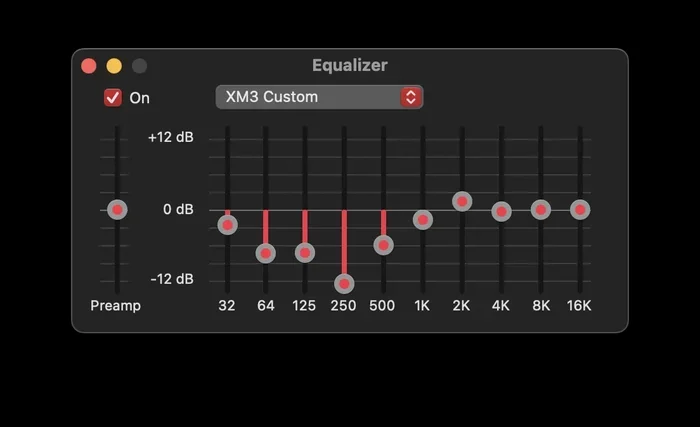
Now comes the equalizer. This is where you can really customize your sound. Most car audio systems offer preset options like Rock, Pop, Jazz, and Classical. You can also create a custom setting by adjusting the bass, midrange, and treble levels individually.
Here are some quick tips for the best sound after a reset:
- Keep the bass moderate: Too much bass can distort the sound and strain your car amplifier.
- Balance the treble: High treble can be harsh on long drives. Keep it at a comfortable level.
- Test in different environments: Try your settings at low speeds, high speeds, and in city traffic.
- Pause and listen: Give each adjustment a few minutes before changing it further.
Taking the time to adjust your settings after a reset makes a huge difference. You will notice clearer vocals, richer bass, and a more enjoyable driving experience overall.
Understanding Your Car’s Audio System
Modern car audio systems are more complex than ever. Most vehicles now come with multiple speakers, built-in amplifiers, and digital signal processing. Understanding how these components work helps you get the most out of your reset.
The head unit is the brain of your car sound system. It controls the source selection, volume, and equalizer settings. The amplifier boosts the signal to the speakers. And the speakers themselves turn electrical signals into the sound you hear. When all these parts work together, you get a rich and immersive audio experience.
If you want to learn more about car audio and how different systems work, check out this 10 Lines On My Favourite Toy Car article for some interesting insights into car culture. It is a fun read that connects with the broader world of automotive enthusiasm.
When to Seek Professional Help for Audio Issues
Most audio problems go away after a simple reset. But some issues need the attention of a professional. Knowing when to call for help saves you time, money, and frustration.
Here are the signs that your audio problem needs expert help:
- Physical damage to speakers: If you can see or hear a torn or rattling speaker cone, a professional should take a look.
- Wiring problems: Frayed or corroded wires behind the dashboard need special tools and expertise to fix.
- Persistent distortion: If the sound is still distorted after a full factory reset, there may be a deeper hardware issue.
- No power to the audio unit: If the system does not turn on at all, even after a battery disconnect, the problem could be electrical.
- Water damage: If moisture has gotten into the audio system, professional drying and inspection are essential.
Do not try to open up your audio unit or mess with the wiring yourself unless you have experience. Car audio systems are sensitive, and one wrong move can cause more damage. A qualified technician can diagnose the problem correctly and fix it safely.
Regular maintenance also helps prevent audio issues. Clean your audio controls, check your connections, and keep your software updated. These small habits go a long way in keeping your car sound system in top shape.
Preventive Tips for Long-Lasting Audio Performance
Prevention is always better than cure. Here are some simple habits that keep your car audio settings working perfectly for years:
- Keep your software updated: Many car brands release updates that fix audio bugs and improve performance.
- Avoid extreme volume levels: Playing music too loud for too long can damage your speakers over time.
- Use quality audio files: Low-quality audio files can sound terrible even on the best car sound systems.
- Protect your car from moisture: Park indoors when possible and use a sunshade to prevent heat buildup.
- Reset settings periodically: A quick reset every few months keeps your audio system running smoothly.
These tips are easy to follow and they make a real difference. Your car audio system is an investment, and taking care of it pays off in better sound and fewer headaches.
Final Thoughts on Resetting Your Car Audio Settings
Resetting your audio settings is one of the easiest and most effective things you can do for your car. It fixes most common audio problems, restores your sound quality, and takes only a few minutes. Whether you own a Toyota, Honda, Ford, or Chevrolet, the process is straightforward and well worth the effort.
Remember to start with a soft reset and only move to a factory reset if needed. Adjust your settings carefully after the reset, and do not hesitate to call a professional if the problem persists. Your car’s audio system deserves the same attention as every other part of your vehicle.
If you are passionate about cars in every form, take a moment to explore 10 Lines On My Favourite Toy Car for some enjoyable car-related content. It is a wonderful reminder of why we love cars so much.
Now that you know how to reset audio settings, you are ready to tackle any sound problem that comes your way. Keep this guide bookmarked, share it with fellow car owners, and enjoy the best possible audio experience every time you hit the road.
Frequently Asked Questions
How long does it take to reset car audio settings?
A soft reset takes about one to two minutes. A factory reset with battery disconnection takes around ten to fifteen minutes. The time depends on your car model and the method you choose. Either way, it is a quick process that delivers great results.
Will resetting my car audio settings delete my saved radio stations?
Yes, a factory reset will erase all saved radio stations and Bluetooth pairings. A soft reset usually keeps these intact. We recommend writing down your favorite stations before performing a full reset so you can quickly restore them afterward.
Can I reset my car audio settings without disconnecting the battery?
Absolutely. Most car brands offer a soft reset option through the infotainment system. You can also use the reset button on the audio unit itself if your car has one. Battery disconnection is only needed for a complete factory reset.
Why does my car audio keep resetting on its own?
This is usually caused by a weak car battery or a loose connection. The audio system loses power intermittently and reverts to default settings. Have your battery and electrical system checked by a mechanic if this happens frequently.
Is it safe to reset audio settings while driving?
No, you should always reset audio settings when your car is parked and the engine is off. Attempting to reset while driving distracts you and can be dangerous. Pull over to a safe location before starting the reset process.
What should I do if resetting does not fix my audio problem?
If a reset does not solve the issue, the problem is likely hardware-related. It could be a damaged speaker, faulty wiring, or a malfunctioning amplifier. Visit a qualified car audio technician who can diagnose and repair the problem properly.
=== CONCLUSION ===
Resetting your car audio settings is a simple yet powerful way to keep your sound system running at its best. Whether you are dealing with distorted sound, no audio at all, or just want a fresh start, the steps in this guide will help you get there. The process is quick, easy, and does not require any special tools or technical skills.
Start with a soft reset for minor issues. Move to a factory reset if the problem persists. And always take a moment to adjust your settings after the reset for the best possible sound. Your car audio system is a big part of your driving experience, and a little maintenance goes a long way.
Keep these tips handy, share them with other car owners, and enjoy every drive with crystal-clear sound. Happy listening!