Can I Upgrade My Toyota Entune System to the Latest Version
Yes, you can upgrade your Toyota Entune system, and the process is simpler than most owners think. Whether you want the newest Entune 3.0 features or just a Toyota software update, this guide covers every option. Learn about DIY methods, dealership services, and what to expect from your Toyota infotainment system.
Key Takeaways
- Multiple upgrade paths exist: You can update Entune through a USB drive, at a dealership, or by upgrading the hardware.
- Entune 3.0 is the latest version: It offers improved navigation, voice recognition, and smartphone integration.
- Not all Toyota models support the newest version: Check your vehicle year and trim level before starting.
- DIY upgrades save money: You can handle many updates yourself without visiting a dealer.
- Subscription plans may apply: Some Entune features require an active Entune subscription.
- Common issues are fixable: Frozen screens, connection errors, and slow performance often have simple solutions.
📑 Table of Contents
- Can I Upgrade My Toyota Entune System to the Latest Version?
- Understanding the Toyota Entune System
- How to Upgrade Your Toyota Entune System
- Entune 3.0 vs Older Versions: What You Gain
- DIY vs Professional Upgrade: Which Is Right for You?
- Common Problems After Upgrading Your Entune System
- Is Upgrading Your Entune System Worth It?
- Final Thoughts on Upgrading Your Toyota Entune System
Can I Upgrade My Toyota Entune System to the Latest Version?
If you drive a Toyota, you have probably wondered about your Toyota Entune system. This Toyota infotainment system has been a staple in Toyota vehicles for years. But technology moves fast. And many owners want to know if they can get the latest features.
The short answer is yes. You can upgrade your Toyota Entune system. But the process depends on your vehicle model, year, and current system version. Some upgrades are free and simple. Others may require a visit to the dealership or a hardware swap.
In this guide, we will walk you through everything you need to know. We will cover the different Entune versions, how to update your system, and whether a DIY approach works for you. By the end, you will have a clear path forward.
Let us dive into the world of Toyota car tech upgrades and get your dashboard up to date.
Understanding the Toyota Entune System
Before you upgrade, it helps to understand what you are working with. The Toyota Entune system is Toyota’s proprietary infotainment platform. It has evolved over the years. And each version brought new capabilities.
Entune first appeared in Toyota vehicles around 2011. It was a basic system at the time. It offered AM/FM radio, a CD player, and basic Bluetooth connectivity. Over the years, Toyota expanded its features significantly.
Entune Versions Over the Years
Toyota released several versions of Entune. Each one added more functionality and improved performance.
- Entune 1.0: The original system. Basic radio and Bluetooth features. Found in older Toyota models.
- Entune 2.0: Added touchscreen capability, better navigation, and smartphone integration through the Entune app.
- Entune 3.0: The latest version. Features a faster processor, improved voice recognition, and enhanced connectivity options.
Your current version depends on when your vehicle was manufactured. Newer Toyotas from 2018 and later typically come with Entune 3.0 or higher. Older models may still run on Entune 1.0 or 2.0.
What Does the Entune System Do?
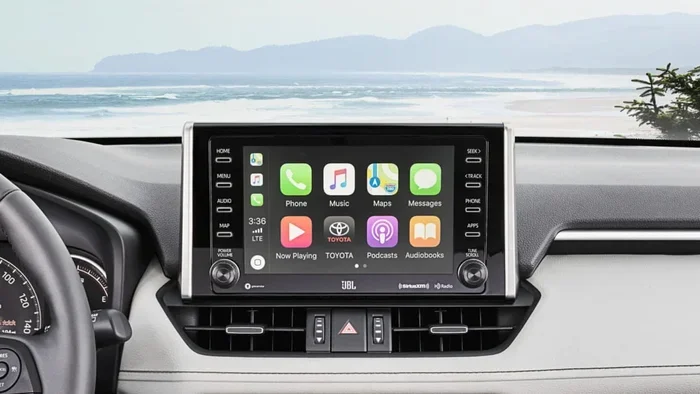
The Entune system is more than just a radio. It serves as your car’s multimedia hub. Here is what it typically handles:
- AM/FM radio and satellite radio
- GPS navigation with real-time traffic updates
- Bluetooth phone calls and audio streaming
- Smartphone integration through Apple CarPlay and Android Auto
- Voice commands for hands-free control
- USB and auxiliary input for music and charging
- Wi-Fi hotspot capability in select models
Understanding these features helps you decide what kind of upgrade makes sense for you. If your current system struggles with basic tasks, an upgrade can be a game changer.
How to Upgrade Your Toyota Entune System
Now that you understand the system, let us talk about how to actually upgrade it. There are several methods available. Each has its own advantages and limitations.
Method 1: Over-the-Air Software Updates
Some newer Toyota models support wireless updates. This means your Toyota infotainment system can receive updates over Wi-Fi. You do not need to visit a dealer or use a USB drive.
To check for updates, follow these steps:
- Turn on your vehicle or put it in accessory mode.
- Navigate to the Settings menu on your touchscreen.
- Look for the Software Update or System Update option.
- Select Check for Updates.
- If an update is available, follow the on-screen prompts to download and install.
This method is the easiest and most convenient. However, not all Entune systems support it. Check your owner’s manual to confirm.
Method 2: USB Drive Update
If your vehicle does not support wireless updates, you can use a USB drive. Toyota releases update files that you can download from their official website. You then transfer the file to a USB drive and install it through your car’s system.
Here is how it works:
- Visit the Toyota support website and enter your vehicle information.
- Download the latest software update file for your model.
- Transfer the file to a USB flash drive (FAT32 format).
- Plug the USB drive into your car’s USB port.
- Follow the on-screen prompts to begin the installation.
- Wait for the process to complete. Do not turn off the vehicle during installation.
This method requires a bit more effort. But it works reliably for most Toyota models. Make sure your USB drive is compatible and has enough storage space.
Method 3: Visit a Toyota Dealership
The most hands-off approach is to let the professionals handle it. A Toyota dealership can update your system during a routine service visit. They have the right tools and expertise.
Benefits of a dealership upgrade include:
- Guaranteed compatibility with your specific model
- Professional installation with no risk of errors
- Access to the latest features and bug fixes
- Opportunity to ask questions about your Toyota car multimedia upgrade
The downside is the cost. Dealership visits are not always free. And you may need to schedule an appointment and wait for service. But for peace of mind, this is often the best route.
Entune 3.0 vs Older Versions: What You Gain
If you are currently running an older Entune version, you might be curious about what Entune 3.0 brings to the table. The differences are significant.
| Feature | Entune 2.0 | Entune 3.0 |
|---|---|---|
| Processor Speed | Standard | Faster and more responsive |
| Voice Recognition | Basic commands only | Natural language processing |
| Navigation | Basic maps | Real-time traffic and 3D views |
| Smartphone Integration | Limited app support | Full Apple CarPlay and Android Auto |
| Wi-Fi Hotspot | Not available | Available in select models |
| App Compatibility | Few apps | Expanded app ecosystem |
| Screen Resolution | Standard definition | High definition display |
As you can see, the jump from Entune 2.0 to 3.0 is substantial. The improved Toyota touchscreen and faster processor make a noticeable difference in daily use.
Can Older Toyotas Run Entune 3.0?
This is a common question among Toyota owners. The answer is: it depends.
Generally, Entune 3.0 is available for vehicles from 2018 and newer. Some 2017 models may also support it with hardware modifications. However, vehicles from 2015 and earlier typically cannot run Entune 3.0 without a complete system replacement.
Before assuming you can upgrade, check your vehicle’s compatibility. You can find this information in your owner’s manual or by contacting a Toyota dealer with your VIN number.
DIY vs Professional Upgrade: Which Is Right for You?
One of the biggest decisions you will face is whether to upgrade yourself or pay for professional help. Both approaches have merit.
When to Go DIY
A DIY upgrade makes sense if you are comfortable with basic technology. If you have ever done your own car diagnostics, you likely have the skills needed for a software update. USB drive updates are straightforward and well-documented by Toyota.
DIY upgrades are also great because they are usually free. Toyota provides software updates at no cost. You just need a compatible USB drive and a little patience.
Some owners also enjoy the satisfaction of handling car upgrades themselves. It builds confidence and helps you understand your vehicle better.
When to Choose a Professional
Professional upgrades are the better choice in certain situations. If your vehicle requires hardware changes, a dealership is the way to go. Complex upgrades involving wiring or system replacement should never be attempted at home.
Also, if your vehicle is still under warranty, a dealership upgrade ensures you do not void any coverage. You can also combine the upgrade with other scheduled maintenance to save time.
For those who want the full Toyota smart features experience, a professional installation of new hardware may be necessary. This includes installing a new head unit or adding connectivity modules.
Quick Tips for Any Upgrade
- Always back up your current system settings before updating.
- Make sure your vehicle battery is fully charged before starting.
- Do not interrupt the installation process once it begins.
- Read all instructions carefully before you start.
- Keep your vehicle manual handy for model-specific guidance.
Common Problems After Upgrading Your Entune System
Even with a smooth installation, issues can sometimes arise. Knowing what to expect helps you troubleshoot effectively.
Frozen or Unresponsive Screen
A frozen screen is the most common complaint after an update. This usually happens when the system is processing new software. Wait a few minutes before taking action.
If the screen remains frozen for more than 15 minutes, try a hard reset. Turn off the vehicle, remove the key, and wait 30 seconds. Restart the vehicle and the system should reboot normally.
Bluetooth Connection Issues
After an update, your Bluetooth settings may reset. You may need to re-pair your phone with the system. Go to the Bluetooth settings menu, delete old connections, and pair your device again.
Navigation Maps Are Out of Date
Software updates do not always include the latest map data. You may need a separate map update. Toyota offers free map updates for a limited time. Check the Toyota website or contact your dealer for details.
Some owners also find that downloading an app to start my car or other connected features behave differently after a system update. Always reconfigure your app settings after any major software change.
Loss of Certain Features
Rarely, an update can cause some features to stop working. This is usually temporary. A second update or reset typically fixes the problem. If it does not, contact Toyota support for assistance.
Is Upgrading Your Entune System Worth It?
The short answer is yes. Upgrading your Toyota Entune system brings tangible benefits. You get better performance, new features, and improved reliability.
Here are the main reasons to consider an upgrade:
- Improved safety: Newer systems offer better voice commands and navigation, keeping your eyes on the road.
- Better connectivity: Stay connected with updated Bluetooth, Wi-Fi, and smartphone integration.
- Enhanced entertainment: Enjoy better audio quality and more app options.
- Longer vehicle lifespan: Keeping your tech current helps your car feel modern for years to come.
- Resale value: A vehicle with updated technology commands a higher resale price.
On the other hand, if your current system works fine and meets your needs, you may not need to upgrade immediately. Technology upgrades are always nice to have. But they are not always essential.
Think about your daily driving habits. Do you use navigation often? Do you rely on Bluetooth for calls? Do you wish your system had better voice recognition? If yes, an upgrade will improve your daily driving experience.
For owners who want to explore more car tech options, learning about DIY car modifications like installing splash guards yourself can be a great starting point. These small upgrades build confidence and prepare you for more complex tech improvements.
Final Thoughts on Upgrading Your Toyota Entune System
Upgrading your Toyota Entune system is a smart move for any Toyota owner. Whether you choose a simple software update or a full hardware replacement, the benefits are clear. You get a better driving experience, improved connectivity, and access to the latest features.
Start by checking your current system version and your vehicle’s compatibility. Then choose the upgrade method that fits your comfort level and budget. If you are unsure, a quick visit to your local Toyota dealership can clarify everything.
Remember, technology evolves fast. Keeping your Toyota infotainment system current ensures you get the most out of your vehicle. Do not let outdated software hold you back from enjoying everything your Toyota has to offer.
Take action today. Check for updates, explore your options, and enjoy a smarter, more connected driving experience with your Toyota.
Frequently Asked Questions
How do I check my current Entune version?
Go to your vehicle’s Settings menu on the touchscreen. Look for System Information or About Entune. Your current version number will be displayed there. You can also check your owner’s manual for the default version installed in your model year.
Is upgrading my Entune system free?
Most software updates from Toyota are free of charge. However, hardware upgrades or dealership installation fees may apply. Check with your local dealer for specific pricing before committing to any upgrade service.
Can I downgrade my Entune system if I do not like the new version?
Downgrading is generally not recommended and is not officially supported by Toyota. Once you update to a newer version, it is very difficult to revert. Always make sure you are ready for the change before proceeding with any update.
How long does an Entune upgrade take?
A software update typically takes between 15 and 30 minutes. Hardware upgrades at a dealership may take a few hours. The exact time depends on your vehicle model and the complexity of the upgrade being performed.
Will upgrading my Entune system void my warranty?
No. Software updates from Toyota will not void your warranty. However, if you install aftermarket hardware yourself and it causes damage, your warranty may be affected. Always consult your dealer before making hardware changes to your vehicle.
What should I do if my Entune system stops working after an update?
Try a system reset first. Turn off the vehicle, remove the key, and wait at least 30 seconds before restarting. If the problem persists, contact Toyota customer support or visit your nearest dealership for professional assistance.
=== CONCLUSION ===
Upgrading your Toyota Entune system is one of the best ways to keep your vehicle feeling modern and connected. Whether you choose a simple USB update, a wireless upgrade, or a dealership visit, the process is well within reach for most Toyota owners. The improvements in navigation, connectivity, and overall performance make it well worth the effort.
Start with the basics. Check your current version, confirm your compatibility, and pick the upgrade method that suits your needs. With the right approach, you will be enjoying the latest Entune features in no time. Your Toyota deserves the best technology, and now you know exactly how to give it to yourself.