Can You Change a Key Fob Battery Yourself Right Now
Yes, you can change a key fob battery yourself right now — it is one of the easiest car maintenance tasks you can do at home. With just a small screwdriver and a replacement battery, most drivers save time and money by handling this simple fix. This guide walks you through every step, from picking the right battery to reassembling your fob. You will also learn troubleshooting tips for when the fob still does not work after a swap. Keep reading to become your own key fob battery expert today.
Have you ever stood by your car, pressing the remote button over and over, hoping it would magically unlock the doors? That frustrating moment usually means your key fob battery is dying. The good news is that replacing it is one of the simplest car maintenance tasks you can handle on your own.
Most people do not realize that a dead key fob does not mean a trip to the dealer or a locksmith. You can fix this problem in under five minutes with tools you already have at home. Whether you drive a sedan, SUV, or truck, the process is nearly identical across brands. This guide will show you exactly how to do it, what to watch out for, and when it is time to call a professional.
Key Takeaways
- DIY Key Fob Battery Swap: Changing your key fob battery is simple, fast, and requires no professional help.
- Right Battery Matters: Using the correct coin cell battery (usually CR2032) ensures your remote key fob works perfectly.
- Common Mistakes to Avoid: Damaging the casing or inserting the battery backwards are the most frequent DIY errors.
- Post-Replacement Steps: Reprogramming or resetting may be needed for some vehicle models after a battery change.
- Safety First: Handling the small components carefully prevents injury and protects your key fob electronics.
- When to Seek Help: If the fob still fails after a battery swap, the issue may be internal circuitry or a deeper car electronics problem.
📑 Table of Contents
- Why Key Fob Batteries Die and What Causes It
- What You Need Before You Start
- Step-by-Step Guide to Changing Your Key Fob Battery
- Troubleshooting: What to Do When the Fob Still Does Not Work
- How Often Should You Replace Your Key Fob Battery
- Common Mistakes People Make When Changing a Key Fob Battery
- When to Call a Professional
- Pro Tips for Extending Your Key Fob Battery Life
- Key Takeaways
Why Key Fob Batteries Die and What Causes It
Understanding why your fob battery dies helps you prevent surprises. Like all batteries, the coin cell inside your remote key fob has a limited lifespan. Most last between two and four years, depending on usage and quality.
Several factors speed up battery drain. Pressing the button accidentally in your pocket or bag sends signals even when you do not need them. Extreme temperatures, both hot and cold, also reduce battery life significantly. And cheap replacement batteries simply do not last as long as trusted brands.
Signs Your Key Fob Battery Is Low
Your car gives you plenty of warning before the battery dies completely. Watch for these early signs of a key fob battery low situation:
- The remote range shrinks. You have to stand closer to the car for it to respond.
- The buttons feel less responsive or require multiple presses.
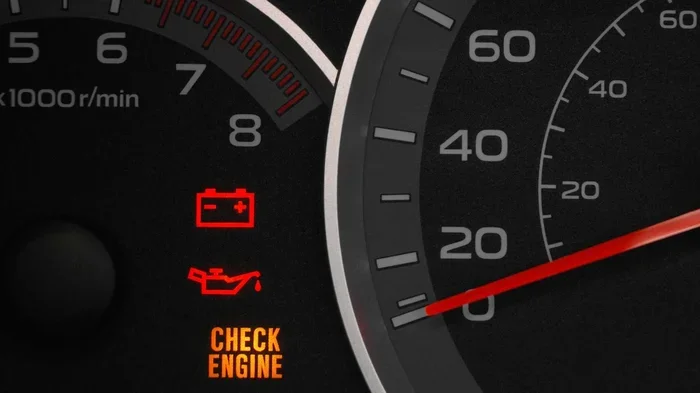
- The dashboard displays a key fob battery low warning message.
- The keyless entry system takes longer to unlock the doors.
- Your push button start does not recognize the fob right away.
If you notice any of these symptoms, do not wait too long. A completely dead fob means you cannot remotely lock, unlock, or start your car. Some vehicles allow you to use a hidden physical key as a backup, but that is not convenient for daily use.
For more car care tips that save you time and money, check out our article on 30 Unwanted Things You Can Remove From Car Glass for simple ways to keep your vehicle in top shape.
What You Need Before You Start
Gathering your tools before you begin makes the whole process smooth and stress-free. You do not need anything fancy or expensive. Here is your simple checklist:
Essential Tools and Materials
- Replacement battery: Most key fobs use a CR2032 coin cell battery. Check your owner manual to confirm the exact model.
- Small flathead screwdriver: A thin, sturdy screwdriver works best for prying open the fob casing.
- Coin or flat tool: A nickel or a plastic prying tool helps separate the two halves of the fob.
- Clean cloth: A soft cloth lets you wipe down the inside of the fob before reassembly.
- Good lighting: Working near a window or desk lamp makes it easier to see small components.
Pro tip: Buy a pack of CR2032 batteries online or at any hardware store. They cost just a few dollars and last a long time. Keep one spare in your glove box so you are never caught off guard.
Safety Precautions
Safety might sound overkill for such a small job, but a few precautions go a long way. Never use metal tools that can scratch the electronic components inside the fob. Avoid touching the battery contacts with your bare fingers, as oils from your skin can cause corrosion over time. And always dispose of old batteries properly according to local recycling guidelines.
If you enjoy handling small car tasks yourself, you might also appreciate learning about Can I Install Splash Guards Myself — another satisfying DIY maintenance project that protects your vehicle from road debris.
Step-by-Step Guide to Changing Your Key Fob Battery
Now for the fun part. Follow these steps carefully, and you will have a working fob in no time. The process is the same for most major brands including Ford, Toyota, Honda, Chevrolet, and Nissan.
Step 1: Locate the Key Fob Seam
Hold your remote key fob in your hand and look for a thin line or groove along the edge. This is where the two halves of the casing meet. On some models, there is a small release button near the top. On others, you simply need to apply gentle pressure along the seam.
Take your time here. Rushing this step can crack the plastic casing. If your fob has a physical key hidden inside, remove it first. That small metal key often slides out of a release button on the side of the fob.
Step 2: Open the Fob Casing
Insert your flathead screwdriver or prying tool into the seam. Gently twist the tool to pop the first half of the casing loose. Work your way around the entire edge, applying even pressure. The two halves should separate with a soft click.
Be careful not to scratch the circuit board inside. Place the fob on a soft surface like a towel or cloth while you work. If the casing feels stuck, stop and check for any hidden clips. Forcing it open can break the internal components.
For more DIY car maintenance confidence, explore our guide on Can I Do My Own Car Diagnostics to learn how to troubleshoot other vehicle issues at home.
Step 3: Remove the Old Battery
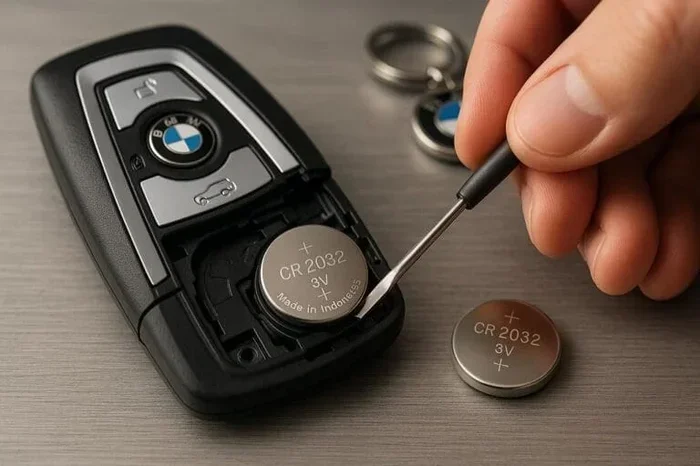
Once the fob is open, you will see the battery sitting in a small compartment. It is usually held in place by a tiny metal clip or simply resting in a slot. Note the orientation of the old battery — the positive side (marked with a +) faces up in most fobs.
Use your screwdriver or a plastic tool to gently lift the clip or pry the battery out. Do not use your fingers, as pressure can damage the delicate contacts underneath. Set the old battery aside for proper recycling.
Step 4: Insert the New Battery
Take your new CR2032 battery and hold it with the positive side facing up. Slide it carefully into the compartment, making sure it sits flat and secure. The metal clip should snap back into place, holding the battery firmly.
Double-check the orientation. Putting the battery in backwards is the most common mistake people make. If the fob does not work after replacement, the battery orientation is the first thing to check.
Step 5: Reassemble the Fob
Align the two halves of the fob casing carefully. Press them together firmly until you hear the clips click into place. Make sure there are no gaps or loose spots. The casing should feel snug and secure.
Before you celebrate, test the fob immediately. Stand near your car and press the unlock button. If the doors respond, you are all set. If not, do not panic — there are a few things to check.
Troubleshooting: What to Do When the Fob Still Does Not Work
Replacing the battery does not always fix the problem right away. Do not worry — this is more common than you think. Here are the most likely reasons your key fob replacement did not solve the issue.
The Battery Is Installed Backwards
This is the number one cause of a new battery not working. Open the fob again and check the orientation. The positive side should face upward, matching the position of the old battery. Flip it around and test again.
The Contacts Need Cleaning
Over time, dirt, dust, and oxidation build up on the battery contacts. Use a clean, dry cloth to gently wipe the metal contacts inside the fob. A cotton swab dipped in a tiny amount of rubbing alcohol works well for stubborn grime. Let the contacts dry completely before reassembly.
The Fob Needs Reprogramming
Some vehicles require you to reprogram the transponder key or remote after a battery change. This is more common in newer models with advanced keyless entry systems. Check your owner manual for the specific reprogramming steps for your make and model.
Typically, reprogramming involves sitting in the driver seat, inserting the key into the ignition, and following a sequence of button presses. The process usually takes about two minutes and does not require any special equipment.
The Internal Circuitry Is Damaged
If none of the above solutions work, the problem may be internal damage to the fob itself. Dropping the fob, exposing it to moisture, or general wear and tear can damage the circuit board. In this case, you may need a key fob replacement unit or professional repair.
How Often Should You Replace Your Key Fob Battery
There is no single answer to this question because battery life depends on several factors. However, a good rule of thumb is to replace the battery every two to three years as a preventive measure.
If you use your remote key fob multiple times a day, the battery may drain faster. Extreme weather conditions, frequent travel, and using the fob at long range also shorten battery life. Keep track of when you last changed the battery so you can plan ahead and avoid being stranded.
Some drivers keep a log in their phone or glove box. This simple habit ensures you always know when the next replacement is due. It also saves you from the panic of a dead fob at the worst possible moment.
Comparison: Key Fob Battery Brands
| Brand | Average Lifespan | Price Range | Best For |
|---|---|---|---|
| Duracell | 3-4 years | $3-$5 | Long-lasting reliability |
| Energizer | 2-3 years | $2-$4 | Everyday use |
| Amazon Basics | 2-3 years | $2-$3 | Budget-friendly option |
| Eveready | 2-4 years | $2-$4 | Wide availability |
Investing in a quality battery brand pays off in the long run. Cheap batteries may save a few cents upfront but often die within months. Stick with trusted brands for consistent performance.
Common Mistakes People Make When Changing a Key Fob Battery
Even simple tasks come with pitfalls. Learning from other people’s mistakes helps you avoid the same problems. Here are the most common errors to watch out for.
- Using the wrong battery type: Not all fobs use a CR2032. Some require CR2025 or CR2016. Always check your owner manual first.
- Forcing the casing open: Excessive force cracks the plastic. Work slowly and gently around the seam.
- Touching the circuit board: Finger oils can corrode sensitive electronics. Handle the inside components as little as possible.
- Skipping the reprogramming step: Some cars need a reset after a battery swap. Check your manual for specific instructions.
- Throwing the old battery in the trash: Coin cell batteries contain materials that should be recycled properly. Take them to a recycling center.
Avoiding these simple mistakes keeps your fob working smoothly and extends its overall lifespan. A little patience goes a long way.
When to Call a Professional
Changing a key fob battery is a DIY-friendly task, but not every situation calls for a home fix. Here are signs that you should seek professional help.
- Your fob still does not work after replacing the battery and cleaning the contacts.
- The fob casing is cracked or damaged beyond simple reassembly.
- Your vehicle requires specialized programming equipment for fob synchronization.
- You notice water damage or corrosion inside the fob housing.
- The push button start system fails to recognize any key fob at all.
Dealers and locksmiths have the tools and expertise to handle complex key fob replacement and programming tasks. While it costs more than a DIY battery swap, it ensures the job is done correctly. For general car maintenance questions, you can also explore our article on Can I Put Too Much Weight In My Car to learn about vehicle capacity limits and safety.
Pro Tips for Extending Your Key Fob Battery Life
Want to get the most out of every new battery? These simple habits help your remote key fob last longer between replacements.
- Do not press the button accidentally: Keep your fob in a dedicated pocket or compartment. Loose fobs in bags press buttons without you knowing.
- Store the fob away from extreme heat: Leaving it on your dashboard in summer heat drains the battery fast.
- Use the physical key when possible: For short distances, manually unlocking the door saves battery power.
- Buy quality batteries: Trusted brands consistently outperform generic options in both lifespan and reliability.
- Keep spare batteries on hand: Having a replacement ready means you never wait when the fob dies unexpectedly.
These small habits add up over time. You will find yourself changing your fob battery less often and spending less money on replacements.
Key Takeaways
- DIY Key Fob Battery Swap: Changing your key fob battery is simple, fast, and requires no professional help.
- Right Battery Matters: Using the correct coin cell battery (usually CR2032) ensures your remote key fob works perfectly.
- Common Mistakes to Avoid: Damaging the casing or inserting the battery backwards are the most frequent DIY errors.
- Post-Replacement Steps: Reprogramming or resetting may be needed for some vehicle models after a battery change.
- Safety First: Handling the small components carefully prevents injury and protects your key fob electronics.
- When to Seek Help: If the fob still fails after a battery swap, the issue may be internal circuitry or a deeper car electronics problem.
Frequently Asked Questions
What type of battery does my key fob use?
Most key fobs use a CR2032 coin cell battery, but some models require CR2025 or CR2016. Check your vehicle owner manual or look at the old battery to confirm the exact type before purchasing a replacement.
How long does a key fob battery last?
A typical key fob battery lasts between two and four years, depending on how often you use the remote. Frequent use, extreme temperatures, and accidental button presses can shorten the lifespan significantly.
Can a dead key fob prevent my car from starting?
Yes, in vehicles with push button start systems, a dead fob can prevent the engine from starting. Most cars have a backup method, such as placing the fob against the start button, but it is much more convenient to keep the battery fresh.
Do I need to reprogram my key fob after changing the battery?
Most vehicles do not require reprogramming after a simple battery swap. However, some newer models with advanced keyless entry systems may need a reset. Always consult your owner manual for model-specific instructions.
Is it safe to change the key fob battery myself?
Absolutely. Changing a key fob battery is one of the safest and easiest DIY car maintenance tasks. As long as you use the right tools and handle the internal components gently, there is very little risk of damage or injury.
What should I do with my old key fob battery?
Old coin cell batteries should be recycled properly. Do not throw them in your household trash. Many hardware stores, electronics retailers, and local recycling centers accept used batteries for safe disposal and recycling.
=== CONCLUSION ===
Changing your key fob battery yourself right now is one of the smartest, simplest car maintenance moves you can make. It saves you time, money, and the hassle of waiting at a dealership or locksmith. With just a few basic tools and a replacement battery, you can have your remote working again in minutes.
Remember to use the correct battery type, handle the internal components with care, and test the fob immediately after reassembly. If the problem persists, do not hesitate to seek professional help. Keeping your key fob battery fresh means you always have seamless access to your vehicle.
Take a few minutes today to check your fob battery status. A little preventive maintenance now saves you from a frustrating, locked-out situation later. You have got this — and your car will thank you for it.