Can You Replace a Key Fob Battery Yourself at Home
Yes, you can replace a key fob battery yourself at home in just a few minutes. This simple DIY task saves you money and keeps your car remote working perfectly. We walk you through every step, from picking the right battery to reassembling your fob with confidence.
Your car key fob stops working right when you’re rushing out the door. You press the button, and nothing happens. Before you call a locksmith or visit the dealer, stop and take a breath. The answer is almost always a dead battery, and you can replace a key fob battery yourself at home in minutes.
Most people don’t realize how simple this fix really is. You don’t need special training, expensive tools, or a trip to the auto shop. A new battery costs less than five dollars, and the whole process is over before you know it. This guide shows you exactly how to do it, no matter what kind of car you drive.
We will cover everything from finding the right battery type to troubleshooting common problems after the swap. By the end, you will feel confident handling this job on your own. Let’s get into it.
Key Takeaways
- Easy DIY Task: Replacing a key fob battery is one of the simplest car maintenance jobs you can do at home.
- Common Battery Type: Most key fobs use a CR2032 coin cell battery that costs just a few dollars.
- No Special Tools Needed: A small flathead screwdriver or coin is usually all you need to open the fob.
- Saves Money: Doing it yourself avoids dealer fees and locksmith charges for a simple battery swap.
- Quick Process: The entire replacement takes less than 10 minutes in most cases.
- Know When to Seek Help: If the fob still doesn’t work after a battery change, professional diagnostics may be needed.
📑 Table of Contents
- Why Key Fob Batteries Die and What to Watch For
- Tools You Need for Key Fob Battery Replacement
- Step-by-Step Guide to Replacing Your Key Fob Battery
- How to Know Which Battery Your Key Fob Needs
- When to Seek Professional Help Instead
- Extending the Life of Your Key Fob Battery
- Common Mistakes to Avoid When Replacing a Key Fob Battery
- Expert Insight on Key Fob Maintenance
- Conclusion
Why Key Fob Batteries Die and What to Watch For
Key fob batteries don’t last forever. They slowly lose power over time, and one day, the remote just stops responding. Understanding the signs of a dying battery helps you replace it before you get stuck.
Common Signs Your Key Fob Battery Is Low
Watch for these warning signals that your key fob battery is running low:
- The remote works only when you hold it very close to the car.
- You need to press the button multiple times before the car responds.
- The range of the remote shrinks significantly.
- The key fob warning light appears on your dashboard.
- The remote stops working entirely in cold weather.
Cold weather makes battery problems worse. If your fob works fine in summer but struggles in winter, the battery is likely on its way out. Some drivers notice the key fob not working only after the car has been sitting overnight. This is another classic sign of a low battery.
How Long Does a Key Fob Battery Last?
Most key fob battery life ranges from two to four years. However, heavy daily use shortens that timeline. If you use your remote every single day, you might need a replacement sooner. The battery type also matters. A CR2032 battery is the most common and tends to last around three years with normal use.
If you have ever wondered how long does a key fob battery last, now you know the answer. Keep track of when you last replaced it, and set a reminder. Preventing a dead battery is much easier than dealing with one when you are in a hurry.
Tools You Need for Key Fob Battery Replacement
One of the best parts about replacing a key fob battery is that you barely need any tools. Most people already have everything sitting in a kitchen drawer. Here is what you will need:
- A CR2032 battery (or the specific type your fob requires).
- A small flathead screwdriver or a thin plastic pry tool.
- A clean, soft cloth to work on.
- A well-lit workspace.
That is it. No expensive equipment. No complicated gadgets. You can pick up a CR2032 battery at any grocery store, pharmacy, or gas station for about two to three dollars. If you are unsure about the battery type, check your car owner’s manual or look online for your specific fob model.
Some people also like to keep a small tray or plate nearby. The tiny screws and clips from the fob can be easy to lose if they roll away. A little preparation goes a long way in making this job smooth and stress-free.
Step-by-Step Guide to Replacing Your Key Fob Battery
Now let us walk through the actual process. Follow these steps carefully, and your fob will be working again in no time.
Step 1: Find the Opening Seam
Turn your key fob over and look closely at the seams. Most fobs have a visible line where the two halves meet. Run your fingernail along the edges to find the slight gap. Some fobs have a small button or latch that releases the cover. Others simply pop open with a gentle pry.
If you have trouble finding the seam, check online for a video specific to your fob model. A quick search for your car make and model plus “key fob battery replacement” usually brings up helpful results.
Step 2: Open the Fob Carefully
Insert your flathead screwdriver or plastic pry tool into the gap. Work it gently around the edge to pop the cover loose. Do not force it. If it does not open easily, double-check that you found the right seam.
Be careful around the key ring attachment if your fob has one. Some fobs separate the key blade from the remote during this step. Set the key aside safely so you do not lose it.
Step 3: Remove the Old Battery
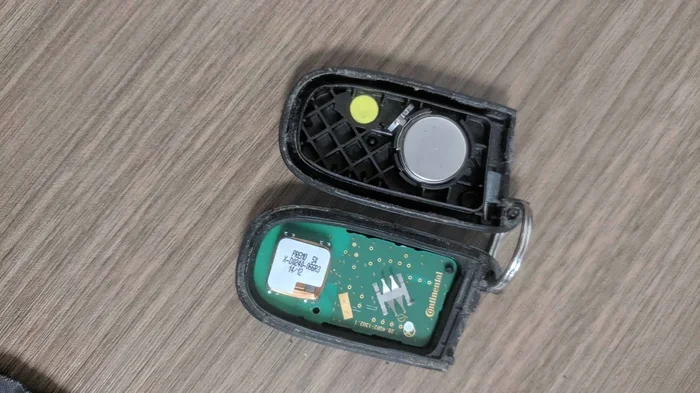
Once the fob is open, you will see the battery sitting in a small compartment. Note which side faces up. Take a photo with your phone if it helps you remember the orientation. Use the screwdriver or a small pair of tweezers to gently lift the old battery out.
Dispose of the old battery properly. Most stores that sell batteries have recycling bins for this purpose. Do not toss it in the regular trash.
Step 4: Insert the New Battery
Take your fresh CR2032 battery and place it in the compartment with the correct side facing up. The positive side (the one with the + sign and the slightly raised rim) should face up in most fobs. Press it down gently until it sits snugly in place.
Double-check the orientation before closing the fob. Putting the battery in backwards will prevent the fob from working.
Step 5: Reassemble the Fob
Align the two halves of the fob and press them together firmly. You should hear a click or feel the snap engage. Make sure there are no gaps along the edges. If the cover does not sit flush, open it again and check for any misaligned clips.
Test the fob immediately by standing near your car and pressing the unlock button. If the car responds, you are all set. If it does not work, open the fob again and check the battery orientation.
Step 6: Test Everything
Walk a few steps away from your car and test all the buttons. Lock, unlock, trunk release, and any panic or remote start features. Make sure every function works properly. If one button does not respond, the battery may not be seated correctly.
This is also a great time to check if you need to do your own car diagnostics for any other issues. If the fob works but the car still shows a warning light, there might be a separate problem worth investigating.
How to Know Which Battery Your Key Fob Needs
Not all key fobs use the same battery. While the CR2032 is the most common, some models use different sizes or types. Using the wrong battery can damage the fob or simply not work.
Here is how to find the right battery for your fob:
- Check the existing battery label for the model number.
- Look up your car model and year online.
- Consult your vehicle owner’s manual.
- Visit the dealership or auto parts store and ask for help.
Most dealerships carry the exact battery you need. Auto parts stores like AutoZone or O’Reilly also stock common fob batteries. The cost is usually very low, making this a budget-friendly repair you can handle on your own.
Some newer vehicles use rechargeable fobs or built-in battery packs. These are different from the standard coin cell type. If your fob came with a USB charging cable, you likely have a rechargeable model. In that case, simply charge it instead of replacing the battery.
When to Seek Professional Help Instead
Replacing the battery fixes most key fob problems. But what happens when the new battery does not solve the issue? There are times when professional help makes sense.
Problems That Persist After a Battery Change
If you have replaced the battery and the fob still does not work, the issue may be deeper than a dead cell. Here are some signs that you need expert help:
- The fob still shows no response after a fresh battery.
- The car does not detect the fob at all.
- Buttons work intermittently or feel stuck.
- The fob got wet or was dropped and now malfunctioning.
In these situations, the internal electronics of the fob may be damaged. A professional locksmith or dealership technician can diagnose the problem and recommend the right fix. Sometimes the fob needs reprogramming or a full replacement.
Cost Considerations
Dealer battery replacement or fob reprogramming typically costs more than doing it yourself. However, if the fob is under warranty, the dealer may do it for free. Always check your warranty coverage before paying out of pocket.
Some people prefer to visit a locksmith for fob-related issues. A locksmith can often handle battery swaps and programming at a lower cost than the dealership. This is especially true if your fob uses a less common battery type or has a more complex design.
If you have been looking into DIY car maintenance, you might also enjoy learning about installing splash guards yourself. It is another simple home repair that saves you money and keeps your car protected.
Extending the Life of Your Key Fob Battery
Once you have replaced the battery, you want it to last as long as possible. A few simple habits can help you get the most out of every new battery.
Tips to Make Your Key Fob Battery Last Longer
- Do not leave the fob near strong magnetic fields.
- Keep the fob away from extreme heat and moisture.
- Remove the battery if you will not use the fob for an extended period.
- Store spare batteries in a cool, dry place.
- Press buttons only when needed to conserve battery life.
These small habits add up over time. They can extend your battery life by several months or even a year. The goal is to protect the battery from conditions that drain it faster than normal use would.
What If You Want to Explore More Car Tech?
Modern cars are packed with technology. Some vehicles now let you download an app to start your car from your phone. These smart features rely on wireless signals and Bluetooth connections. Understanding how your car’s technology works helps you take better care of it overall.
Similarly, if you ever want to dig deeper into your vehicle’s health, learning about doing your own car diagnostics is a great next step. Many modern cars display diagnostic codes that can point to specific issues. A simple scan tool can save you hundreds of dollars in mechanic visits.
Taking care of your car does not have to be complicated. Small actions like replacing a key fob battery yourself build confidence and save real money over time.
Common Mistakes to Avoid When Replacing a Key Fob Battery
Even though this is a simple job, people still make mistakes. Here are the most common ones and how to avoid them.
- Using the wrong battery type: Always double-check the model number before purchasing.
- Forcing the fob open: If it does not pop easily, you may be prying at the wrong spot. Stop and reassess.
- Forgetting to remove the old battery: This sounds obvious, but people sometimes put the new battery in on top of the old one.
- Not testing the fob right away: Always test immediately after reassembly so you can fix any issues on the spot.
- Losing the small screws or clips: Work on a clean surface and keep track of every tiny part.
Avoiding these mistakes makes the process smoother the first time around. Even if you do run into a small issue, it is easy to fix. Just stay patient and methodical.
Expert Insight on Key Fob Maintenance
Experienced car owners know that regular fob maintenance keeps everything running smoothly. A key fob is essentially a small electronic device, and like all electronics, it benefits from basic care. Keep the contacts clean, replace the battery before it fully dies, and store the fob in a safe place when not in use.
Some mechanics recommend replacing the battery every two to three years as a preventive measure. This approach avoids the frustration of a dead fob at the worst possible moment. It also ensures the remote signal stays strong and reliable.
If you ever feel unsure about any car maintenance task, remember that you can always do your own car diagnostics to check for issues before deciding whether to visit a shop. Knowledge gives you confidence, and confidence makes every repair easier.
Taking a few minutes to learn about your vehicle pays off in the long run. Simple tasks like battery replacement build a foundation of DIY skills that serve you well for years. Your car, your wallet, and your time all benefit when you handle these jobs yourself.
Conclusion
Replacing a key fob battery yourself at home is one of the easiest and most rewarding car maintenance tasks you can do. It costs almost nothing, takes just a few minutes, and requires no special skills. With the right battery and a basic screwdriver, you can have your fob working perfectly again.
We have covered the warning signs of a low battery, the tools you need, the step-by-step replacement process, and tips to extend battery life. You also learned when to seek professional help and what common mistakes to avoid. This knowledge puts you in control of a simple but essential part of car ownership.
Do not wait until your fob dies completely to take action. Replace the battery at the first sign of weakness. Keep a spare CR2032 battery in your glove box for emergencies. These small preparations save time, money, and a lot of stress down the road.
Next time your key fob starts acting up, do not panic. Open it up, swap the battery, and get back on the road. You have got this.
Frequently Asked Questions
What type of battery does a key fob use?
Most key fobs use a CR2032 coin cell battery, but some models require different sizes. Check your fob label or owner’s manual to confirm the correct battery type before purchasing.
How much does it cost to replace a key fob battery yourself?
A CR2032 battery costs between two and five dollars at most stores. Doing it yourself saves you the labor charges that locksmiths and dealerships typically add to the service.
How long does a key fob battery last?
A key fob battery typically lasts between two and four years depending on usage. Heavy daily use may shorten the lifespan, while occasional use can extend it.
Can a dead key fob battery prevent my car from starting?
In most modern vehicles, a dead fob battery will not prevent the car from starting if you use the physical key blade. However, push-button start systems may not recognize the fob if the battery is completely dead.
What should I do if my key fob still does not work after replacing the battery?
Double-check the battery orientation and make sure the new battery is seated properly. If the fob still does not work, the internal electronics may be damaged, and professional diagnostics or replacement may be needed.
Is it hard to open a key fob for battery replacement?
No, it is very easy. Most fobs have a visible seam that you can gently pry open with a flathead screwdriver or plastic pry tool. It takes just a few seconds and requires no special skills.