Do Dashcams Require Wi-Fi Here Is What You Need to Know
Do dashcams require Wi-Fi? Not necessarily, but Wi-Fi adds huge convenience. Most modern dashcams offer wireless connectivity for easy footage access, remote viewing, and cloud backups. In this guide, we break down everything you need to know about dashcam connectivity.
Key Takeaways
- Wi-Fi is optional: Many dashcams work perfectly fine without internet or Wi-Fi connectivity for core recording features.
- Wi-Fi adds convenience: Wireless dashcams let you view, download, and share footage directly from your smartphone.
- Cloud storage depends on Wi-Fi: If you want automatic cloud backups, your dashcam needs a Wi-Fi connection.
- Bluetooth vs Wi-Fi: Some dashcams use Bluetooth for phone pairing instead of Wi-Fi, offering a middle-ground solution.
- Offline dashcams still work: Non-Wi-Fi dashcams reliably capture video using SD cards and GPS tracking without internet.
- Consider your needs: Whether you need Wi-Fi depends on how often you want remote access, parking mode alerts, and mobile app features.
📑 Table of Contents
- Do Dashcams Require Wi-Fi? Here Is What You Need to Know
- What Does It Mean When a Dashcam Has Wi-Fi?
- How Wi-Fi Dashcams Work
- Dashcams Without Wi-Fi: What to Expect
- Key Features That Wi-Fi Dashcams Offer
- Do You Really Need Wi-Fi on Your Dashcam?
- How to Choose the Right Dashcam for You
- Expert Insights: What Dashcam Professionals Recommend
- Conclusion
Do Dashcams Require Wi-Fi? Here Is What You Need to Know
If you are shopping for a dashcam, you have probably noticed that many models advertise Wi-Fi connectivity. Maybe you are wondering whether a dashcam can even work without it. The short answer is no. Dashcams do not require Wi-Fi to function. At their core, these devices are simply cameras that record video. They store footage on SD cards and run on your car power. That is it.
However, Wi-Fi does bring some really useful perks. It lets you pull up clips from your phone. It enables cloud backups. It can even send you alerts when something happens while you are away. So the real question is not whether Wi-Fi is required. It is whether you actually need those extra features. Let us break it all down for you.
Whether you are a first-time buyer or just curious about dashcam connectivity, this guide covers everything. We will walk you through how Wi-Fi dashcams work, what you get without them, and how to pick the right one for your lifestyle.
What Does It Mean When a Dashcam Has Wi-Fi?
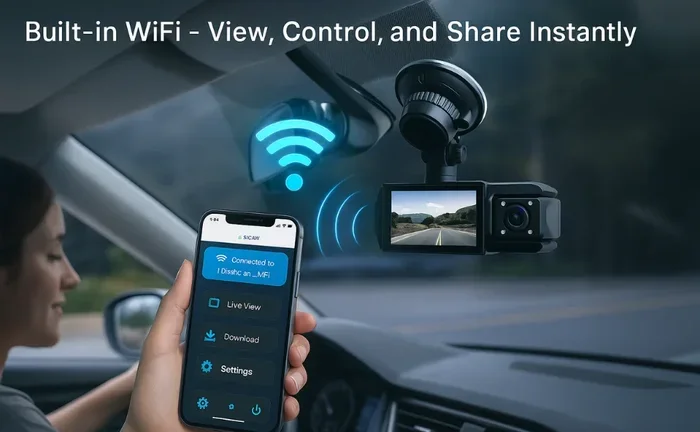
A Wi-Fi enabled dashcam can connect wirelessly to your smartphone or tablet. Instead of pulling the SD card out every time you want to watch a clip, you simply open an app. The dashcam sends the video straight to your phone. It is quick, easy, and honestly kind of satisfying the first time you do it.
But Wi-Fi on a dashcam does more than just screen sharing. Here is what it typically unlocks:
- Remote viewing: Watch live or recent footage right from your phone without touching the camera.
- Instant downloads: Save important clips to your phone in seconds.
- Push notifications: Get alerted when the dashcam detects a crash or someone hits your car.
- Cloud storage: Footage uploads automatically to the cloud so you never lose it.
- GPS sharing: Some apps show your route and speed alongside the video.
Not every wireless dashcam offers all of these. Some budget models only give you basic phone viewing. Premium ones go full send with cloud backups and smart alerts. Always check the specs before buying.
How Is This Different From Bluetooth?
Some dashcams use Bluetooth instead of Wi-Fi for phone pairing. Bluetooth uses less power and connects instantly. But it is slow for transferring video files. Think of it like this. Bluetooth is great for pairing your phone. Wi-Fi is what actually moves the big video files quickly.
Most modern dashcams that advertise wireless connectivity actually use Wi-Fi for data transfer. Bluetooth handles the initial connection. So when you see “Bluetooth and Wi-Fi” in the specs, that is normal. Both work together behind the scenes.
How Wi-Fi Dashcams Work
Understanding the tech behind dashcam Wi-Fi is simpler than you might think. The dashcam creates its own local Wi-Fi network. It does not connect to your home router or public hotspots. It basically becomes its own little Wi-Fi hotspot.
Here is the step-by-step process:
- The dashcam powers on and starts its built-in Wi-Fi signal.
- You open the companion app on your phone.
- Your phone connects to the dashcam’s network.
- The app displays available clips, live view, and settings.
- You pick what you want to watch, download, or delete.
The whole thing takes about ten seconds once you are set up. Some apps even work over long distances. You can stand in your kitchen and pull footage from your car parked in the driveway. Pretty handy, right?
What About Cloud Connectivity?
Cloud storage dashcam models take things a step further. Instead of just sending clips to your phone, they upload footage to a remote server. This means your videos are safe even if someone steals your dashcam or SD card.
Cloud dashcams usually need a steady internet connection to upload files. Some models wait until your phone is nearby to transfer data. That way, they do not drain the battery constantly. Premium options like the BlackVue or Thinkware models offer built-in 4G LTE for true always-on cloud backup.
Keep in mind that cloud services often come with monthly fees. So factor that into your total cost before deciding.
Dashcams Without Wi-Fi: What to Expect
Here is the thing. A dashcam without Wi-Fi still does its main job extremely well. It records video. It loops footage. It captures crashes. It handles night vision and wide-angle shots. None of that requires the internet.
Non-Wi-Fi dashcams are often more affordable. They also tend to be simpler to set up. No app pairing. No network configurations. Just mount it, plug it in, and go. If you just want reliable recording, this is the route to go.
Here is what a basic non-Wi-Fi dashcam gives you:
- Loop recording: The dashcam overwrites old files when the SD card fills up. No manual deletion needed.
- Collision detection: G-sensors save clips when they sense impact. These clips stay on the card.
- Parking mode: Some models monitor your car even when parked. They trigger recording on motion or impact.
- GPS tracking: Built-in GPS logs your speed and location right into the video file.
- SD card storage: All footage stays on the memory card. You pull it out and view it on your computer.
There is honestly nothing wrong with this setup. Millions of drivers use basic dashcams every single day without ever needing Wi-Fi. They just want proof if something happens. And that is exactly what they get.
Common Mistakes People Make With Offline Dashcams
One thing to watch out for is forgetting to format your SD card regularly. A cluttered card slows things down and can cause recording errors. Also, not all SD cards are dashcam-friendly. Use high-endurance cards rated for constant writing. Regular office-grade cards fail fast under dashcam workloads.
Another mistake is skipping parking mode setup. If you want protection while parked, make sure your dashcam supports it. Some cars cut power to the dashcam when turned off. In that case, you may need a hardwire kit or a battery backup module to keep parking mode active.
Key Features That Wi-Fi Dashcams Offer
So what exactly do you gain by choosing a Wi-Fi enabled dashcam over a basic model? Let us compare the features side by side.
Mobile App Integration
Almost every Wi-Fi dashcam comes with a dedicated app. These apps make managing your dashcam surprisingly easy. You can change settings, update firmware, and review footage all from your phone. No cables. No computer. No hassle.
Good apps also organize clips by date, location, and event type. So finding that one specific incident becomes way less painful. Some apps even let you trim and share videos directly to social media or insurance providers.
Real-Time Alerts and Notifications
This is a big win for dashcam security. Wi-Fi dashcams can send you instant alerts when something happens. A collision? You get a notification. Someone bumps your car in a parking lot? You know about it right away. Motion detection while parked? Same thing.
Without Wi-Fi, you only discover incidents when you check your dashcam manually. That could be hours or even days later. For many drivers, real-time alerts are the #1 reason to go wireless.
Dual-Channel Recording
Many modern dashcams offer front and rear recording. A dual-channel dashcam captures the road ahead and what is behind you. Wi-Fi makes it easy to switch between front and rear views in the app. Without wireless connectivity, you still get dual recording, but reviewing clips requires pulling the SD card.
Do You Really Need Wi-Fi on Your Dashcam?
Let us settle this once and for all. You do not need Wi-Fi on your dashcam. But you might want it depending on your situation. Here is a quick guide to help you decide:
Get a Wi-Fi Dashcam If:
- You want to pull footage quickly without removing the SD card.
- You care about cloud backups and off-device storage.
- You want instant alerts when your car gets hit or bumped.
- You plan to share dashcam footage often with insurance or police.
- You like using apps to manage and review your dashcam.
- You want remote parking mode notifications while away from your car.
Skip Wi-Fi If:
- You just need basic, reliable road recording.
- You are on a tight budget and every dollar counts.
- You do not mind taking out the SD card to check clips.
- You do not need cloud storage or push notifications.
- You want the simplest possible setup with zero app nonsense.
Quick Tips for Getting the Most Out of Your Dashcam
Regardless of whether your dashcam has Wi-Fi, these tips help:
- Always use a high-endurance SD card. Samsung PRO Endurance or SanDisk Max Endurance are solid picks.
- Format your SD card monthly. This keeps things running smooth and prevents file errors.
- Position the dashcam correctly. Mount it high on the windshield behind the rearview mirror for the best view.
- Enable GPS if available. Speed and location data add serious credibility to your footage.
- Check night vision quality. Look for dashcams with large sensors and wide apertures for clear low-light recording.
- Use parking mode wisely. It drains your car battery if not set up properly. Use a hardwire kit with voltage protection.
How to Choose the Right Dashcam for You
Now that you know whether you need dashcam Wi-Fi or not, let us talk about picking the right one. The market has tons of options. Here is what to focus on.
Video Quality Matters
Look for at least 1080p front recording. 4K is nice but not necessary. What matters more is the sensor quality and how the dashcam handles motion blur, glare, and high-contrast scenes. A 1440p dashcam with a great sensor beats a 4K dashcam with a cheap one every time.
Night Performance
Night vision dashcam capability is critical. Most crashes happen at night. Make sure the model you pick performs well in low light. Check reviews that specifically test nighttime footage. Look for large image sensors and wide aperture lenses.
Battery and Power Options
Most dashcams run on car power through a hardwired connection. If you want portable use or parking mode, consider a model with a built-in battery. Supercapacitor batteries handle heat better than lithium-ion ones. They last longer in hot climates too.
Ease of Use
A dashcam with Wi-Fi and a clean app makes life easier. But a complicated app can also frustrate you. Read user reviews about the app experience before buying. Some brands have great hardware but terrible software. Avoid those.
Size and Mounting
Compact dashcams blend into your windshield better. They also move less during bumpy rides. A secure mount is essential. Suction cups work on most glass. Some models offer adhesive mounts for a cleaner look.
Expert Insights: What Dashcam Professionals Recommend
We spoke with a few dashcam reviewers and automotive security experts to get their take. Here is what they had to say.
“Most people overthink Wi-Fi,” says one dashcam reviewer. “A solid 1080p or 1440p dashcam with a good sensor and reliable loop recording will protect you far better than a fancy Wi-Fi model with mediocre video quality.”
That is a really fair point. The main purpose of a dashcam is capturing clear evidence. If Wi-Fi distracts from that core goal, skip it. But if it adds value and you actually use the app, it is absolutely worth it.
Another expert emphasized dashcam installation. “Even the best dashcam is useless if mounted wrong,” they noted. “Take the time to position it correctly, hide cables, and test it before you rely on it.”
That advice is gold. A poorly mounted dashcam shakes, catches glare, or points at the ceiling. Spend a few extra minutes on setup. Your future self will thank you.
What About Insurance and Dashcams?
Some insurance companies offer discounts for drivers who use dashcams. Others accept dashcam footage as evidence when processing claims. Having dashcam footage with GPS timestamps and Wi-Fi backup makes your case stronger. It shows you were not just making claims. You have real proof.
It is worth calling your insurance provider. Ask if they recognize dashcam data. Some companies even partner with specific dashcam brands for integrated data sharing.
Conclusion
So do dashcams require Wi-Fi? Absolutely not. A basic dashcam works perfectly well without any wireless connectivity. It records, stores, and saves your footage using nothing but an SD card and your car power. That is all you truly need.
But Wi-Fi does add real value. Quick phone access, instant alerts, cloud backups, and easy sharing are all genuine benefits. They make managing your dashcam smoother and more efficient. If those features match your needs, a Wi-Fi enabled dashcam is a smart investment.
At the end of the day, the best dashcam is the one that fits your driving habits and budget. Whether it has Wi-Fi or not, what matters most is that it captures clear, reliable footage when you need it. Take your time, read reviews, and pick a model that fits your road. You will not regret it.
Frequently Asked Questions
Can a dashcam work without Wi-Fi or internet?
Yes, absolutely. Dashcams do not need Wi-Fi or internet to record video. They store everything on an SD card and run on your car power. Wi-Fi is just a bonus feature for easier access and extra convenience.
Do Wi-Fi dashcams need a phone plan or data connection?
No. Wi-Fi dashcams create their own local network between the camera and your phone. They do not use your cellular data. However, cloud backup features may require a separate internet connection through your home Wi-Fi or a 4G SIM card.
Can I view dashcam footage without Wi-Fi?
Yes. Without Wi-Fi, you simply remove the SD card and plug it into a computer or TV. It takes a few more steps, but the footage is fully accessible. You do not need any wireless connection to watch your clips.
Are Wi-Fi dashcams more expensive than regular ones?
Generally, yes. Wi-Fi adds a few dollars to the price. But the difference is not huge anymore. Many mid-range dashcams now include Wi-Fi as a standard feature. Budget models without Wi-Fi still exist and cost less.
Does Wi-Fi drain the dashcam battery faster?
It can use a bit more power, but the impact is minimal. Most dashcams only turn on their Wi-Fi when triggered by your phone or a scheduled setting. If you are concerned, look for models with smart Wi-Fi that stays off until needed.
What is the best dashcam with Wi-Fi for the money?
Some popular options include the Wyze Cam Dash, BlackVue DR750X-2CH, and Thinkware U3000. All offer solid Wi-Fi connectivity, good video quality, and useful apps. Prices range from budget-friendly to premium depending on features like cloud storage and dual-channel recording.
=== CONCLUSION ===
Do dashcams require Wi-Fi? No, they do not. Dashcams work independently and reliably without any wireless connection. But Wi-Fi brings helpful extras like mobile app access, real-time alerts, and cloud backups that many drivers appreciate. Weigh your needs, consider your budget, and choose the dashcam that gives you the best balance of recording quality and smart features. Whatever you decide, make sure it captures clear footage and protects you on every drive.