Can a Tesla Overheat Warning Signs and How to Prevent It
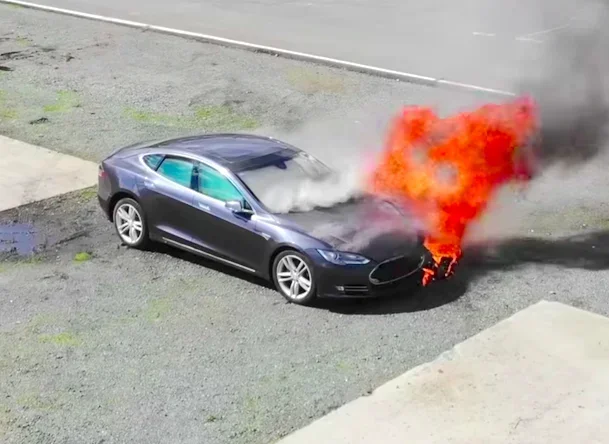
Can a Tesla overheat? Yes, but Teslas are built with advanced thermal management systems that reduce the risk significantly. Understanding the Tesla overheating warning signs and prevention methods helps owners protect their investment and stay safe on the road.
Owning a Tesla is exciting. These electric vehicles are sleek, fast, and packed with cutting-edge technology. But here is a question many Tesla owners ask: can a Tesla overheat? The short answer is yes. Even though Teslas are designed with advanced cooling systems, they are not immune to overheating. Whether you live in a hot climate, drive aggressively, or haul heavy loads, your Tesla can run too hot. Understanding the warning signs and knowing how to prevent overheating can save you from expensive repairs and keep you safe on the road.
In this guide, we will walk through everything you need to know about Tesla overheating. We will cover the warning signs, the reasons it happens, and practical steps you can take to prevent it. Whether you drive a Model S, Model 3, Model X, or Model Y, this article has you covered.
Key Takeaways
- Tesla Has Advanced Cooling: Teslas use liquid-cooled battery systems and electric motors, making overheating less common but still possible.
- Warning Signs Exist: Dashboard alerts, reduced performance, and unusual sounds signal potential overheating issues.
- Prevention Is Simple: Regular maintenance, smart driving habits, and proper charging routines keep your Tesla cool.
- Extreme Heat Is a Factor: Hot weather and heavy loads increase the chance of overheating in any electric vehicle.
- Act Fast When Alerts Appear: Ignoring warning lights can lead to serious damage and costly repairs.
📑 Table of Contents
- What Happens When a Tesla Overheats?
- Common Warning Signs of Tesla Overheating
- Why Does a Tesla Overheat?
- How to Prevent Tesla Overheating
- What to Do When Your Tesla Overheats
- Tesla Models and Overheating: Is One More Prone Than Others?
- Expert Tips for Keeping Your Tesla Cool
- Common Mistakes Tesla Owners Make That Lead to Overheating
- The Role of Tesla’s Thermal Management System
- Long-Term Effects of Repeated Overheating
- Final Thoughts
What Happens When a Tesla Overheats?
When a Tesla starts to overheat, several things can go wrong. The battery, electric motor, and power electronics all generate heat during operation. Tesla vehicles come equipped with a thermal management system that uses liquid coolant to regulate temperatures. However, when the system is pushed beyond its limits, problems arise.
Battery Overheating
The battery pack is the heart of any Tesla. It stores and delivers the energy that powers the car. When the battery gets too hot, its performance drops. You may notice slower acceleration, reduced range, or even a complete power shutdown in extreme cases. Battery overheating is the most serious type of overheating because it can affect the long-term health of your vehicle.
Motor and Power Electronics Overheating
The electric motor and power electronics also generate significant heat. Tesla uses a coolant loop that circulates through the motor and inverter to keep temperatures in check. When the cooling system fails or is overwhelmed, these components can overheat. This often leads to a warning message on the dashboard and a noticeable drop in performance.
It is worth noting that Tesla vehicles are quite heavy for their size. If you are curious about how much weight a car can carry, you might find this article on what is considered too heavy for a car interesting. Extra weight puts more stress on the battery and motor, which can contribute to overheating.
Common Warning Signs of Tesla Overheating
Tesla gives you several signals when something is wrong. The key is knowing what to look for. Here are the most common warning signs that your Tesla might be overheating.
Dashboard Warning Lights
The most obvious sign is a warning light on the dashboard. Tesla vehicles display red or yellow icons when the temperature of critical components rises too high. A red thermometer icon means immediate action is needed. A yellow icon suggests you should pull over and let the car cool down.
Reduced Driving Range
Have you noticed your Tesla losing range faster than usual? Overheating causes the battery to work harder and drain more quickly. If your estimated range drops suddenly on a cool day, overheating might be the culprit.
Unusual Sounds From the Motor
Tesla motors are nearly silent under normal conditions. If you hear grinding, buzzing, or whining noises, the motor could be overheating. These sounds often indicate that the cooling system is struggling to keep up.
Slow Acceleration
A Tesla is known for its quick acceleration. If your car feels sluggish or takes longer to respond to the accelerator, the battery or motor may be too hot. The vehicle reduces power output to protect itself from damage.
Strong Smell of Burning Plastic or Rubber
This is a serious warning sign. A burning smell can indicate that internal components are getting too hot. If you notice this smell, pull over safely, turn off the car, and let it cool down. Contact Tesla service if the smell persists.
Coolant Warning Messages
Tesla may display a message about low coolant levels or a cooling system fault. These messages should never be ignored. They directly relate to the car’s ability to manage heat.
Why Does a Tesla Overheat?
Understanding the causes of overheating helps you prevent it. Several factors can push a Tesla beyond its thermal limits.
Extreme Outdoor Temperatures
Driving in extreme heat, especially in desert climates or during summer heatwaves, puts extra strain on the cooling system. Tesla’s thermal management works hard to keep the battery and motor cool. In very hot conditions, the system may not keep up if you are pushing the car hard.
Heavy Loads and Towing
Towing a trailer or carrying heavy cargo increases the demand on the battery and motor. More power means more heat. If you are hauling a heavy load, the cooling system has to work overtime. This is especially true for the heavier Tesla models like the Model X and Model S.
Fast and Repeated Acceleration
Launching the car hard over and over generates a lot of heat in the motor and battery. Frequent high-performance driving without breaks can cause the thermal system to fall behind.
Charging Too Quickly or Too Often
Supercharging at high speeds generates heat in the battery. While Tesla’s battery management system handles normal supercharging well, frequent fast charges in hot weather can raise battery temperatures significantly.
Coolant System Malfunctions
Like any car, Tesla relies on coolant to absorb and transfer heat. If the coolant level drops or the pump fails, the system cannot cool the components properly. Regular maintenance checks help catch these issues early.
Software Glitches
Sometimes overheating warnings are triggered by software issues rather than actual temperature problems. Tesla regularly releases over-the-air updates that fix bugs and improve thermal management. Keeping your software up to date is an easy way to prevent false warnings.
How to Prevent Tesla Overheating
The good news is that preventing Tesla overheating is straightforward. A few simple habits can keep your car running at the right temperature.
Pre-Cool Your Car
Before you start driving, use the Tesla app to pre-cool the cabin and the battery. This is especially helpful on hot days. Pre-cooling reduces the thermal load on the battery and keeps the car comfortable from the start.
Avoid Driving During Peak Heat
If possible, plan your drives for cooler parts of the day. Early mornings and evenings are better for your Tesla in summer. This simple change reduces the stress on the cooling system.
Limit Supercharging Frequency
While supercharging is convenient, doing it too often in hot weather can raise battery temperatures. Try to charge at home or at slower chargers when you can. Reserve supercharging for long trips when it is really needed.
Keep the Coolant System Maintained
Check your coolant levels regularly. Tesla recommends coolant replacement at specific intervals. Follow the maintenance schedule in your owner’s manual. A well-maintained cooling system is your best defense against overheating.
Drive Smoothly
Avoid aggressive acceleration and hard braking. Smooth driving puts less strain on the battery and motor, which means less heat generated. You will also save battery life in the process.
Keep the Car Clean
Debris on the car can block airflow and affect cooling. Regular washing helps. Also, make sure the air conditioning system is clean and functioning properly. A well-maintained AC system supports the overall thermal management of the vehicle.
Regular cleaning also helps you spot issues early. For instance, removing unwanted debris from car glass and surfaces keeps you alert to any unusual smells or visual cues. If you are curious about what should not be left inside your vehicle, check out this guide on 30 unwanted things you can remove from car glass for helpful tips.
Monitor Battery Health
Use the Tesla app to monitor your battery health regularly. The app provides real-time data on battery temperature and state of charge. If you notice unusual temperature readings, take action before the problem gets worse.
Update Your Software
Tesla pushes software updates frequently. These updates often include improvements to the thermal management system. Make sure your car is always running the latest version of the software.
What to Do When Your Tesla Overheats
If you notice signs of overheating, stay calm and take the right steps. Here is what you should do.
Step 1: Pull Over Safely
Find a safe spot to pull over. Turn on your hazard lights and stop the car. Do not continue driving if you see a red warning light.
Step 2: Turn Off the Car
Turning off the car stops the power draw from the battery and motor. This allows the components to start cooling down naturally.
Step 3: Let the Car Cool
Wait at least 15 to 20 minutes before restarting the car. Open the doors or windows to help with airflow. Do not touch any hot components directly.
Step 4: Check for Warning Messages
After the car cools down, restart it and check the dashboard. If the warning light is gone, you can continue driving carefully. If the light stays on, do not drive the car. Contact Tesla roadside assistance or a service center.
Step 5: Schedule a Service Check
Even if the warning goes away, it is a good idea to get the car checked. Overheating can be a sign of a deeper issue like a coolant leak or a failing pump. Early detection prevents bigger problems down the road.
Tesla Models and Overheating: Is One More Prone Than Others?
All Tesla models have similar thermal management systems, but some differences exist. Here is a quick comparison of how different Tesla models handle heat.
- Model S: Larger battery and more powerful motor mean more heat generation. The cooling system handles it well, but heavy use in hot weather can push limits.
- Model 3: Compact and efficient. The smaller battery generates less heat, but the system is also smaller and can be more sensitive in extreme conditions.
- Model X: Heavy SUV with a large battery. The extra weight contributes to more heat, especially when carrying passengers or cargo.
- Model Y: Similar to the Model 3 but slightly larger. Good thermal management overall, but still vulnerable to overheating under extreme conditions.
No matter which model you drive, the principles of overheating prevention remain the same. Keep the car maintained, drive smart, and monitor your battery health.
Expert Tips for Keeping Your Tesla Cool
Here are some extra tips from experienced Tesla owners and automotive experts.
- Use the Tesla App to Monitor Temperatures: The app lets you check battery and motor temperatures in real time. Make it a habit to glance at these readings during long drives.
- Install a Home Charger: Home charging is gentler on the battery than supercharging. It generates less heat and helps preserve battery health over time.
- Plan Long Trips Carefully: Map out charging stops and avoid pushing the car too hard between charges. Give the car time to rest and cool down at each stop.
- Use Shade When Parking: Parking in the shade keeps the cabin and battery cooler. This is especially helpful during summer months.
- Keep an Eye on Tire Pressure: Under-inflated tires create more rolling resistance, which generates extra heat. This heat can transfer to the battery through the chassis.
Common Mistakes Tesla Owners Make That Lead to Overheating
Avoid these common mistakes to keep your Tesla running cool.
- Ignoring Warning Lights: Many owners dismiss warning lights, hoping they will go away. This is a dangerous habit that can lead to serious damage.
- Skipping Maintenance: Skipping coolant checks or software updates leaves your car vulnerable to overheating problems.
- Charging to 100% Every Day: Keeping the battery at full charge all the time increases heat. Try to charge to 80 or 90% for daily use.
- Driving Hard in Extreme Heat: Pushing the car to its limits on a hot day is a recipe for overheating. Ease off the accelerator when temperatures soar.
- Neglecting Air Conditioning Maintenance: A dirty or broken AC system puts extra strain on the thermal management system. Keep it clean and serviced.
The Role of Tesla’s Thermal Management System
Tesla’s thermal management system is one of the best in the industry. It uses a liquid cooling loop that connects the battery, motor, and power electronics into one integrated system. This design allows heat to be transferred efficiently and kept at safe levels.
The system also uses a heat pump in newer models, which is more energy-efficient than older resistive heating systems. The heat pump helps regulate cabin temperature while using less battery power. This means less stress on the overall cooling system.
Tesla also uses active battery conditioning. When you precondition the car before a trip, the system warms or cools the battery to the optimal temperature. This not only improves performance but also extends battery life.
However, even the best thermal management system has limits. Extreme conditions, heavy loads, and aggressive driving can all overwhelm the system. Understanding these limits is key to keeping your Tesla safe.
Long-Term Effects of Repeated Overheating
Occasional overheating warnings are not usually a cause for alarm. But repeated overheating can cause lasting damage. Here is what can happen over time.
- Reduced Battery Capacity: Frequent overheating degrades the battery cells faster. You will notice a shorter range over time.
- Motor Wear and Tear: High temperatures accelerate wear on motor components. This can lead to expensive repairs down the road.
- Coolant System Damage: Repeated overheating can cause coolant leaks or pump failure. Replacing these components is costly.
- Software and Sensor Errors: Heat can damage sensors and electronic components, leading to false warnings or system errors.
The best approach is to take overheating warnings seriously and address them promptly. A little prevention goes a long way.
Final Thoughts
So, can a Tesla overheat? Yes, it can. But with the right knowledge and habits, you can prevent it from happening. Pay attention to the warning signs, keep up with maintenance, and drive smart. Your Tesla is a sophisticated machine that deserves proper care.
Whether you are dealing with a hot summer day or a long road trip, the tips in this article will help you keep your Tesla running at the right temperature. Stay cool, drive safe, and enjoy the ride.
Frequently Asked Questions
Can a Tesla overheat in hot weather?
Yes, Teslas can overheat in extremely hot weather, especially during heavy driving or fast charging. Tesla’s thermal management system helps, but extreme heat can push it beyond its limits. Pre-cooling your car and avoiding peak heat hours can reduce the risk.
What should I do if my Tesla shows an overheating warning?
Pull over safely, turn off the car, and let it cool down for at least 15 to 20 minutes. Check the dashboard for warning messages after restarting. If the warning persists, contact Tesla roadside assistance immediately.
Does Tesla battery overheating affect driving range?
Yes, battery overheating reduces driving range significantly. When the battery gets too hot, the system limits power output and drains energy faster to manage the temperature. Keeping the battery at optimal temperatures helps maintain range.
How often should I check my Tesla’s coolant level?
Tesla recommends checking coolant levels as part of regular maintenance, typically every 12,500 miles or once a year. Follow the maintenance schedule in your owner’s manual for the best results.
Can supercharging cause a Tesla to overheat?
Supercharging generates heat in the battery, but Tesla’s system is designed to handle it. However, frequent supercharging in hot weather can raise battery temperatures. It is best to supercharge only when necessary and let the car cool between charges.
Is Tesla overheating covered under warranty?
Tesla’s warranty covers manufacturing defects, including cooling system failures. However, overheating caused by misuse, neglect, or extreme conditions may not be covered. Check your warranty details and maintain your car properly to avoid issues.
=== CONCLUSION ===
Can a Tesla overheat? The answer is yes, but it is preventable with the right approach. By recognizing the warning signs early and following the prevention tips in this guide, you can keep your Tesla running smoothly and safely. Regular maintenance, smart driving habits, and software updates are your best tools against overheating. Take care of your Tesla, and it will take care of you for years to come.